
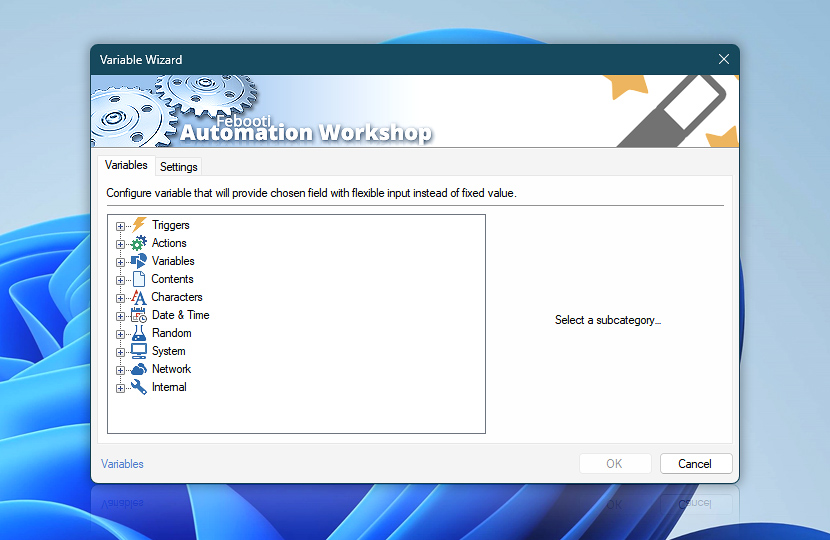
Variable Wizard is a powerful visual tool that provides options to set advanced input when configuring Actions. In addition to fixed values, allows using parameters that can be taken from external files, Triggers, or system related information · Variable Wizard explained
An Action or Trigger, when executed, performs its operations based on provided settings. While for some Tasks fixed parameters can be specified, others require more flexible approach when providing values relative to current system state · See Global Variables
Triggers
- Task Scheduler
- File & Folder Watcher
- FTP Watcher
- SFTP Watcher
- WebDAV Watcher
- Amazon S3 Watcher
- Google Cloud Storage Watcher
- DigitalOcean Spaces Watcher
- Service Monitor
- Process & App Monitor
- User Logon & Logoff
- System Startup & Shutdown
- Multi-triggering · seamlessly retrieve variables from multiple Triggers.
Run
- Start App
- Run CMD Command
- Execute Script
- Open Document
- Start Task
- Stop Task
- More » Remote FTP Command · Search…
- More » Remote SSH Command · Search…
- More » Start & Stop Service · Search…
- More » Terminate App · Search…
- More » Set Execution Result · Search…
FTP & Cloud
- Connect to FTP
- Connect to SFTP
- Connect to WebDAV
- Connect to Amazon S3
- Connect to Google Cloud Storage
- Connect to DigitalOcean Spaces
- Close Connection
- Remote FTP Command
- Remote SSH Command
- Upload File
- Download File
- Move Remote File
- Rename Remote File
- Delete Remote File
- List Remote Files
- Remote File Information
- Synchronize Directories
- Ensure Remote Directory
- Create Remote Directory
- Clear Remote Directory
- Remove Remote Directory
- More » If Remote File · Search…
- More » If Remote Directory · Search…
- More » Wait for Remote File · Search…
- More » Wait for Remote Directory · Search…
- More » Use web content · Search…
File & Folder
- Copy File
- Move File
- Rename File
- Delete File
- Read from File
- Write to File
- List Files
- Compute File Checksum
- Get File Information
- Get File Date & Time
- Set File Date & Time
- Set File Attributes
- Split File Path
- More » If File · Search…
- More » Wait for File · Search…
- More » Print File · Search…
- More » Open File Dialog · Search…
- More » Save File Dialog · Search…
- More » Use file content · Search…
Folder
Compression
Services
Apps & Processes
- Terminate App
- Tweak App
- App Information
- List Apps
- More » If App · Search…
- More » Wait for App · Search…
- More » Start App · Search…
Printing
Multimedia
Dialogs
Wait
Registry
Logic Actions include Compare and Flow categories that allow using conditional branching, labels and redirection operators to create non-linear Action sequences in Tasks. With these redirector Actions it is possible to build decision algorithm in the workflow which allows differentiating between different conditions.
Compare
- If
- If Remote File
- If Remote Directory
- If File
- If Folder
- If Service
- If App
- Else · No variables
- More » Lookup Text · Search…
Variables
Lists
- Pick Item
- Convert List
- Reverse List
- More » List Remote Files · Search…
- More » List Files · Search…
- More » List Services · Search…
- More » List Apps · Search…
Loops
- For Each
- Loop
- Control Loop
- More » Lookup Text · Search…
Workshop Actions provide automated Task management, by allowing the Task to automatically enable or disable itself and other Tasks.
Tasks
- Enable Task
- Disable Task
- Toggle Task
- Set Execution Result
- More » Start Task · Search…
- More » Stop Task · Search…
- More » Task Properties · Search…
Variable Wizard provides various system-specific parameters as well as file-based settings as input values for Actions.
Variables
No results
- Try full site search
- See Online tutorials · Demo videos
- See Automation Workshop screenshots

Overview
- Variable Wizard explained.
- Overview of all File & Folder Actions.
- Overview of all Text Actions.
Notes
- If the Trigger or Action has not been executed at the moment when Variable Wizard tries to provide variable value, an empty value is returned.
- To open Variable Wizard, press F2 key in input fields. If a field already contains some Variable Wizard value, F2 key allows editing its parameters.
- To make quick in-place variable modifications, use the adjust variable feature.
- To customize Variable Wizard layout and behavior, use quick Settings.
Explore…
Take advantage of the automation benefits, including remote task management, and see how the Variable Wizard helps you achieve workflow automation in no time! To review all the features, simply use the quick «VW» shortcut across the entire Automation suite.
Questions?
If you have any questions, please do not hesitate to contact our support team.