
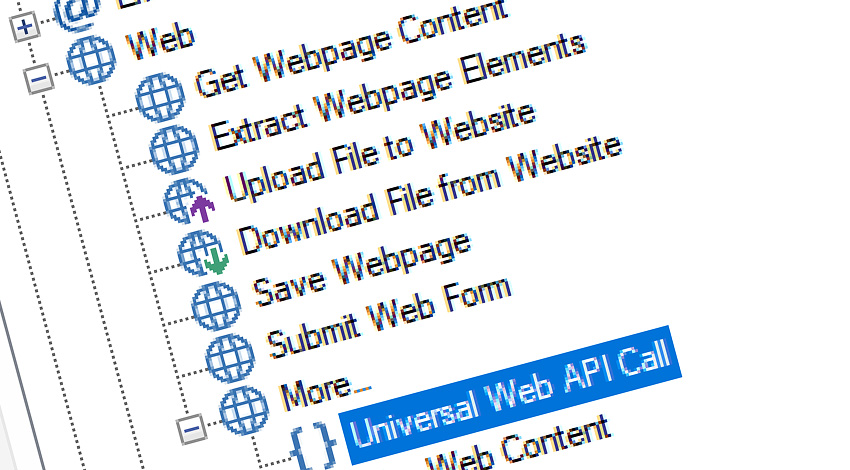
Automation Workshop includes a comprehensive set of Internet & Web Actions for communicating with websites, web services, and APIs. Actions can retrieve or download content, upload files, submit forms, save webpages, and perform fully customized HTTP requests.
Built-in support for authentication, headers, cookies, query parameters, redirects, TLS, caching, and response handling makes it possible to automate anything from a simple webpage download to a complex multi-step API workflow.
Features & highlights
- Communicate with REST APIs and other web services using custom HTTP methods, endpoints, headers, and request bodies.
- Share authentication, connection, security, and request settings through reusable Web Profiles. Maintain authenticated sessions by automatically storing and reusing cookies. Add custom headers, cookies, and query parameters at either the Action or profile level.
- Control redirects, TLS validation, DNS resolution, connection reuse, retries, timeouts, and transfer limits. Inspect response codes, headers, content, remote endpoint details, and detailed request timings.
- Use flexible host addressing with standard URLs, IPv4 and IPv6 literals, legacy IPv4 notations, internationalized domain names, and Windows single-label host names · Details
Usage examples
- Retrieve webpage content and use the response directly in subsequent workflow steps.
- Save complete webpages and submit forms with configurable fields and request data.
- Upload and download files using standard HTTP and HTTPS requests.
- Save responses to files or expose returned data through Automation Workshop web variables.
Documentation
- Headers · Define additional HTTP request headers and review headers inherited from the selected Web Profile.
- Cookies · Define Action-level cookies, reuse stored cookies, and preserve session continuity across requests.
- Params · Add query parameters to request URLs and combine them with reusable profile-level parameters.
- Flow · Control whether the Action waits for a response and how response codes, timeouts, and failures are handled.
- Extras · Configure advanced networking, request processing, naming, and content-handling settings.
- Options · Adjust Action behavior, logging, execution conditions, and other common settings.
Flexible host addressing
Internet & Web Actions support flexible URL and host syntax for public websites, APIs, internal services, and local network resources. In addition to conventional domain names and IPv4 addresses, workflows can use IPv6 literals, alternative IPv4 representations, internationalized domain names, and local Windows host names.
Standard URLs and IPv4
Use regular HTTP and HTTPS addresses, domain names, IPv4 addresses, paths, query strings, and ports as required by the destination:
- http://
example.com/ api/ status/ - https://
api.example.net/ v2/ accounts/ 2047/ - 10.0.0.6/
service/ jobs?state=pending
IPv6 literals
IPv6 addresses can be used directly in URLs by enclosing the address in square brackets. A port can be specified after the closing bracket. This bracketed form is the standard URI representation for IPv6 literal hosts.
- http://
[2001:db8:85a3 :0:0:8a2e :370:7334]/ - http://
[2001:db8:85a3 :0:0:8a2e :370:7334] :8080/ - https://
[2001:db8:85a3 :0:0:8a2e :370:7334]/ - https://
[2001:db8:85a3 :0:0:8a2e :370:7334] :8443/
Legacy IPv4 notation
For compatibility with established URL parsing conventions, Automation Workshop also recognizes several legacy numeric representations of an IPv4 address. For example, the conventional address 192.168.88.60 can also be represented as:
3232258108· 32-bit integer0xc0a8583c· hexadecimal integer0xc0.0xa8.0x58.0x3c· hexadecimal octets0300.0250.0130.074· octal octets192.168.22588· three-part notation, with a 16-bit final field192.11032636· two-part notation, with a 24-bit final field
These are legacy URL-compatible IPv4 forms, not the canonical four-part dotted-decimal IPv4 syntax defined by RFC 3986. The WHATWG URL Standard retains parsing rules for hexadecimal, octal, integer, and shortened IPv4 forms for browser compatibility.
A leading 0 denotes octal notation in these legacy forms. For example, 010.1.1.1 represents 8.1.1.1, not 10.1.1.1.
Internationalized domain names
Automation Workshop supports internationalized domain names (IDNs), allowing Unicode host names to be used naturally while handling their ASCII-compatible IDNA representation automatically. IDNA represents internationalized labels on the DNS side using A-labels such as the familiar xn--… form. For example:
www.пример⇄.example www.xn--e1afmkfd.example www.ยจฆฟคฏข⇄.example www.xn--22cdfh1b8fsa.example www.αβγ⇄.example www.xn--mxacd.example
This allows workflows to use readable Unicode host names without manually converting them to their IDNA/Punycode representation.
Local and single-label host names
Automation Workshop can also connect using Windows single-label host names, such as:
- MyLocalServer
- AD02
Depending on the Windows and network configuration, single-label names can be resolved through DNS or NetBIOS name resolution, making them convenient for internal servers and LAN resources.
Address normalization
Regardless of the accepted input representation, Automation Workshop resolves the host and performs the web request using the corresponding network address. This allows the same Internet & Web Actions to work consistently across public Internet endpoints, private IPv4 networks, IPv6 environments, internationalized domains, and Windows-based local networks.
Actions…
- Get Webpage Content · Overview
- Upload File to Website · Overview
- Download File from Website · Overview
- Save Webpage · Overview
- Submit Web Form · Overview
- Universal Web API Call · Overview
More…
Internet & Web Profiles
Internet & Web Profiles provide centralized, reusable configuration for Internet & Web Actions. A profile can contain authentication credentials, security rules, connection settings, headers, cookies, query parameters, caching policies, and other shared options.
Using profiles reduces repeated configuration, keeps related Actions consistent, and makes authentication or connection settings easier to update across an entire workflow.
- Overview · Learn how Internet & Web Profiles simplify shared request configuration.
- Summary · Review profile totals, authentication status, stored cookies, and recent activity.
- Profiles · Manage · Create, edit, and organize reusable Web Profiles.
- Cookies · Review stored cookies, their scope, expiration, security attributes, and caching information.
Profile
A Web Profile combines multiple reusable configuration blocks into a single shared profile. Actions linked to the profile automatically inherit its applicable settings while still allowing Action-level customization where supported.
- General · Name and describe the Web Profile for easier identification and reuse.
- Auth · Configure OAuth 2.0, bearer token, API key, Digest, NTLM, Basic, and client certificate authentication.
- Security · Control server validation, TLS behavior, redirects, and certificate trust.
- Connection · Configure HTTP version, protocol negotiation, reconnects, DNS resolution, and keep-alive behavior.
- Limits · Set upload, download, connection, request, response, concurrency, and retry limits.
- Headers · Define reusable HTTP headers automatically applied to linked Actions.
- Cookies · Define shared cookies and configure how stored cookies are reused.
- Params · Create reusable query parameters automatically added to web requests.
- Cache · Control DNS, connection, TLS session, and cookie caching scopes.
- Options · Configure verbose output, communication logging, URL encoding, and other profile behavior.
Need a helping hand?
If you have any questions, please do not hesitate to contact our support team.