
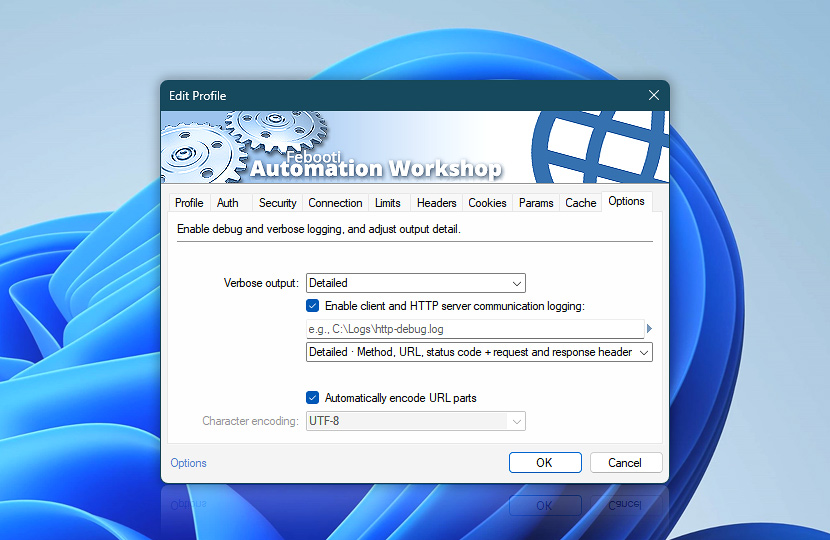
Configure diagnostic output, communication logging, URL encoding, and character encoding for this Web Profile. These settings help troubleshoot web communication, keep request URLs valid, and ensure consistent formatting across Internet and Web Actions.
| Options | Details |
|---|---|
| Verbose output | Choose how much diagnostic information is included in Action output. These messages can be viewed in real time in the Automation Workshop Log Pane and are useful for monitoring requests, responses, and transfer progress.
Verbose output controls the diagnostic information displayed while the Task is running. To retain these messages in the Service log or a separate Task log file, configure the Task logging level to record all messages. |
| Enable client and HTTP server communication logging | Write client and HTTP server communication details to a log file. Specify the log file and choose how much information to record · Details
|
| Automatically encode URL parts | Automatically URL-encode spaces and special characters in URL parts when needed to keep request URLs valid. When this option is enabled, Automation Workshop prepares URL paths in a browser-like way. For example, spaces are encoded as %20, while values that are already encoded are not encoded again.Query parameters are encoded separately and more strictly. Special characters in query parameter names and values are encoded as entered, so provide query data in its original, unencoded form when using automatic encoding. When this option is disabled, URL parts and query parameters are used exactly as entered. Use this mode when the URL is already encoded or when a service requires a specific custom URL format. |
| Character encoding | Use UTF-8 character encoding for web requests and encoded URL parts. UTF-8 is used consistently when preparing request text, form values, and encoded URL data. |
| Browse |  Use Browse to select a particular file or folder on a local disk, network share, or LAN location. Use Browse to select a particular file or folder on a local disk, network share, or LAN location. |
Debugging…
Communication logging provides progressively deeper insight into how Automation Workshop prepares, sends, and completes web requests. It can help diagnose connectivity, protocol negotiation, request formatting, server responses, redirects, certificate validation, and transfer performance.
Each logging level builds on the previous one, adding more detail about the HTTP exchange. The Quick Summary at the end of each request provides a compact overview of its route, timings, origin, response status, and completion result.
The examples below show the typical information available at each output level. Actual messages vary depending on the selected Web Profile, HTTP version, security settings, server behavior, and the Action being executed.
Basic
Basic level presents a compact technical overview of the request lifecycle. It records essential connection events, the resolved endpoint, negotiated protocol, request completion, and a concise summary of routing and timing information.
This level is suitable for routine monitoring and initial troubleshooting. It provides enough context to confirm where the request was sent, how the connection was established, and whether the operation completed successfully—without displaying the full HTTP exchange.
· [NEW REQUEST 7/15/2026 10:17:34]

· Host example.com:8443 was resolved.

· IPv6: -

· IPv4: 104.18.32.47

·  Try: 104.18.32.47:8443...

· disabled automatic use of client certificate

· ALPN: curl offers h2,http/1.1

· ALPN: server accepted h2

· Established connection to example.com (104.18.32.47 port 8443) from 192.168.0.1 port 63627

· using HTTP/2

· [HTTP/2] [1] OPENED stream for https://example.com:8443/api

· [HTTP/2] [1] [:method: GET]

· [HTTP/2] [1] [:scheme: https]

· [HTTP/2] [1] [:authority: example.com:8443]

· [HTTP/2] [1] [:path: /echo]

· [HTTP/2] [1] [accept-encoding: gzip, deflate, br, zstd]

· [HTTP/2] [1] [accept: */*]

· [HTTP/2] [1] [accept-language: en-US,en;q=0.9]

· [HTTP/2] [1] [user-agent: Automation Workshop/10.0 (+https://www.febooti.com)]

· [HTTP/2] [1] [cache-control: no-cache]

· [HTTP/2] [1] [content-type: text/plain; charset=utf-8]

· [HTTP/2] [1] [content-length: 0]

· Request completely sent off

· remote party requests TLS renegotiation or session ticket

· handling TLS renegotiation or session ticket

· TLS renegotiation or session ticket handled

· remote party requests TLS renegotiation or session ticket

· handling TLS renegotiation or session ticket

· TLS renegotiation or session ticket handled

· Connection #0 to host example.com:8443 left intact

·

· [QUICK SUMMARY]

· Routing: 192.168.0.1:63627 => 104.18.32.47:8443 over HTTP/2

· Timings: queue=0.239 dns=9.662 init=0.803 tls=7.547 ready=0.412 request=0.004 ttfb=1.444 redirect=0.000 download=0.214 total=20.086 ms

· Invoker: Task "Basic API debug" via "Universal Web API Call"

· 200 OK · Request completed successfully · 7/15/2026 10:17:35
Detailed
Detailed output expands the Basic trace with a readable representation of the HTTP request and response. It includes the request method, target path, host, request headers, response status, and response headers returned by the server.
Use this level when investigating authentication, content negotiation, caching, redirects, header values, or unexpected server responses. It provides a clear view of the HTTP conversation while omitting the response body.
· [NEW REQUEST 7/15/2026 10:17:34]

· Host example.com:8443 was resolved.

· IPv6: -

· IPv4: 104.18.32.47

·  Try: 104.18.32.47:8443...

· disabled automatic use of client certificate

· ALPN: curl offers h2,http/1.1

· ALPN: server accepted h2

· Established connection to example.com (104.18.32.47 port 8443) from 192.168.0.1 port 63627

· using HTTP/2

· [HTTP/2] [1] OPENED stream for https://example.com:8443/api

· [HTTP/2] [1] [:method: GET]

· [HTTP/2] [1] [:scheme: https]

· [HTTP/2] [1] [:authority: example.com:8443]

· [HTTP/2] [1] [:path: /echo]

· [HTTP/2] [1] [accept-encoding: gzip, deflate, br, zstd]

· [HTTP/2] [1] [accept: */*]

· [HTTP/2] [1] [accept-language: en-US,en;q=0.9]

· [HTTP/2] [1] [user-agent: Automation Workshop/10.0 (+https://www.febooti.com)]

· [HTTP/2] [1] [cache-control: no-cache]

· [HTTP/2] [1] [content-type: text/plain; charset=utf-8]

· [HTTP/2] [1] [content-length: 0]

> GET /echo HTTP/2

> Host: example.com:8443

> Accept-Encoding: gzip, deflate, br, zstd

> Accept: */*

> Accept-Language: en-US,en;q=0.9

> User-Agent: Automation Workshop/10.0 (+https://www.febooti.com)

> Cache-Control: no-cache

> Content-Type: text/plain; charset=utf-8

> Content-Length: 0

· Request completely sent off

· remote party requests TLS renegotiation or session ticket

· handling TLS renegotiation or session ticket

· TLS renegotiation or session ticket handled

· remote party requests TLS renegotiation or session ticket

· handling TLS renegotiation or session ticket

· TLS renegotiation or session ticket handled

< HTTP/2 200

< server: nginx/1.26.3

< date: Wed, 15 Jul 2026 07:17:34 GMT

< content-type: application/json; charset=utf-8

< vary: Accept-Encoding

< content-encoding: gzip

· Connection #0 to host example.com:8443 left intact

·

· [QUICK SUMMARY]

· Routing: 192.168.0.1:63627 => 104.18.32.47:8443 over HTTP/2

· Timings: queue=0.239 dns=9.662 init=0.803 tls=7.547 ready=0.412 request=0.004 ttfb=1.444 redirect=0.000 download=0.214 total=20.086 ms

· Invoker: Task "Detailed API debug" via "Universal Web API Call"

· 200 OK · Request completed successfully · 7/15/2026 10:17:35
Complete
Complete output provides the most comprehensive record of the web transaction. In addition to all connection, timing, request, and response details, it includes the response body whenever available.
Text content is written directly to the log, while binary or non-printable data may be displayed as a hexadecimal preview. Large bodies can be truncated to keep the diagnostic output manageable.
Use Complete output only when the additional payload detail is necessary for troubleshooting. Request and response bodies may contain credentials, tokens, personal information, or other sensitive data.
· [NEW REQUEST 7/15/2026 10:17:34]

· Host example.com:8443 was resolved.

· IPv6: -

· IPv4: 104.18.32.47

·  Try: 104.18.32.47:8443...

· disabled automatic use of client certificate

· ALPN: curl offers h2,http/1.1

· ALPN: server accepted h2

· Established connection to example.com (104.18.32.47 port 8443) from 192.168.0.1 port 63627

· using HTTP/2

· [HTTP/2] [1] OPENED stream for https://example.com:8443/api

· [HTTP/2] [1] [:method: GET]

· [HTTP/2] [1] [:scheme: https]

· [HTTP/2] [1] [:authority: example.com:8443]

· [HTTP/2] [1] [:path: /echo]

· [HTTP/2] [1] [accept-encoding: gzip, deflate, br, zstd]

· [HTTP/2] [1] [accept: */*]

· [HTTP/2] [1] [accept-language: en-US,en;q=0.9]

· [HTTP/2] [1] [user-agent: Automation Workshop/10.0 (+https://www.febooti.com)]

· [HTTP/2] [1] [cache-control: no-cache]

· [HTTP/2] [1] [content-type: text/plain; charset=utf-8]

· [HTTP/2] [1] [content-length: 0]

> GET /echo HTTP/2

> Host: example.com:8443

> Accept-Encoding: gzip, deflate, br, zstd

> Accept: */*

> Accept-Language: en-US,en;q=0.9

> User-Agent: Automation Workshop/10.0 (+https://www.febooti.com)

> Cache-Control: no-cache

> Content-Type: text/plain; charset=utf-8

> Content-Length: 0

· Request completely sent off

· remote party requests TLS renegotiation or session ticket

· handling TLS renegotiation or session ticket

· TLS renegotiation or session ticket handled

· remote party requests TLS renegotiation or session ticket

· handling TLS renegotiation or session ticket

· TLS renegotiation or session ticket handled

< HTTP/2 200

< server: nginx/1.26.3

< date: Wed, 15 Jul 2026 07:17:34 GMT

< content-type: application/json; charset=utf-8

< vary: Accept-Encoding

< content-encoding: gzip

<< [binary data, 396 bytes]

00000000  1F 8B 08 00 00 00 00 00 00 03 8D 51  ...........Q

0000000C  3D 6F DB 30 10 DD F3 2B 04 4D 69 AA  =o.0...+.Mi.

00000018  6F 53 8E E8 20 43 87 A2 1D 0B D4 45  oS.. C.....E

00000024  86 A0 30 48 EA 24 0A 91 79 0A 79 AA  ..0H.$..y.y.

00000030  EB 04 F9 EF 95 68 27 70 93 0C E1 C6  .....h'p....

0000003C  F7 C1 E3 BB F7 78 16 4C 27 DC 02 69  .....x.L'..i

00000048  AC C3 55 10 7E FB BA 0E A3 03 68 E1  ..U.~.....h.

00000054  7E 04 47 9B D1 76 33 93 82 D2 F8 CC  ~.G..v3.....

00000060  39 B0 7F C0 6E 06 8B 84 0A FB 99 FF  9...n.......

0000006C  BE 5E FF 48 8B 24 7B 96 28 34 04 86  .^.H.${.(4..

...[chunk truncated, total 396 bytes]

<<

· Connection #0 to host example.com:8443 left intact

·

· [QUICK SUMMARY]

· Routing: 192.168.0.1:63627 => 104.18.32.47:8443 over HTTP/2

· Timings: queue=0.239 dns=9.662 init=0.803 tls=7.547 ready=0.412 request=0.004 ttfb=1.444 redirect=0.000 download=0.214 total=20.086 ms

· Invoker: Task "Complete API debug" via "Universal Web API Call"

· 200 OK · Request completed successfully · 7/15/2026 10:17:35
More…
Depending on the request and Web Profile configuration, verbose output may also include additional diagnostic events that do not appear in every transaction.
These messages can describe DNS-over-HTTPS configuration, resolver fallback, reused connections, redirects, ignored response bodies, HTTP stream activity, certificate properties, TLS negotiation, output truncation, and other low-level communication details. Their presence depends on the selected options and the behavior encountered while processing the request.
· DoH configured: https://1.1.1.1/dns-query

·    [x] Validate DNS requests

· DoH misconfigured:

·    no server specified, falling back to the system DNS resolver

· Reusing existing https

· Ignoring the response-body

· Issue another request to this URL: 'https://example.net/xml/'

· [HTTP/2] [147] OPENED stream for 'https://example.com/view/'

· Redirects: 5

· [...debug log truncated at cap...]


· Cert:

· handling TLS renegotiation or session ticket

·    Subject: CN=*.example.com

·    Issuer: C=US, O=Amazon, CN=Amazon RSA 2048 M04

·    Version: 2

·    Serial Number: 07:76:86:dc:c2:97:2e:42:c3:38:41:e8:9a:56:

·    Signature Algorithm: sha256WithRSAEncryption

·    Start Date: 2026-01-17 00:00:00 GMT

·    Expire Date: 2027-02-15 23:59:59 GMT

·    Public Key Algorithm: rsaEncryption

·    RSA Public Key (2048 bits)

·    rsa(n): 8f:fc:eb:c8:4d:2a:86:44:be:bd:10:4d:aa:26:bf:82:70:8b:90:03:6c:ed:6e:7e:d1:66:cd:0b:3f:b1:cd:1c:a8:89:39:b9:d9:7d:bb:ef:06:e2:87:e0:ac:4b:f5:e7:4c:46:50:4a:6f:22:fd:fd:aa:...

·    rsa(e): 0x10001

·    Signature: 6d:13:37:91:5c:38:32:32:85:ce:f4:15:a6:1b:10:3f:bd:ce:0c:ae:4d:ac:5a:8a:7d:bd:5a:26:da:e1:82:37:39:69:05:6d:45:22:72:8c:3e:af:bb:6b:6c:5f:ac:74:b9:b1:88:1b:02:fb:45:07:...

·    Cert: -----BEGIN CERTIFICATE-----

· MIIFyTCCBLGgAwIBAgIQB3aG3MKXLkLDOEHomtGjVjANBgkqhkiG9w0BAQsFAD

· MQswCQYDVQQGEwJVUzEPMA0GA1UEChMGQW1hem9uMRwwGgYDVQQDExNBbWF6b2

· J4hmJY84VdhYefFK8k8yQNssASDCYuLxSNV9YsGMi6VjO2jg5cYqFX8sz...

· TLS renegotiation or session ticket handled
When one or more redirects occur, redirect shows the cumulative time added by the redirect round-trips, excluding the initial DNS, connection, and TLS setup. Because redirect and ttfb are cumulative timing markers, they may overlap or appear out of chronological order. The total remains the authoritative end-to-end duration · More about timing variables.
Notes
- Complete communication logging can include sensitive request and response data. Enable it only when troubleshooting and protect the resulting log files.
- Each request ends with a Quick Summary, providing an at-a-glance overview of the route, protocol, key timing values, invoking Task and Action, response status, and final result.
- Communication logs are always appended to the specified file. Each new request is separated by a clear visual marker, making individual communication sessions easy to identify and review.
- For advanced troubleshooting, a Windows Registry override can enable an even more comprehensive level of diagnostic logging beyond the Complete setting. Use it only when instructed by Febooti Support, as it may generate very large log files containing additional sensitive data.
We are here to help…
If you have any questions, please do not hesitate to contact our support team.