
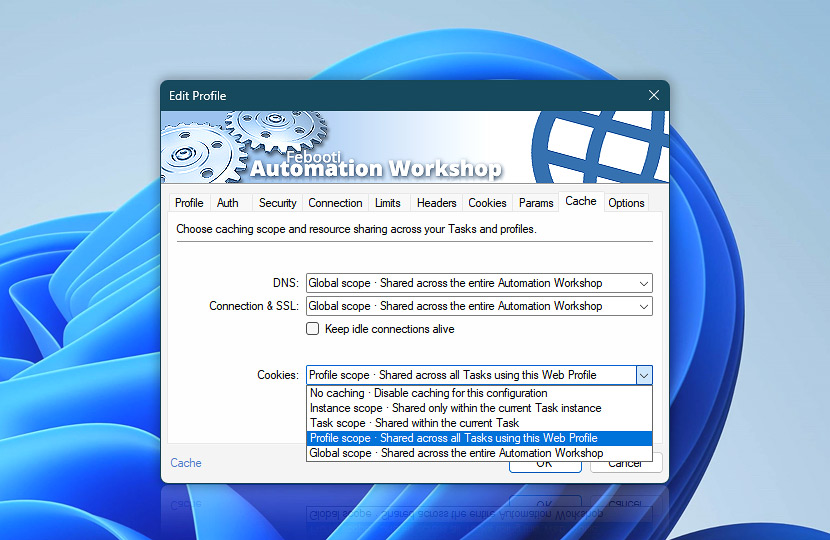
Control how this Web Profile stores and reuses DNS results, connections, SSL sessions, and cookies. Caching settings help improve performance and define how far cached data is shared across Internet and Web Actions · Details
| Cache | Details |
|---|---|
| DNS | Choose how DNS lookup results are cached and shared:
|
| Connection & SSL | Choose how connection and SSL session data is cached and reused:
|
| Keep idle connections alive | Send periodic TCP keep-alive probes on idle connections to help preserve long-lived connections and detect disconnected or unreachable peers sooner. When Connection & SSL caching uses the Global scope, physical connections may be shared across Web Profiles and Tasks. Keep-alive behavior is established when a connection is created and remains in effect for that connection while it is reused. As a result, the settings of the profile that first establishes the connection take precedence for that physical connection. |
| Cookies | Choose how cookies are stored, shared, and reused:
|
Notes
- DNS, Connection, and Cookies use the same caching scope.
- Wider caching scopes can improve performance and preserve session continuity, while narrower scopes provide stronger isolation between Task runs and profiles.
Caching…
Caching scopes determine how widely DNS results, connections, SSL/TLS sessions, and cookies can be reused. The same five scopes are available, and one selected scope applies to DNS, Connection & SSL, and Cookies throughout the Web Profile.
The selected scope defines the reuse boundary. Broader scopes can improve performance and preserve session continuity, while narrower scopes provide stronger isolation between Task instances, Tasks, profiles, and users.
Isolated cache scopes
Each scope is an isolated cache bucket. Cached data is reused only by requests that use the same scope and it is never shared across different scope buckets.
For example, a connection stored in Global scope is reused only by other requests using Global scope. A request using Profile scope does not reuse that connection, even when it uses the similar settings and endpoint.
Although the scope names are the same, network resources and cookies have different sharing boundaries:
- DNS, connections, and SSL/TLS sessions are additionally partitioned by the RunAs user.
- Cookies are stored in memory or shared cookie files and can therefore be shared across RunAs users.
No caching
No caching starts every Action with a fresh state. DNS information, connections, SSL/TLS sessions, and received cookies are not retained for subsequent requests. Each Action performs the required lookup and connection setup independently, and no cookie session is continued.
Use this scope when complete isolation is required, when testing from a clean state, or when cached data must not influence another request.
Instance scope
Instance scope shares cached data only within one running Task instance. Actions executed during the same Task run can reuse compatible DNS results, connections, SSL/TLS sessions, and cookies. The cached data is discarded when that Task instance ends and is not available to another simultaneous or later instance of the same Task.
Instance-scope cookies belong to the Task instance rather than to an individual Web Profile. When one Task instance uses several profiles configured for Instance scope, their Actions share one in-memory cookie set.
Use this scope when several Actions form one continuous workflow, but every new Task run must begin with an independent cache and cookie session.
Task scope
Task scope shares cached data across all runs of the same Task. For network resources, each RunAs user receives a separate Task-scope bucket. Runs performed as different users cannot reuse each other's DNS, connection, or SSL/TLS session data.
Task-scope cookies are stored in a Task-specific file:[TaskName].Task.Cookies.txt
The same cookie file is used by every instance and every RunAs user that executes the Task.
Use this scope when a Task repeatedly communicates with the same service and should retain connection benefits or cookie state across separate runs without sharing that state with other Tasks.
Profile scope
Profile scope shares cached data across all Tasks and instances that use the Web Profile. Network reuse remains partitioned by RunAs user. Tasks using the same profile can reuse compatible connections and SSL/TLS sessions only when they also run as the same user.
Profile-scope cookies are stored in a profile-specific file:[ProfileName].Profile.Cookies.txt
This cookie file is shared by all Tasks, Task instances, and RunAs users that use the profile.
Use this scope when the Web Profile represents a shared service, account, or web session that should remain consistent across several Tasks.
Global scope
Global scope provides the widest reuse boundary. For DNS, connections, and SSL/TLS sessions, Global scope is not shared between different RunAs users. Each user receives a separate global network cache spanning all Web Profiles used by that user.
Because the network pool crosses profile boundaries, compatible connections can be reused by different profiles belonging to the same RunAs user. This can also reuse connection-level properties already negotiated with the server, including the selected HTTP protocol version, such as HTTP/2 or HTTP/3.
Global-scope cookies are stored in one shared file:Global.Cookies.txt
This file is available to all Tasks, profiles, Task instances, and RunAs users.
Use Global scope only when the broadest possible reuse and cookie sharing are intentional.
Network reuse and RunAs users
DNS results, TCP connections, and SSL/TLS sessions are always partitioned by the RunAs user. Different Windows users execute within separate impersonated contexts and cannot share an active connection. As a result:
- A Task executed by two RunAs users creates two separate Task-scope network buckets.
- A profile used by several RunAs users creates a separate Profile-scope network bucket for each user.
- Global scope creates one global network pool per RunAs user, not one pool for the entire Automation Workshop service.
Connection reuse also requires the existing connection to be compatible with the new request. The destination, protocol, security settings, proxy configuration, and other connection properties can prevent reuse even when both requests use the same scope.
Cookie storage and sharing
Cookies are shared more widely than network connections because persistent cookies are keyed by shared files rather than by the RunAs execution context. Their storage depends on the selected scope:
- No caching · cookies are not retained.
- Instance scope · cookies are held in memory until the Task instance ends.
- Task scope · cookies are stored in the Task-specific cookie file.
- Profile scope · cookies are stored in the profile-specific cookie file.
- Global scope · cookies are stored in the common global cookie file.
Task-, Profile-, and Global-scope cookie files can therefore be read and updated by requests running as different users.
A cookie variable resolved by name returns one matching value, normally the last matching cookie. Use the All cookies variable when every cookie value is required, including multiple cookies that share the same name.
Saving received cookies
Received cookies are saved only after Automation Workshop has obtained a complete server response. Both of the following conditions must be met:
- The complete response body was successfully received.
- A valid server response status was obtained, such as
200,204,301,404, or500.
By default, an HTTP error response such as 404 or 500 causes the Action to fail, and cookies from that response are not saved.
Cookies are saved when the response code is configured as a warning or marked as not being an error. This allows legitimate server cookies returned with 4xx or 5xx responses to be retained.
Session cookie lifetime
A session cookie does not contain an Expires or Max-Age attribute. In a stored Netscape-format cookie file, it is represented by an expiration value of 0. this is an internal file-format value and does not mean that the server sent a literal expiration date of zero.
Automation Workshop does not automatically expire these cookies according to a browser session. Instead, the selected caching scope defines the practical lifetime of the session:
- No caching · every Action starts a new session.
- Instance scope · the session ends when the Task instance ends.
- Task scope · the session is retained across runs of the Task.
- Profile scope · the session is shared by all Tasks using the profile.
- Global scope · the session has no automatic scope-based end and remains available until the cookie is removed, replaced, or the shared cookie store is cleared.
Choose the cookie scope according to how long the web session should persist and which Tasks or users should be allowed to participate in it.
Concurrent cookie updates
Shared cookie files can be updated by more than one request at the same time. Each request loads the cookie file when it starts and writes its resulting cookie set when it finishes.
When two requests overlap, the last request to save the file can overwrite cookies added by the other request. For example:
- Request A and Request B both load cookie
x. - Request A receives cookie
yand saves{x,y}. - Request B receives cookie
zand saves{x,z}. - Cookie
yis no longer present.
This does not damage the cookie file, but a concurrent update can be lost.
Use the Task concurrency policy, execution conditions, or other Task logic to prevent simultaneous requests from writing to the same Task-, Profile-, or Global-scope cookie file when every received cookie must be preserved.
Cookie files and interoperability
Task-scope cookie files are stored together in a flat Web Cookies folder. Their names are derived from the Task folder path and Task name.
Extremely long paths and names are truncated to fit the supported file-name length. In rare cases, two Tasks with very long and similar names can truncate to the same cookie-file name and consequently share one cookie store. Keep Task folder paths and Task names reasonably short to avoid such collisions.
Automation Workshop accepts Unicode characters in cookie names and values more freely than standard HTTP cookie implementations. These cookies work within Automation Workshop, but browsers, proxies, external libraries, and exported cookie files may accept only the restricted character set defined by the cookie standards.
For maximum interoperability, encode non-ASCII cookie data before sending it—for example, by using percent-encoding or Base64URL.
When loading Netscape-format cookie files, blank lines and ordinary lines beginning with # are ignored. Lines beginning with #HttpOnly_ are an exception—they represent valid HttpOnly cookies and are retained.
Profile changes during execution
Changes made to a Web Profile do not necessarily affect requests that are already being processed. A worker currently using the profile can continue with the previous settings until it becomes idle. Changes to settings such as the preferred HTTP version may therefore take effect after a short delay.
Under continuous or heavy activity, workers may remain busy for longer. Restarting the Automation Workshop service at an appropriate time forces all workers to reload the current profile configuration promptly.
Cookies…
Cookie caching determines how session data is retained and shared when web requests use this profile. Use the related cookie settings to define, inspect, or override stored cookies when needed.
- Define reusable cookies in the Web Profile using Profile cookies. The cookie caching policy determines how cookies are stored, shared, and reused across Tasks.
- View all cookies available in Automation Workshop. Use Advanced Cookie Management to inspect, edit, or remove stored cookies.
- You can manage Action-level cookies to override or extend profile cookies when needed.
- Get Webpage Content · Overview · Cookies
- Upload File to Website · Overview · Cookies
- Download File from Website · Overview · Cookies
- Save Webpage · Overview · Cookies
- Submit Web Form · Overview · Cookies
- Universal Web API Call · Overview · Cookies
Ask for more…
If you have any questions, please do not hesitate to contact our support team.