
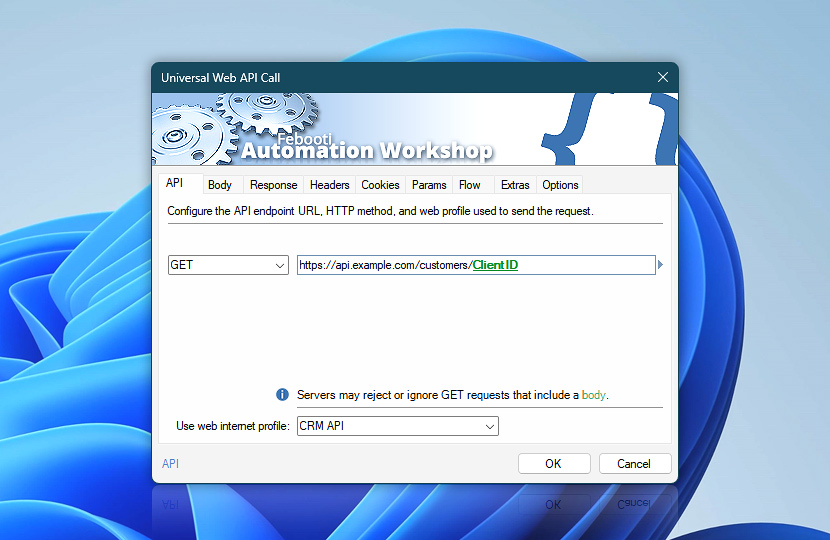
Universal Web API Call sends fully configurable HTTP requests to web APIs, REST endpoints, online services, and internal systems. Its API settings define the request method, target URL, and Internet & Web Profile used to establish the connection.
Choose a predefined HTTP method or enter any custom method required by the target service. The request can retrieve data, create or update resources, invoke remote operations, inspect endpoint capabilities, or perform specialized API commands.
Specify a fixed endpoint or dynamically build the URL using variables from files, Triggers, previous Actions, dates, times, or other workflow data. Request bodies, headers, cookies, parameters, authentication, response handling, and execution behavior can be configured in the related Action settings.
| API | Details |
|---|---|
| Method | Choose the HTTP request method that defines the operation performed on the target resource:
|
| URL | Enter the API URL or HTTP endpoint to which the request will be sent. The address can point to a public website, an internal web application, a REST API, a local service, or any other HTTP or HTTPS resource. Use this field to access records, services, webhooks, cloud platforms, monitoring endpoints, business systems, or custom server operations. The URL may include variables when the target resource depends on identifiers, dates, account data, file names, paging values, or previous workflow results. Examples:
|
| Info | Automation Workshop allows a request body to be configured independently of the HTTP method. Whether that body is accepted or has any meaning depends on the target server, API, and HTTP method.
|
| Use web internet profile | The Internet & Web Profiles Manager provides centralized management for reusable web connection settings. Each profile can include connection, authentication, security, header, cookie, parameter, cache, and limit settings that can be shared across multiple Actions. Choose an existing profile from the list of available profiles, or create a dedicated profile when this request needs its own credentials, TLS behavior, redirects, proxy settings, DNS options, cookies, throttling, or connection limits. For Universal Web API Call, the selected profile controls how Automation Workshop connects to the API endpoint and applies shared request behavior. Use it to keep authentication, certificates, cookies, headers, security rules, proxy and DNS settings, connection reuse, throttling, retries, and execution limits consistent across advanced API integrations. |
| Variable Wizard |  Use dynamic data input—substitute a parameter from a file, web, connected Trigger, other Actions, date and time presets, etc. Use dynamic data input—substitute a parameter from a file, web, connected Trigger, other Actions, date and time presets, etc. |
Note
Universal Web API Call is not limited to the predefined methods listed above. You can enter any valid HTTP method required by the target service, including proprietary or service-specific methods and methods introduced by newer HTTP standards, such as QUERY, defined by RFC 10008. Actual support depends on the destination server, API, and any intermediaries processing the request.
Interconnect
- Universal Web API Call integration and auditing—Variables (dynamic data) and Events (recorded activity). Retrieve the complete API response returned by the server, including the response body, status code, response headers, final URL, and timing information.
Still have a question?
If you have any questions, please do not hesitate to contact our support team.