
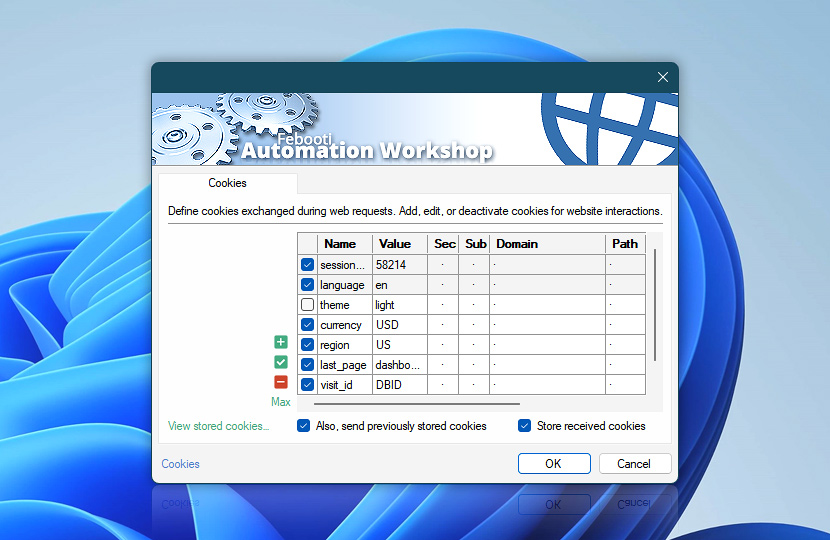
HTTP cookies define how session data is stored and reused across web requests. They allow websites and APIs to maintain state between requests, enabling authentication, preferences, and consistent interactions.
Automation Workshop can automatically store cookies received from server responses and send them with subsequent requests, enabling seamless session continuity. Cookies configured here allow you to control session handling, reuse authentication data, and adjust how requests behave across workflows.
Cookies are optional and should be used when session continuity or state management is required, such as authenticated interactions or multi-step workflows.
| Cookies | Details |
|---|---|
| List of cookies | Define cookies included with each request. Cookies allow you to maintain session state, reuse authentication data, and ensure consistent interactions with websites or APIs. Cookies can be defined directly in an Action or provided by a Web Profile. When both are used, Action-level cookies override or extend those defined in the Web Profile. Cookies defined in a Web Profile appear as highlighted entries, while locally defined cookies are shown as regular entries. Each cookie can be enabled or disabled individually. Disabled cookies are not sent with the request. |
| Editing | Use the editing controls to manage cookies:
Use the context menu for additional options such as duplicate, move, enable or disable entries, and quick access to related editing features. |
| Min / Max | Resize the cookies list area between compact and expanded views to improve visibility when working with multiple entries or longer values. Press F11 to toggle between view modes. |
| View stored cookies… | View cookies currently stored by Automation Workshop. Review stored cookie values, caching profiles, security attributes, domain and path rules, and expiration details. The manager also provides advanced options for managing stored cookies. |
| Also, send previously stored cookies | Automatically send stored cookies with requests to preserve session state and ensure consistent communication with websites or APIs. Cookies are included automatically when matching domain and path rules, enabling requests to continue within the same session context. |
| Store received cookies | Automatically store cookies received from server responses to maintain session continuity across requests. Stored cookies can be reused by subsequent requests, allowing authentication data, session identifiers, and preferences to persist throughout the workflow. |
Automatic cookie flow…
Automation Workshop can automatically manage cookies during web requests, handling both storage and transmission to preserve session continuity without manual intervention.
When enabled, cookies received from server responses are stored and reused by subsequent requests according to their domain, path, security, and expiration rules. This allows workflows to maintain authenticated sessions, preserve state, and interact with websites or APIs as part of a continuous session.
Send cookies
When sending a request, Automation Workshop can automatically include previously stored cookies. Cookies defined directly in the Action or inherited from the selected Web Profile are handled separately and are sent whenever they are enabled.
Stored cookies are matched to each request using standard cookie rules, including domain, path, security, and expiration requirements. Only applicable cookies are sent, allowing the server to recognize the session and continue processing requests in context. Typical uses include:
- Maintaining authenticated sessions across requests
- Accessing protected resources
- Preserving website or API state
- Ensuring consistent behavior in multi-step workflows
When this option is disabled, previously stored cookies are not included. This may result in unauthenticated responses, lost session state, or incomplete interactions with websites and APIs.
Store cookies
Server responses may contain cookies that define session state, authentication tokens, user preferences, or other persistent values. Enabling this option allows Automation Workshop to capture and store these cookies automatically.
Stored cookies are evaluated against future requests using standard rules such as domain, path, security, and expiration. When applicable, they can be sent automatically, allowing workflows to maintain login sessions, avoid repeated authentication, and preserve interaction state across multiple steps. This is especially useful for:
- Authenticated sessions and login-based workflows
- Multi-step processes, such as form submissions or API sequences
- Websites that rely on session identifiers for access control
- Requests that must preserve preferences or server-issued state
Without cookie storage, each request is treated independently, which may cause session context to be lost or authentication to be repeated.
Notes
- Shared cookie handling is configured in the Web Profile. Use Profile cookies to manage shared entries, or review the cookies caching policy to control how cookies are stored and reused.
- Cookies received from server responses can be stored and reused by subsequent requests to preserve session continuity.
- Action-level cookies support dynamic values through the Variable Wizard, allowing cookie data to be generated at runtime. Cookies defined in a Web Profile are generally static and can be shared across multiple Actions.
Context menu
Use the context menu for quick access to cookie management features:
- Manage entries—Add, Edit, or Remove cookies (ALT+A, F2, ALT+R).
- Duplicate and copy—Duplicate, Copy, or Paste entries (CTRL+D, CTRL+C, CTRL+V).
- Reorder—Move cookies up or down (ALT+Up, ALT+Down) to control the order in which they are included in the request. While cookie order is usually not critical, some servers process cookies sequentially, and reordering can help ensure correct session handling or compatibility with specific services.
These shortcuts help speed up cookie management when working with multiple entries.
Editing…
Define and modify cookie values using the editor. Each cookie is configured with properties such as name, value, domain, path, and expiration, allowing precise control over how cookies are sent with requests.
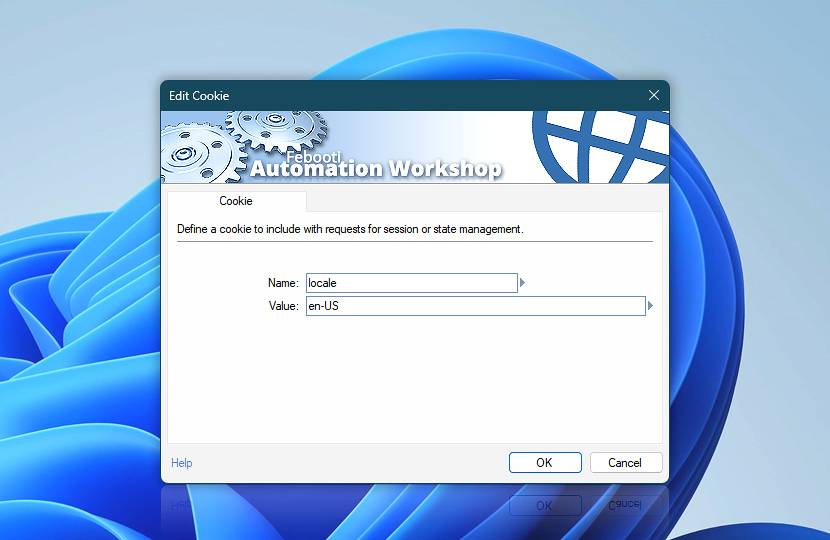
Use the editor to enter values manually or insert dynamic data using the Variable Wizard. This allows cookie values to be generated or updated at runtime based on workflow context.
| Cookie | Details |
|---|---|
| Name | Specifies the cookie name used by the server to identify stored data. |
| Value | Specifies the data associated with the cookie. This can be a static value or dynamically generated content. |
| Variable Wizard |  Use dynamic data input—substitute a parameter from a file, web, connected Trigger, other Actions, date and time presets, etc. Use dynamic data input—substitute a parameter from a file, web, connected Trigger, other Actions, date and time presets, etc. |
| Send this cookie only over secure HTTPS connection* | Ensures the cookie is sent only over secure HTTPS connections. HTTPS encrypts communication between the client and server, protecting sensitive data such as authentication tokens from interception or exposure. When enabled, the cookie will not be sent over unencrypted HTTP connections. |
| Domain* | Defines the domain for which the cookie is valid. Cookies can be restricted to a specific domain (e.g., example.com) or shared across subdomains (e.g., .example.com). Using a leading dot allows the cookie to be sent to all subdomains, such as api.example.com or www.example.com. |
| Path* | Specifies the URL path where the cookie is applied. The cookie will only be sent with requests whose path matches or is a subpath of the defined value. For example, a path of /app applies to /app and /app/settings, but not to / or /other. |
| Expires* | Defines when the cookie expires. Session cookies are removed when the session ends, while persistent cookies remain until the specified expiration time. Automation Workshop supports standard date formats (such as RFC-compliant HTTP date strings) as well as Unix epoch timestamps (seconds since January 1, 1970). Both formats are handled automatically, allowing flexible and seamless configuration of expiration values. |
* When a cookie is sent with a web request, only its name and value are included in the Cookie header. The additional fields marked with an asterisk are available only for stored cookies received from a server and preserved in Netscape cookie file format.
Applies to…
These cookie settings are available in the following Actions:
- Get Webpage Content · Overview · Cookies
- Upload File to Website · Overview · Cookies
- Download File from Website · Overview · Cookies
- Save Webpage · Overview · Cookies
- Submit Web Form · Overview · Cookies
- Universal Web API Call · Overview · Cookies
See also…
Cookies work together with other request components:
- Headers · Define how requests are interpreted by servers, including authentication, content types, and caching behavior.
- Params · Define query parameters appended to request URLs for passing additional data to endpoints.
Just ask…
If you have any questions, please do not hesitate to contact our support team.