
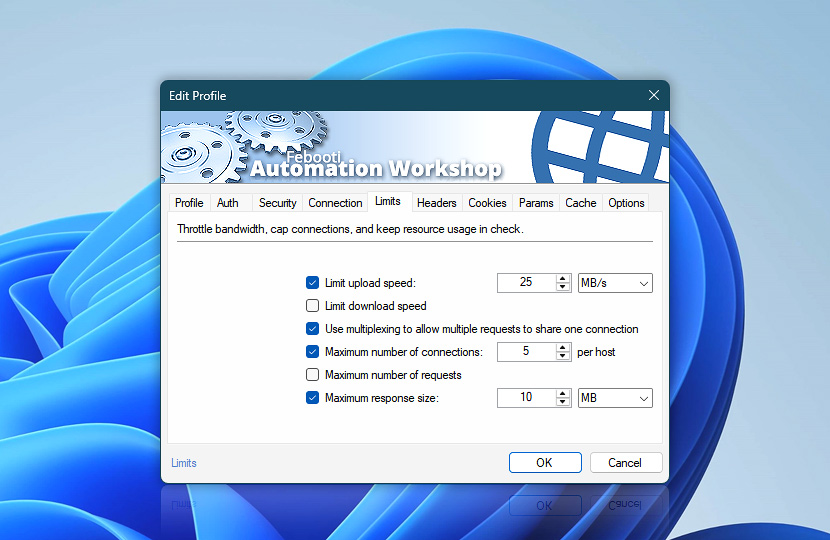
Control how much network capacity this Web Profile may use. Limits help manage upload and download speeds, connection and request concurrency, and maximum response size for Internet & Web Actions that use the profile.
Limits and throttling are especially useful for large uploads or downloads, API polling, and workflows that may issue many web requests in parallel.
| Limits | Details |
|---|---|
| Limit upload speed | Limit the maximum upload speed used by requests. This can help prevent large uploads or request bodies from consuming excessive upstream bandwidth. The limit applies to data uploaded by the Action. It does not limit TCP acknowledgements or other transport-level control traffic. Very low upload limits can still increase the total request time when a server waits for uploaded data to complete before returning a response. |
| Limit download speed | Limit the maximum download speed used by requests. This can help reduce bandwidth usage when retrieving large files or responses, or when multiple workflows share the same network connection. |
| Use multiplexing to allow multiple requests to share one connection | Use HTTP/2 or HTTP/3 multiplexing to allow multiple requests to share a single connection when supported by the server.
Multiplexing does not remove request concurrency limits. Use Maximum number of requests when the total number of requests processed at the same time must be restricted. |
| Maximum number of connections | Set the maximum number of connections that may be open simultaneously to the same host. For this limit, a host is identified by its protocol, hostname, and port. When the limit is reached, additional requests wait until a connection becomes available. With HTTP/2 or HTTP/3 multiplexing, a single connection can carry multiple requests at the same time. This setting therefore limits connections, not simultaneous requests. For example, a limit of 2 connections can still allow many requests to run concurrently when those requests are multiplexed over the two connections. Use Maximum number of requests when request concurrency itself must be limited. Time spent waiting for an available connection can count toward applicable timeouts, so very restrictive connection limits may delay queued requests. |
| Maximum number of requests | Set the maximum number of requests that may be processed at the same time. When the limit is reached, additional requests wait until a request slot becomes available. This provides a request-level concurrency limit independently of how many physical connections are used. It is particularly useful with HTTP/2 and HTTP/3 multiplexing, where many simultaneous requests may otherwise share only one or a few connections. Redirects are treated as part of the original request and do not consume an additional request slot. Automatic retry attempts are also subject to the same concurrency limit. While a request is waiting for an available request slot, this waiting period does not count toward its request timeout. |
| Maximum response size | Set the largest response body that Automation Workshop may accept. Responses exceeding this limit are stopped to protect memory, storage, and network resources. The limit applies to the response body only and HTTP response headers are not included. The limit is measured against the decoded response body delivered to the Action, not the compressed size transferred over the network. With automatic content decoding, responses encoded with formats such as gzip, br, zstd, or deflate are measured after decompression. This makes the limit a practical safeguard for memory and storage usage rather than a limit on network traffic.With HTTP/1.0 or HTTP/1.1, stopping the transfer may require closing the current connection, preventing it from being reused. With multiplexed HTTP/2 or HTTP/3, the affected request stream can be stopped independently while the shared connection remains available for other requests. |
| Speed units |  Limit the transfer speed (bandwidth) using your preferred units—KB/s, MB/s, or GB/s. One KB is 1,024 bytes. Limit the transfer speed (bandwidth) using your preferred units—KB/s, MB/s, or GB/s. One KB is 1,024 bytes. |
| Size units |  Set size limits using your preferred units—bytes, kilobytes, megabytes, gigabytes, or terabytes. Set size limits using your preferred units—bytes, kilobytes, megabytes, gigabytes, or terabytes. |
Note
- When Connection & SSL caching uses the Global scope, multiplexing is enabled automatically and shown as read-only. And the Maximum number of connections and Maximum number of requests settings in this Web Profile are not applied. To enforce profile-specific concurrency limits, use a non-Global caching scope.
Have a question?
If you have any questions, please do not hesitate to contact our support team.