
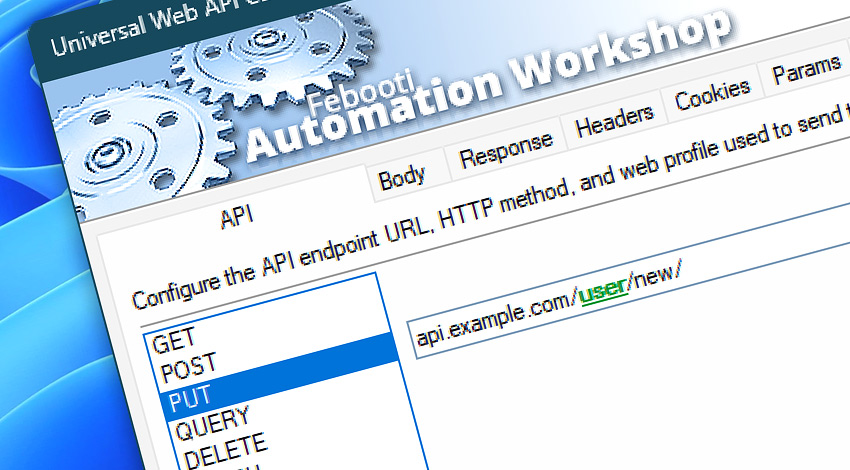
Automation Workshop includes the Universal Web API Call Action for calling web APIs, REST endpoints, HTTP services, and custom online systems with full control over the request structure. It provides a flexible way to automate API communication directly within a workflow, from simple service checks to advanced data exchange with authenticated platforms.
Use Universal Web API Call Action to send GET, POST, PUT, QUERY, DELETE, PATCH, and other HTTP requests, include request bodies, submit files or text payloads, read server responses, and save returned data for later processing. The Action is designed for workflows that need precise control over how API requests are built, executed, validated, and handled.
API behavior can be customized with headers, cookies, query parameters, authentication, TLS settings, redirects, timeouts, retries, response code handling, output options, and Internet & Web Profiles. This makes Universal Web API Call the most flexible Internet & Web Action for integrating Automation Workshop with modern web services and custom APIs.
Features & highlights
- Drive virtually any web API with full control over request structure, authentication, security, connection handling, and performance limits powered by Internet & Web Profiles.
- Call REST APIs, HTTP services, webhook endpoints, cloud platforms, internal systems, and custom web applications. Send request bodies as plain text, structured data, JSON, XML, form-style content, or file-based payloads.
- Receive API responses as workflow variables or save returned content directly to files for later processing. Access response codes, headers, returned content, final URL, content size, timing details, and other response data.
- Combine headers, cookies, query parameters, authentication, redirects, TLS settings, timeouts, retries, and response handling for advanced API workflows.
- Send any HTTP request, trigger webhooks, and connect your apps and services—all from one flexible platform.
Usage examples
- Send data to REST APIs, webhook receivers, cloud platforms, monitoring systems, CRMs, ERPs, or internal business applications.
- Retrieve JSON, XML, CSV, plain text, HTML, or custom API responses and use the returned data in later workflow steps.
- Create, update, delete, or synchronize records in external systems using POST, PUT, PATCH, DELETE, and related API methods.
- Trigger remote jobs, deployments, notifications, integrations, data imports, report generation, or other server-side processes.
- Submit authenticated API requests that require bearer tokens, API keys, cookies, custom headers, client certificates, or other security settings.
- Save API responses directly to files for reports, exports, downloads, generated documents, logs, backups, or audit trails.
- Validate API results by checking response codes, headers, returned content, response size, final URL, or workflow variables.
Documentation
- API · Enter the API endpoint, choose the HTTP method, and define the main request settings.
- Body · Configure the request body as text, file content, structured data, or another payload required by the API.
- Response · Choose how returned API content is handled, including variables, files, response details, and output behavior.
- Headers · Add custom request headers for API access, content negotiation, authentication support, user agent, and other request details.
- Cookies · Provide cookies used for sessions, preferences, authentication, or server-side state during the API request.
- Params · Add query parameters to the API request URL without manually editing the full endpoint address.
- Flow · Configure response waiting, timeout behavior, response code handling, and workflow continuation rules after the API call.
- Extras · Fine-tune optional API request details, including highly specific request, response, transfer, and processing behavior.
- Options · Access the full Action configuration, including state, display name, error handling, logging behavior, and other advanced options.
Interconnect
- Universal Web API Call integration—with Variables (manipulate data dynamically within a workflow) and Events (recorded entries that detail system activity).
- Streamline your automation processes by visually connecting your workflow using Variable Wizard—a powerful tool to access all 1,000+ variables—system, network, Triggers, Actions, globals, web, and much more…
Quick access
To streamline your workflow creation, you can locate the Universal Web API Call Action throughout Automation Workshop's search tools—including the knowledge base, menu, and Add Action feature—using quick shortcuts like «UWA», «UAC», «UWC», «WAC», or «AC».
Discover
Automation Workshop includes many additional Triggers and numerous Actions to help automate repetitive computer or business tasks using state-of-the-art GUI tools.
Assistance is here…
If you have any questions, please do not hesitate to contact our support team.