
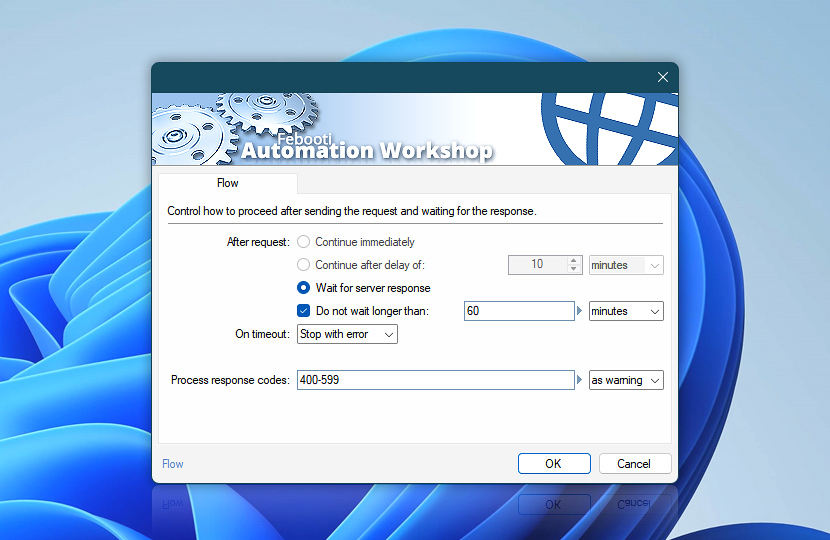
Flow settings define how Automation Workshop handles web requests after they are sent and how it reacts to responses from remote servers. You can control whether execution continues immediately, waits for a response, or applies a delay—depending on how the result is used in your workflow.
These options also determine how timeouts and HTTP response codes are handled, allowing you to build reliable workflows that adapt to different server behaviors, network conditions, and API response patterns.
Requests can be processed synchronously (waiting for a response) or asynchronously (continuing execution while the request completes in the background). This flexibility enables both simple fire-and-forget scenarios and advanced, response-driven integrations.
| Flow | Details |
|---|---|
| After request | Choose how the workflow proceeds after a request is sent:
Use immediate continuation for background or non-critical requests. Waiting is recommended when the response is required for further processing, validation, or decision-making. |
| Enable waiting timeout | Optionally prevent indefinite waiting when a response is delayed or not returned. Configure a maximum wait time and define how the workflow should proceed when the timeout is reached. |
| On timeout | Define what happens when the waiting timeout is reached:
Timeout handling ensures workflows remain responsive and protected from slow or unresponsive services. |
| Process response codes | Define how specific HTTP response codes should be handled during execution:
Use response code handling to distinguish between acceptable variations (such as retries or partial results) and critical failures that require immediate action. Codes such as 301 and 302 can be matched here only when automatic redirect following is disabled in the selected Web Profile. When Follow redirects is enabled, Automation Workshop automatically follows the redirect chain, and response code handling applies to the final response after the redirect chain is completed. |
| Time units |  Define and set a time frame in your preferred format—be it milliseconds, seconds, minutes, hours, or days. Define and set a time frame in your preferred format—be it milliseconds, seconds, minutes, hours, or days. |
| Variable Wizard |  Use dynamic data input—substitute a parameter from a file, web, connected Trigger, other Actions, date and time presets, etc. Use dynamic data input—substitute a parameter from a file, web, connected Trigger, other Actions, date and time presets, etc. |
Continuation…
Common usage patterns for Flow settings:
- Use Continue immediately for background or non-blocking requests.
- Use Wait for server response when response data is required.
- Combine timeouts and response codes for resilient integrations.
Response codes
HTTP response codes indicate how a server processed a request. Automation Workshop allows you to interpret these responses and react accordingly, helping ensure reliable communication with websites and APIs.
Common response code groups:
- Success 2xx · indicates successful request processing (e.g., 200 OK, 201 Created). These responses typically allow the workflow to continue normally.
- Redirects 3xx · indicates that the request is redirected (e.g., 301 Moved Permanently, 302 Found). These responses may require following redirects to reach the final resource. Redirect handling can be configured in Web Profiles under Profile security using options such as Follow redirects, Maximum number of redirects, and Keep original HTTP method.
- Client errors 4xx · indicates issues with the request (e.g., 400 Bad Request, 401 Unauthorized, 404 Not Found, 422 Unprocessable Entity). These may require correction of input data, authentication, or request structure.
- Server errors 5xx · indicates server-side failures (e.g., 500 Internal Server Error, 503 Service Unavailable). These are often temporary and may require retry logic or fallback handling.
Warning codes
Warning-level handling allows workflows to continue while still recording or signaling non-critical issues. This is useful for tolerant integrations where occasional failures or variations are acceptable.
Error codes
Error-level handling stops execution or triggers error handlers when critical issues occur. Use this for strict workflows where successful request completion is required.
Applies to…
These Flow settings are available in the following Actions and control how each request is executed and handled:
- Get Webpage Content · Overview · Flow
- Upload File to Website · Overview · Flow
- Download File from Website · Overview · Flow
- Save Webpage · Overview · Flow
- Submit Web Form · Overview · Flow
- Universal Web API Call · Overview · Flow
Notes
- Currently, the Wait for server response option is the recommended and fully supported flow control option.
- Flow settings apply independently to each Action, providing precise control over request behavior across workflow steps.
- Asynchronous execution (Continue immediately) allows requests to complete in the background while the workflow continues.
- Synchronous execution (Wait for server response) ensures that response data is available before proceeding.
- Timeout and response code handling can be combined to build resilient workflows that adapt to slow, unreliable, or variable external services.
Need help?
If you have any questions, please do not hesitate to contact our support team.