
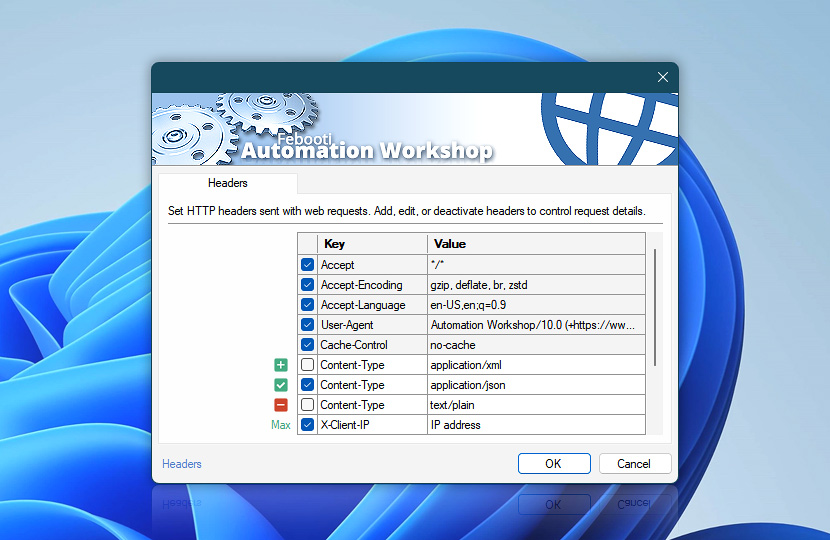
HTTP request headers define how requests are interpreted and processed by websites and APIs. They control authentication, content negotiation, caching behavior, and other aspects of communication between Automation Workshop and remote services.
Automation Workshop automatically generates essential headers for each request (such as Host, Cookies, and authentication-related headers). Headers configured here are additional—used to fine-tune behavior, override defaults, or meet specific API and service requirements.
Headers are optional and should be used only when specific request behavior needs to be adjusted.
| Headers | Details |
|---|---|
| List of headers | Define additional HTTP request headers included with each request. These headers allow you to control how servers respond, customize authentication flows, and adjust request handling for specific scenarios. Headers can be defined directly in an Action or provided by a Web Profile. When both are used, Action-level headers extend those defined in the Web Profile. Headers defined in a Web Profile appear as highlighted entries, while locally defined headers are shown as regular entries. Each header can be enabled or disabled individually. Disabled headers are not sent with the request. |
| Editing | Use the editing controls to manage headers:
Use the context menu for additional options such as duplicate, move, enable or disable header entries, and quick access to related editing features. |
| Min / Max | Resize the headers list area between compact and expanded views to improve visibility when working with multiple entries or longer values. Press F11 to toggle between compact and expanded views. |
Context menu
Use the context menu for quick access to header management features:
- Manage entries—Add, Edit, or Remove headers (ALT+A, F2, ALT+R).
- Duplicate and copy—Duplicate, Copy, or Paste entries (CTRL+D, CTRL+C, CTRL+V).
- Reorder—Move headers up or down to control their order in the request (ALT+Up, ALT+Down). While most servers do not require a specific header order, some APIs or services may expect headers in a particular sequence. Reordering allows you to fine-tune how the request is constructed and interpreted.
These shortcuts help speed up header management when working with multiple entries.
Header name casing
Automation Workshop uses conventional Title-Case header names for HTTP/1.x requests, such as Content-Type, User-Agent, and Accept-Language. HTTP header names are case-insensitive by specification, but conventional casing provides the broadest compatibility with websites, APIs, proxies, and legacy middleware.
Some servers, security systems, and custom integrations may consider header casing and ordering when identifying clients or validating requests. Although compliant software should treat header names case-insensitively, older middleware and custom request-signing implementations may expect the original or conventional representation.
For HTTP/2 and HTTP/3, header names are transmitted in lowercase as required by the protocol. Automation Workshop handles this automatically, so no special configuration is required when switching between HTTP versions.
Header casing does not affect matching of received response headers, which Automation Workshop processes case-insensitively.
Notes
- Reusable header values are maintained in the Web Profile. Open Profile headers to control how headers are applied across Actions.
- Action-level headers support dynamic values using the Variable Wizard, allowing you to generate request data at runtime. Headers defined in a Web Profile are typically static and shared across multiple Actions, while Action-level headers can be dynamic.
Editing…
Define and modify header values using the editor. Each header is configured as a key-value pair and can be adjusted for each request.
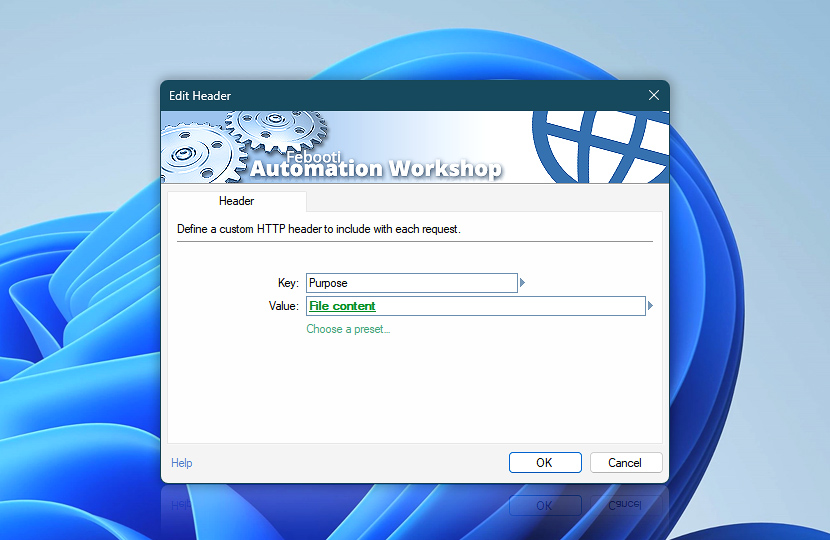
Use the editor to enter values manually, select presets, or insert dynamic data using the Variable Wizard.
| Header | Details |
|---|---|
| Key | Specifies the header name, defining how the receiving server interprets the associated value. |
| Value | Specifies the data sent with the header. This can be a static value or dynamically generated content based on workflow context. Use dynamic data input to substitute values from variables, files, connected Triggers, other Actions, or date and time presets. This allows headers to adapt dynamically based on the workflow context. |
| Choose a preset… | Select from predefined header configurations to quickly insert commonly used header combinations. |
| Variable Wizard |  Use dynamic data input—substitute a parameter from a file, web, connected Trigger, other Actions, date and time presets, etc. Use dynamic data input—substitute a parameter from a file, web, connected Trigger, other Actions, date and time presets, etc. |
Presets…
Automation Workshop provides a wide range of commonly used header presets to simplify configuration and reduce manual errors. These presets follow standard practices and help ensure compatibility with modern web services, REST APIs, and cloud platforms.
Presets provide ready-to-use header configurations for common scenarios. They simplify setup and help ensure compatibility with websites and APIs.
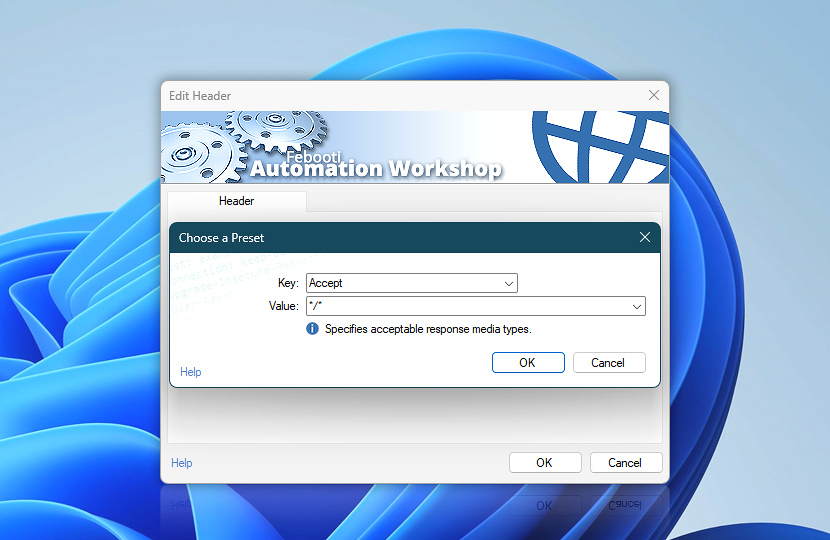
Use presets to quickly insert header keys and values without manual entry. After insertion, presets can be customized to match specific requirements.
Examples…
Use the examples below as a reference when selecting or customizing headers. Depending on your workflow, headers can be adjusted to meet specific requirements, optimize performance, or integrate with advanced authentication and data exchange scenarios.
Header names in this documentation are shown using conventional title-style capitalization for readability. In HTTP/1.1, header field names are case-insensitive, while HTTP/2 requires them to be sent in lowercase.
| Request header | Description |
|---|---|
| A-IM | Requests instance manipulations such as delta or feed compression. |
| Accept | Specifies acceptable response media types. |
| Accept-Charset | Specifies acceptable character encodings for the response. |
| Accept-Datetime | Requests a past resource version at a specific datetime. |
| Accept-Encoding | Specifies the response content encodings supported by the client, such as gzip, Brotli (br), Zstandard (zstd), or deflate. Automation Workshop can automatically decompress responses encoded with gzip, br, and zstd. It also supports deflate, including both zlib-wrapped deflate streams defined in RFC 1950 and raw deflate streams defined in RFC 1951. |
| Accept-Language | Specifies preferred natural languages for the response. |
| Accept-Features | Declares feature tags supported by the client. |
| Accept-Push-Policy | Specifies the server push policy the client accepts. |
| Access-Control-Request-Headers | Lists headers the client will send in the CORS request. |
| Access-Control-Request-Method | Specifies the HTTP method for the actual CORS request. |
| Akamai-Origin-Hop | Tracks origin hop count through Akamai edge servers. |
| ALPN | Specifies application-layer protocol negotiation identifiers. |
| Alt-Used | Identifies the alternative service host actually used. |
| Apply-To-Redirect-Ref | Controls whether WebDAV operations apply to the redirect reference. |
| Authorization | Provides credentials to authenticate the client. |
| b3 | Carries Zipkin B3 trace context in single-header format. |
| baggage | Propagates key-value metadata across distributed services. |
| Cache-Control | Specifies caching directives for requests and intermediaries. |
| CalDAV-Timezones | Controls whether the server returns timezone definitions. |
| Capsule-Protocol | Indicates support for HTTP Capsule Protocol. |
| CDN-Loop | Detects and prevents forwarding loops between CDN nodes. |
| CF-Connecting-IP | Original client IP address through Cloudflare. |
| CF-EW-Via | Tracks routing through Cloudflare Edge Workers. |
| CF-IPCountry | Client country code determined by Cloudflare. |
| CF-Ray | Unique Cloudflare request tracing identifier. |
| CF-Visitor | Visitor scheme details such as original protocol via Cloudflare. |
| CF-Worker | Identifies the Cloudflare Worker that handled the request. |
| Client-Cert | Forwards client TLS certificate from a trusted proxy. |
| Client-Cert-Chain | Forwards client TLS certificate chain from a trusted proxy. |
| Connection | Controls whether the connection stays open after the request. |
| Content-Digest | Digest hash of the request body for integrity verification. |
| Content-Disposition | Specifies how the content should be displayed or handled. |
| Content-Encoding | Specifies the encoding applied to the request body, such as gzip, Brotli (br), Zstandard (zstd), or deflate. When sending a pre-compressed payload, configure it in the Universal Web API Call body settings and set this header to the exact encoding used. |
| Content-ID | Uniquely identifies content within a multipart message. |
| Content-Language | Natural language of the request body. |
| Content-Length | Size of the request body in bytes. |
| Content-Location | Alternate URI for the enclosed content. |
| Content-MD5 | Legacy MD5 checksum of the request body. |
| Content-Range | Specifies which portion of the full content is enclosed. |
| Content-Type | Media type of the request body. |
| Cookie | Sends stored cookies associated with the target resource. |
| Cookie2 | Legacy versioned cookie support header. |
| Date | Date and time when the request was generated. |
| Depth | Recursion depth for WebDAV collection operations. |
| Destination | Target URI for WebDAV copy or move operations. |
| Device-Memory | Approximate device RAM in gigabytes (client hint). |
| Digest | Legacy digest hash for request body integrity. |
| DNT | User preference to opt out of tracking. |
| Downlink | Estimated downstream bandwidth in megabits per second. |
| DPR | Device pixel ratio of the client display. |
| Early-Data | Indicates the request was sent in TLS 1.3 early data. |
| ECT | Effective connection type such as 4G or 3G. |
| Elastic-Apm-Traceparent | Elastic APM distributed trace context. |
| Expect | Server expectations required before processing the request. |
| Fastly-Client-IP | Original client IP address through Fastly CDN. |
| Fastly-FF | Fastly routing metadata and loop detection. |
| Fly-Client-IP | Original client IP address through Fly.io. |
| Forwarded | Standardized proxy forwarding info about the original request. |
| From | Email address of the user making the request. |
| grpc-accept-encoding | Acceptable compression encodings for gRPC responses. |
| grpc-encoding | Compression encoding applied to the gRPC message. |
| grpc-message-type | Fully qualified type name of the gRPC message. |
| grpc-timeout | Timeout limit for the gRPC call. |
| Host | Target host and port for the request. |
| HTTP2-Settings | HTTP/2 settings for protocol upgrade negotiation. |
| Idempotency-Key | Unique key for safely retrying requests without duplication. |
| If | Conditional WebDAV operations based on state token matching. |
| If-Match | Proceed only if the resource matches the given ETag. |
| If-Modified-Since | Proceed only if the resource changed after the date. |
| If-None-Match | Proceed only if the resource does not match the ETag. |
| If-Range | Apply range request only if the resource is unchanged. |
| If-Schedule-Tag-Match | Conditional CalDAV scheduling based on schedule tag. |
| If-Unmodified-Since | Proceed only if the resource is unchanged since the date. |
| Keep-Alive | Parameters for persistent HTTP/1.x connections. |
| Label | Version label identifier for WebDAV version control. |
| Last-Event-ID | Last event ID for Server-Sent Events stream resumption. |
| Lock-Token | WebDAV lock token for modifying locked resources. |
| Max-Forwards | Limits how many proxies may forward the request. |
| MIME-Version | MIME version used for the message format. |
| OData-Isolation | Requests snapshot isolation for OData operations. |
| OData-MaxVersion | Maximum OData protocol version the client supports. |
| OData-Version | OData protocol version used in the request. |
| Ordering-Type | Ordering semantics for a WebDAV ordered collection. |
| Origin | Origin of the request for CORS and security checks. |
| OSCORE | Object Security for Constrained RESTful Environments parameters. |
| ot-tracer-spanid | OpenTracing span identifier. |
| ot-tracer-traceid | OpenTracing trace identifier. |
| ot-tracer-sampled | OpenTracing sampling decision for the trace. |
| Overwrite | Controls whether WebDAV copy/move overwrites the destination. |
| PayPal-Request-Id | Idempotency key for PayPal API request deduplication. |
| Ping-From | Source URL that triggered the hyperlink audit ping. |
| Ping-To | Destination URL for the hyperlink audit ping. |
| Position | Positional info for WebDAV ordered collection operations. |
| Postman-Token | Postman-generated token for request uniqueness. |
| Pragma | Legacy cache control for backward compatibility. |
| Prefer | Client preferences for how the server should process the request. |
| Priority | Request priority and urgency hints for scheduling. |
| Proxy-Authorization | Credentials to authenticate with a proxy server. |
| Proxy-Connection | Connection behavior for legacy proxy implementations. |
| Purpose | Purpose of the request such as prefetch or preload. |
| Range | Requests a specific byte range of the resource. |
| Referer | URI of the page that linked to the requested resource. |
| Repr-Digest | Digest of the selected representation for integrity. |
| RTT | Estimated round-trip time in milliseconds. |
| Save-Data | User preference for reduced data usage. |
| Schedule-Reply | Controls CalDAV scheduling reply behavior. |
| Sec-Browsing-Topics | Privacy Sandbox browsing topics from the browser. |
| Sec-CH-Device-Memory | Device memory as a secure client hint. |
| Sec-CH-DPR | Device pixel ratio as a secure client hint. |
| Sec-CH-Prefers-Color-Scheme | User preferred color scheme (dark/light) as a client hint. |
| Sec-CH-Prefers-Contrast | User preferred contrast level as a client hint. |
| Sec-CH-Prefers-Reduced-Data | User preference for reduced data transfer. |
| Sec-CH-Prefers-Reduced-Motion | User preference for minimal animation and motion. |
| Sec-CH-Prefers-Reduced-Transparency | User preference for reduced transparency effects. |
| Sec-CH-UA | Browser brand and version list as a client hint. |
| Sec-CH-UA-Arch | CPU architecture as a client hint. |
| Sec-CH-UA-Bitness | CPU bitness (32/64) as a client hint. |
| Sec-CH-UA-Form-Factors | Device form factor (desktop/mobile) as a client hint. |
| Sec-CH-UA-Full-Version | Full browser version as a client hint. |
| Sec-CH-UA-Full-Version-List | Full version strings for all browser brands. |
| Sec-CH-UA-Mobile | Whether the client is a mobile device. |
| Sec-CH-UA-Model | Device model name as a client hint. |
| Sec-CH-UA-Platform | Operating system platform as a client hint. |
| Sec-CH-UA-Platform-Version | Operating system version as a client hint. |
| Sec-CH-UA-Reduced | Whether the browser sends a reduced user agent string. |
| Sec-CH-UA-WoW64 | Whether the browser runs 32-bit on 64-bit Windows. |
| Sec-CH-Viewport-Height | Viewport height in CSS pixels as a client hint. |
| Sec-CH-Viewport-Width | Viewport width in CSS pixels as a client hint. |
| Sec-CH-Width | Desired resource width in physical pixels. |
| Sec-Fetch-Dest | Destination context of the fetch request. |
| Sec-Fetch-Mode | Mode of the fetch request (cors, navigate, etc.). |
| Sec-Fetch-Site | Relationship between request origin and target origin. |
| Sec-Fetch-User | Whether the request was triggered by user activation. |
| Sec-GPC | Global Privacy Control opt-out preference. |
| Sec-Purpose | Browser's intended purpose for the request. |
| Sec-Token-Binding | Token binding message for the TLS connection. |
| Sec-WebSocket-Extensions | WebSocket extensions the client wants to negotiate. |
| Sec-WebSocket-Key | Client key for WebSocket handshake verification. |
| Sec-WebSocket-Protocol | WebSocket subprotocols requested by the client. |
| Sec-WebSocket-Version | WebSocket protocol version the client supports. |
| Sentry-Trace | Sentry trace and span identifiers for error tracking. |
| Service-Worker | Indicates service worker request context. |
| Service-Worker-Navigation-Preload | Custom value for service worker navigation preload. |
| Slug | Suggested name for a newly created resource. |
| SOAPAction | Intended SOAP action for the request message. |
| Stripe-Signature | Cryptographic signature for Stripe webhook verification. |
| Stripe-Version | Stripe API version for the request. |
| Surrogate-Capability | Advertises surrogate processing capabilities to the origin. |
| TE | Acceptable transfer encodings and trailer support. |
| Timeout | Timeout duration for WebDAV lock operations. |
| Topic | Push subscription topic for Web Push notifications. |
| traceparent | W3C Trace Context with trace and parent span IDs. |
| tracestate | Vendor-specific W3C Trace Context state. |
| Trailer | Lists header fields present after the message body. |
| Transfer-Encoding | Transfer encoding applied to the request message. |
| True-Client-IP | Original client IP via Akamai or Cloudflare. |
| TTL | Time-to-live in seconds for Web Push messages. |
| uber-trace-id | Jaeger distributed trace context. |
| Upgrade | Requests switching to a different protocol. |
| Upgrade-Insecure-Requests | Client preference for upgrading to HTTPS. |
| Urgency | Urgency level for Web Push notification delivery. |
| User-Agent | Identifies the client software and version. |
| Viewport-Width | Client viewport width hint. |
| Via | Intermediate proxies and protocols the request passed through. |
| Want-Content-Digest | Requests a content digest in the response. |
| Want-Digest | Requests a specific digest algorithm in the response. |
| Want-Repr-Digest | Requests a representation digest in the response. |
| Width | Desired resource display width in physical pixels. |
| X-Access-Token | Access token for API authentication. |
| X-Akamai-Edgescape | Provides geolocation and network data from Akamai edge. |
| X-Amz-Content-SHA256 | SHA-256 hash of payload for AWS request signing. |
| X-Amz-Cf-Id | Amazon CloudFront request identifier. |
| X-Amz-Date | Timestamp for AWS Signature Version 4 signing. |
| X-Amz-Security-Token | Temporary AWS security credentials. |
| X-Amz-Target | Target AWS service operation for JSON API calls. |
| X-Amzn-Trace-Id | AWS X-Ray distributed trace identifier. |
| X-API-Key | API key for service authentication. |
| X-API-Token | API token for service authentication. |
| X-App-Version | Client application version. |
| X-ARR-LOG-ID | Azure Application Request Routing log identifier. |
| X-ARR-SSL | TLS details from Azure Application Request Routing. |
| X-Att-DeviceId | Mobile device identifier on the AT&T network. |
| X-Auth-Token | Authentication token for API access. |
| X-Azure-ClientIP | Original client IP through Azure gateway. |
| X-Azure-FDID | Azure Front Door instance identifier. |
| X-Azure-SocketIP | Socket IP in Azure infrastructure. |
| X-B3-TraceId | Zipkin B3 trace identifier. |
| X-B3-SpanId | Zipkin B3 span identifier. |
| X-B3-ParentSpanId | Zipkin B3 parent span identifier. |
| X-B3-Sampled | Zipkin B3 sampling decision. |
| X-B3-Flags | Zipkin B3 debug and sampling flags. |
| X-Client-ID | Client application or integration identifier. |
| X-Client-IP | Client IP address behind a proxy. |
| X-Client-Secret | Client secret for OAuth or API authentication. |
| X-Cloud-Trace-Context | Google Cloud distributed trace context. |
| X-Cluster-Client-IP | Client IP across clustered proxies. |
| X-Correlation-ID | Correlates related requests across distributed systems. |
| X-CSRF-Token | Anti-CSRF token for state-changing requests. |
| X-Datadog-Trace-Id | Datadog APM trace identifier. |
| X-Datadog-Parent-Id | Datadog APM parent span identifier. |
| X-Datadog-Sampling-Priority | Datadog sampling priority for the trace. |
| X-Device-ID | Device identifier for the request. |
| X-Device-User-Agent | Device-specific user agent string. |
| X-Do-Not-Track | Legacy user tracking opt-out preference. |
| X-Envoy-Attempt-Count | Number of retry attempts by Envoy proxy. |
| X-Envoy-Decorator-Operation | Envoy span decorator operation for tracing. |
| X-Envoy-External-Address | Trusted client address via Envoy proxy. |
| X-Firebase-AppCheck | Firebase App Check verification token. |
| X-Firebase-GMPID | Firebase Google Mobile Platform project identifier. |
| X-Forwarded-Client-Cert | Client TLS certificate details via proxy. |
| X-Forwarded-For | Original client IP through one or more proxies. |
| X-Forwarded-Host | Original Host header value through proxies. |
| X-Forwarded-Port | Original destination port through proxies. |
| X-Forwarded-Prefix | Original URL path prefix before proxy rewriting. |
| X-Forwarded-Proto | Original request scheme (HTTP/HTTPS) through proxies. |
| X-Forwarded-Server | Proxy server that forwarded the request. |
| X-Forwarded-SSL | Whether the original connection used SSL. |
| X-GitHub-Api-Version | GitHub REST API version. |
| X-Goog-Api-Key | Google Cloud API key. |
| X-Goog-User-Project | Google Cloud project billed for the request. |
| X-HTTP-Method | Intended HTTP method when tunneling through POST. |
| X-HTTP-Method-Override | Overrides HTTP method for limited clients. |
| X-Hub-Signature | HMAC-SHA1 signature for GitHub webhook verification. |
| X-Hub-Signature-256 | HMAC-SHA256 signature for GitHub webhook verification. |
| X-Idempotency-Key | Unique key for safely retrying requests without duplication. |
| X-Method-Override | Overrides HTTP method via custom header. |
| X-NewRelic-ID | New Relic application identifier for cross-app tracing. |
| X-NewRelic-Transaction | New Relic transaction metadata for tracing. |
| X-Original-Host | Original host before proxy modification. |
| X-Original-URL | Original URL before rewriting or forwarding. |
| X-Platform | Client platform identifier (web, ios, android, etc.). |
| X-Real-IP | Client IP address from a trusted reverse proxy. |
| X-Request-ID | Unique request identifier for logging and tracing. |
| X-Request-Start | Timestamp when the request entered the infrastructure. |
| X-Requested-With | Identifies AJAX or scripted requests (XMLHttpRequest). |
| X-Rewrite-URL | Original URL before server-side rewriting. |
| X-Security-Token | Security token for custom authentication. |
| X-Sentry-Auth | Sentry DSN authentication for event submission. |
| X-Session-ID | Session identifier for the request. |
| X-Tenant-ID | Tenant identifier in multi-tenant architecture. |
| X-Trace-ID | Custom trace identifier for request tracking. |
| X-Transaction-ID | Business transaction identifier across services. |
| X-UIDH | Unique identifier injected by mobile carriers. |
| X-Wap-Profile | URL to the device capability profile (UAProf). |
| X-Webhook-ID | Webhook event identifier for deduplication. |
| X-Webhook-Timestamp | Timestamp when the webhook event was dispatched. |
| X-Webhook-Signature | Signature for webhook payload verification. |
| X-XSRF-Token | Anti-XSRF token for state-changing AJAX requests. |
The same header presets are available both when creating request headers in Internet and Web Actions and when accessing header values through Variable Wizard variables. This ensures consistent naming, simplifies workflow configuration, and provides quick access to commonly used standard, API, authentication, tracing, and custom communication headers.
Applies to…
These header settings are available in the following Actions:
- Get Webpage Content · Overview · Headers
- Upload File to Website · Overview · Headers
- Download File from Website · Overview · Headers
- Save Webpage · Overview · Headers
- Submit Web Form · Overview · Headers
- Universal Web API Call · Overview · Headers
See also…
Headers work together with other request components:
- Cookies · Maintain session data and state between requests.
- Params · Define query parameters appended to request URLs.
Need help?
If you have any questions, please do not hesitate to contact our support team.