
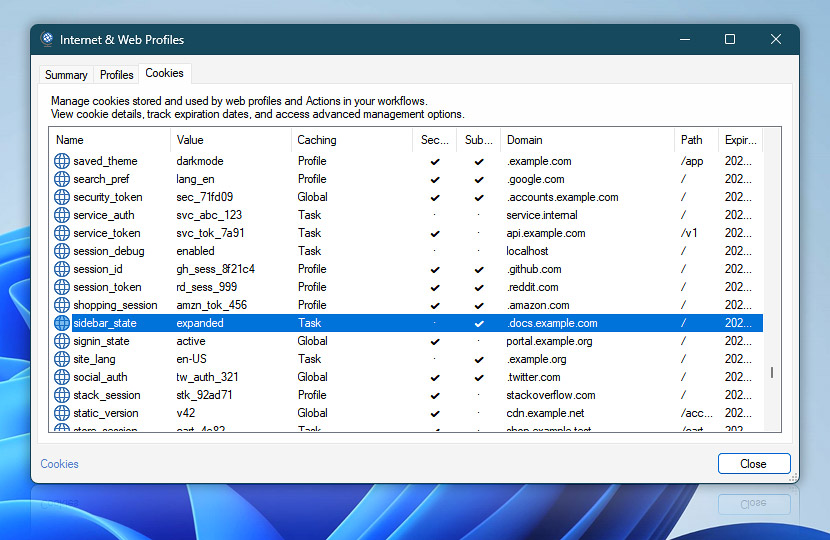
The Cookies tab provides a centralized view of cookies currently stored and used by Web Profiles and Internet & Web Actions. Use it to review cookie values, caching context, security attributes, domain and path restrictions, and real-time expiration details.
Stored cookies can be reused automatically according to the configured cookie and caching rules, allowing related requests to maintain sessions and other server-provided state.
| Cookies | Details |
|---|---|
| Name | The cookie name used when sending the cookie to the server. |
| Value | The value currently stored for the cookie. |
| Caching | Shows the caching context in which the cookie is stored. Review the per-profile cache options to control how stored cookies are retained and shared between requests. |
| Secure | Indicates that the cookie is marked Secure and is sent only over secure HTTPS connections. |
| Subdomains | Indicates whether the cookie can also be sent to subdomains of the specified domain. |
| Domain | The domain for which the cookie is valid. The domain determines which hosts may receive the cookie. |
| Path | The URL path for which the cookie is valid. A cookie is sent only when the request path matches its configured scope. |
| Expires | Shows when a persistent cookie expires. Cookies without an expiration are shown as session cookies and remain subject to the configured caching policy. |
Note
- When opened from the Cookies tab of a specific Action, Internet & Web Profiles opens in a focused Cookies-only view. The Summary and Profiles tabs are temporarily hidden, providing quick access to stored cookies without leaving the Action configuration.
Context menu
Use the context menu for quick access to additional cookie management commands:
- Locate Task · Instantly locate the Task associated with the selected cookie in the Task Pane.
- Advanced management · Open the cookie storage location in Windows Explorer for direct inspection and advanced troubleshooting.
More cookies…
- Cookies configured in a Web Profile can be shared and reused by multiple Actions that use that profile. Open the profile's Cookies settings to manage predefined cookies.
- Review the cookie caching policy to control how received cookies are stored, retained, isolated, and reused between requests.
- Individual Internet & Web Actions can define additional cookies for request-specific requirements, using either fixed or dynamically generated values.
- See the Action-specific cookies help for details about sending configured cookies, storing cookies received from servers, and combining them with cookies already available through the selected Web Profile.
- Get Webpage Content · Overview · Cookies
- Upload File to Website · Overview · Cookies
- Download File from Website · Overview · Cookies
- Save Webpage · Overview · Cookies
- Submit Web Form · Overview · Cookies
- Universal Web API Call · Overview · Cookies
We are here to help…
If you have any questions, please do not hesitate to contact our support team.