
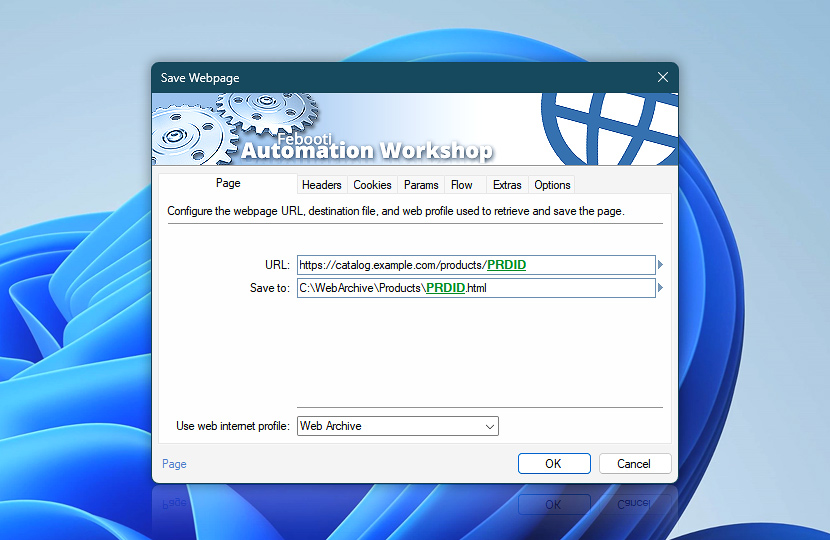
Save Webpage captures page content from a website, web endpoint, or online service and saves it as a file. Its page settings define the source address, the destination file path, and the Internet & Web Profile used to make the connection.
Specify a fixed webpage URL, an API endpoint, or a dynamically built address that includes variables from files, Triggers, previous Actions, dates, times, or other workflow data. The saved webpage path and response details can then be used by later Actions through Variable Wizard.
For details on how the webpage and its supporting resources are discovered, downloaded, organized, and prepared for offline use, see how the Save Webpage Engine works under the hood.
| Page | Details |
|---|---|
| URL | Enter the webpage URL or API endpoint from which the page content will be retrieved and saved. The address can point to a public website, an internal web application, a REST API, a local service, or any other HTTP or HTTPS resource. Use this field to save reports, dashboards, receipts, confirmations, status pages, search results, generated pages, or internal service output. The URL may include variables when the requested page depends on dates, identifiers, customer records, file names, or previous workflow results. Examples:
|
| Save to | Specify where the saved webpage file will be stored. The destination can be a local path, network share, or dynamically built file name that uses variables from the workflow. Use this field to save webpage snapshots, reports, confirmations, dashboards, generated pages, status pages, or internal web output for later review, processing, delivery, record keeping, or offline access. |
| Use web internet profile | The Internet & Web Profiles Manager provides centralized management for reusable web connection settings. Each profile can include connection, authentication, security, header, cookie, parameter, cache, and limit settings that can be shared across multiple Actions. Choose an existing profile from the list of available profiles, or create a dedicated profile when this request needs its own credentials, TLS behavior, redirects, proxy settings, DNS options, cookies, throttling, or connection limits. For Save Webpage, the selected profile controls how Automation Workshop connects to the webpage or API endpoint before saving the returned content as a file. Use it to keep authentication, cookies, shared headers, security rules, connection reuse, throttling, and request limits consistent across repeated webpage saving tasks. |
| Browse |  Use Browse to select a particular file or folder on a local disk, network share, or LAN location. Use Browse to select a particular file or folder on a local disk, network share, or LAN location. |
| Variable Wizard |  Use dynamic data input—substitute a parameter from a file, web, connected Trigger, other Actions, date and time presets, etc. Use dynamic data input—substitute a parameter from a file, web, connected Trigger, other Actions, date and time presets, etc. |
Interconnect
- Save Webpage integration and auditing—Variables (dynamic data) and Events (recorded activity). Retrieve the saved webpage file path, along with the status code, response headers, final URL, and file size.
Need assistance?
If you have any questions, please do not hesitate to contact our support team.