
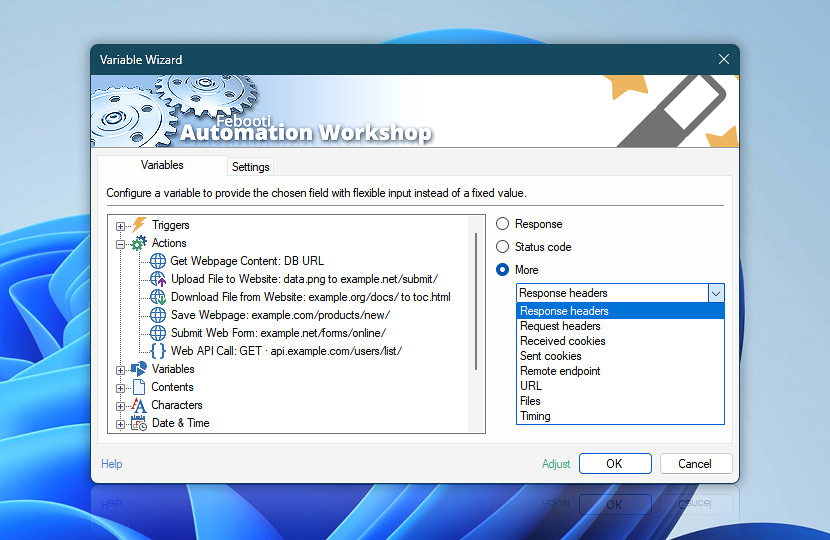
All Internet & Web Actions share a common set of dynamic variables that provide access to request and response data collected during web communication. These variables include response content, HTTP status codes, headers, cookies, remote endpoint details, request and final URLs, file paths, redirects, and detailed timing information.
Use these variables to validate communication, inspect server behavior, troubleshoot requests, log connection details, track redirects, reuse downloaded or saved files, and control workflow execution based on returned web data.
Variable Wizard provides fast and flexible access to "internet" Action variables without scripting or manual parsing. Depending on the selected category, workflows can retrieve header or cookie collections, access specific values by name, inspect endpoints and URLs, reuse file paths, or analyze timing and performance details in real time.
Response
The Response variable provides access to the primary returned value from the selected Internet & Web Action. Depending on the Action type, the returned value may contain webpage content, API responses, confirmation messages, generated IDs, or the final saved file path after download or webpage retrieval operations.
For content-oriented Actions such as Get Webpage Content or Submit Web Form, the response typically contains HTML, JSON, XML, plain text, or other server-generated data. For transfer-oriented Actions such as Download File from Website or Save Webpage, the returned value usually contains the final saved file path after redirects, automatic renaming, overwrite handling, or other file processing operations have completed.
Due to its flexible nature, the Universal Web API Call Action can return either type of result. Depending on its configuration, the Response variable may contain an in-memory web response, such as JSON, XML, or plain text, or the final saved file path when the response is saved directly to a file.
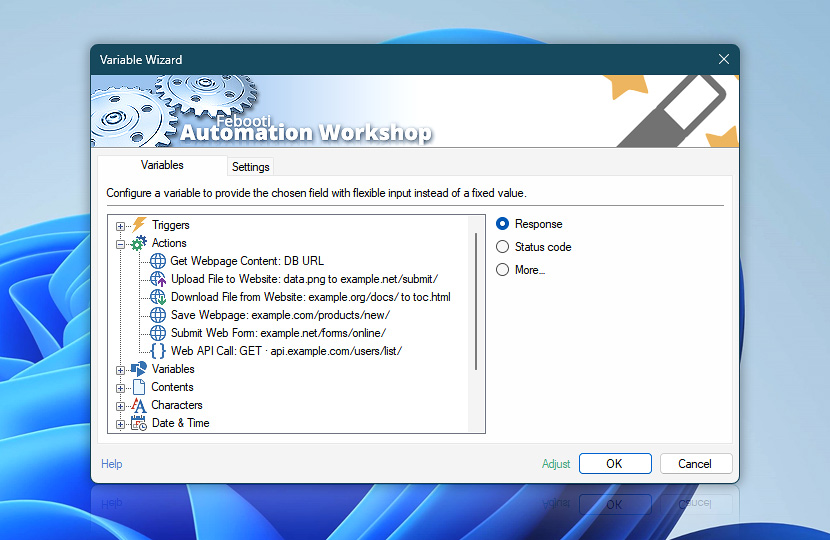
Response variables can be used to validate results, process returned data, extract values, pass information to subsequent Actions, build conditional workflow logic, or dynamically control advanced automation scenarios.
Status code
The Status code variable contains the HTTP response code received after the request is processed. Only the numeric status code is returned, making it easy to use in comparisons, conditions, logging, branching logic, retries, or workflow validation without additional parsing.
HTTP status codes provide a quick way to determine whether communication succeeded, failed, was redirected, required authentication, or is still being processed. Automation Workshop supports standard informational, success, redirection, client error, and server error response codes returned by websites, APIs, cloud services, authentication systems, and enterprise platforms.
Use status codes together with workflow conditions and intelligent automation logic—for example, retry failed requests, detect expired authentication sessions, validate successful uploads or downloads, monitor API availability, or trigger notifications when communication problems occur.
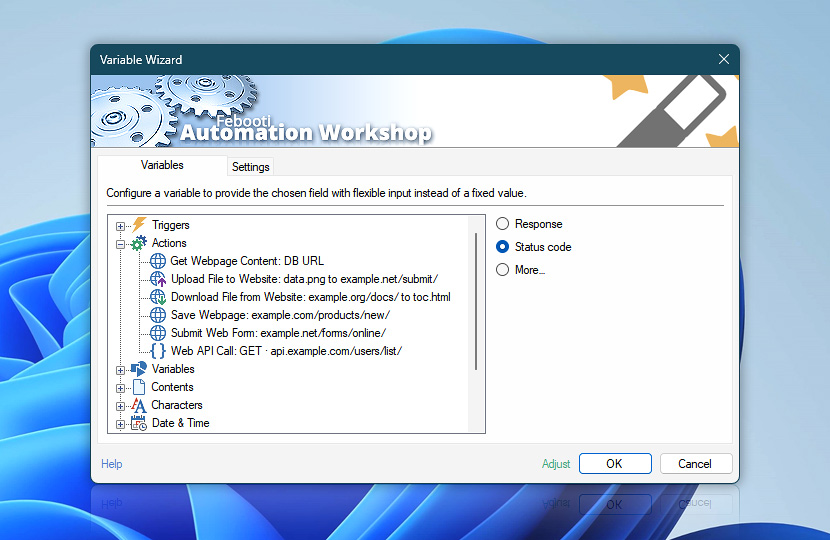
See a quick overview of commonly used HTTP status codes and their meanings. Some servers or APIs may return additional implementation-specific response codes.
| Status code | Description |
|---|---|
| 0 No Response / Connection Failed | No HTTP response was received due to connection failure, DNS failure, timeout, TLS failure, or network unavailability. |
| 100 Continue | Request headers were received, continue sending the request body. |
| 101 Switching Protocols | Server is switching protocols as requested. |
| 102 Processing | Request is being processed, no final response is available yet. |
| 103 Early Hints | Preliminary response was sent before the final response. |
| 104 Upload Resumption Supported | Server supports resumable uploads. |
| 110 Response is Stale | Response provided by a cache is stale. |
| 111 Revalidation Failed | Cache could not validate the response because the origin server was unreachable. |
| 112 Disconnected Operation | Cache is intentionally disconnected from the rest of the network. |
| 113 Heuristic Expiration | Cache heuristically chose a freshness lifetime greater than 24 hours. |
| 199 Miscellaneous Warning | Arbitrary non-persistent warning information was returned for the user. |
| 200 OK | Request completed successfully. |
| 201 Created | Resource was created successfully. |
| 202 Accepted | Request was accepted for processing but has not been completed yet. |
| 203 Non-Authoritative Information | Response was modified by a transforming proxy. |
| 204 No Content | Request completed successfully with no response body. |
| 205 Reset Content | Client should reset the document view. |
| 206 Partial Content | Partial response was returned for a range request. |
| 207 Multi-Status | Multiple resource statuses were returned. |
| 208 Already Reported | Resource was already reported in a previous response. |
| 214 Transformation Applied | Response was transformed by an intermediary proxy or cache. |
| 218 This is fine | Server returned a non-standard success response. |
| 226 IM Used | Instance manipulation was applied to the response. |
| 299 Miscellaneous Persistent Warning | Arbitrary persistent warning information was returned for the user. |
| 300 Multiple Choices | Multiple response options are available. |
| 301 Moved Permanently | Resource was permanently moved to a new location. |
| 302 Found | Resource is temporarily available at another location. |
| 303 See Other | Response is available at a different URI using GET. |
| 304 Not Modified | Cached resource is still valid. |
| 305 Use Proxy | Requested resource must be accessed through a proxy. |
| 306 Unused / Switch Proxy | Historically intended for proxy switching, but reserved and no longer used. |
| 307 Temporary Redirect | Temporary redirect preserves the original request method. |
| 308 Permanent Redirect | Permanent redirect preserves the original request method. |
| 400 Bad Request | Server could not understand the request. |
| 401 Unauthorized | Authentication is required. |
| 402 Payment Required | Reserved for future payment systems. |
| 403 Forbidden | Access to the resource is denied. |
| 404 Not Found | Requested resource was not found. |
| 405 Method Not Allowed | HTTP method is not allowed for this resource. |
| 406 Not Acceptable | Resource cannot generate an acceptable response. |
| 407 Proxy Authentication Required | Proxy authentication is required. |
| 408 Request Timeout | Server timed out while waiting for the request. |
| 409 Conflict | Request conflicts with the current resource state. |
| 410 Gone | Resource is permanently unavailable. |
| 411 Length Required | Content-Length header is required. |
| 412 Precondition Failed | Request preconditions were not met. |
| 413 Content / Payload Too Large | Request content exceeds server limits. |
| 414 URI Too Long | Request URI exceeds server limits. |
| 415 Unsupported Media Type | Request media type is unsupported. |
| 416 Range Not Satisfiable | Requested range cannot be fulfilled. |
| 417 Expectation Failed | Server cannot satisfy the Expect request header. |
| 418 I'm a teapot | Server refuses to brew coffee because it is a teapot. |
| 419 Page Expired / Authentication Timeout | CSRF token is missing or expired, or previously valid authentication has expired. |
| 420 Enhance Your Calm / Method Failure | Client is being rate-limited, or the request method failed. |
| 421 Misdirected Request | Request was sent to the wrong server. |
| 422 Unprocessable Content / Entity | Request content is syntactically correct but semantically invalid. |
| 423 Locked | Requested resource is locked. |
| 424 Failed Dependency | Request failed because another related request failed. |
| 425 Too Early | Server refuses to process a request that might be replayed. |
| 426 Upgrade Required | Client must switch to a different protocol. |
| 428 Precondition Required | Server requires a conditional request. |
| 429 Too Many Requests | Too many requests were sent in a given time period. |
| 430 Request Header Fields Too Large | Currently unallocated. Draft: Request headers exceed allowed limits. Also, used by vendors as a signal that requests were possibly malicious. |
| 431 Request Header Fields Too Large | Request headers exceed server limits. |
| 440 Login Timeout | User session expired. |
| 444 Connection Closed | Server closed the connection without sending any response. Never sent to client. |
| 449 Retry With | Server requests that the client retry after performing a specified action. |
| 450 Blocked by Parental Controls | Request was blocked by parental controls. |
| 451 Unavailable For Legal Reasons / Redirect | Resource is legally restricted, or redirected by server policy. |
| 460 Client Closed Connection | Client closed the connection before the response was sent. |
| 463 X-Forwarded-For Too Large | X-Forwarded-For header contains too many IP addresses. |
| 464 Incompatible Protocol | Client and server are using incompatible protocol versions. |
| 494 Request Header Too Large | Request header is too large. |
| 495 SSL Certificate Error | Client SSL certificate validation failed. |
| 496 SSL Certificate Required | Client SSL certificate is required. |
| 497 HTTP Request Sent to HTTPS Port | Plain HTTP request was sent to an HTTPS port. |
| 498 Invalid Token | Token is invalid or expired. Can arrive inside a 200 response body. |
| 499 Client Closed Request / Token Required | Client closed the connection, or a token is required. Never received by client. Can arrive inside a 200 response body. |
| 500 Internal Server Error | Generic server-side error occurred. |
| 501 Not Implemented | Server does not support the requested functionality. |
| 502 Bad Gateway | Invalid response was received from the upstream server. |
| 503 Service Unavailable | Server is temporarily unavailable. |
| 504 Gateway Timeout | Upstream server did not respond in time. |
| 505 HTTP Version Not Supported | HTTP version is unsupported. |
| 506 Variant Also Negotiates | Server encountered a configuration error during content negotiation. |
| 507 Insufficient Storage | Server cannot store the resource. |
| 508 Loop Detected | Infinite loop was detected while processing the request. |
| 509 Bandwidth Limit Exceeded | Server bandwidth quota was exceeded. |
| 510 Not Extended | Additional request extensions are required. |
| 511 Network Authentication Required | Network authentication is required. |
| 520 Unknown Error | Unknown error was returned by the upstream server. |
| 521 Web Server Is Down | Origin server refused the connection. |
| 522 Connection Timed Out | Connection to the origin server timed out. |
| 523 Origin Is Unreachable | Origin server is unreachable. |
| 524 A Timeout Occurred | Connection was established, but the server timed out. |
| 525 SSL Handshake Failed | SSL handshake with the origin server failed. |
| 526 Invalid SSL Certificate | Origin server returned an invalid SSL certificate. |
| 527 Railgun Error | Cloudflare Railgun connection error occurred. |
| 529 Site Is Overloaded | Server is temporarily overloaded and cannot process the request. |
| 530 Origin DNS Error / Site is Frozen | Origin DNS resolution failed, or the site is temporarily inactive. |
| 540 Temporarily Disabled | Service or resource is temporarily disabled. |
| 561 Unauthorized | Identity provider authentication failed. |
| 562 JWKS Request Failed | Identity provider keys could not be retrieved. |
| 598 Network Read Timeout Error | Network timeout occurred while reading the response. |
| 599 Network Connect Timeout Error | Network timeout occurred while establishing the connection. |
| 600 Invalid Headers | Request or response contained malformed or invalid HTTP headers. Never sent, actually returns 400 to the client. |
| 999 Request Denied | Request was blocked by bot protection, firewall, or rate limiting. |
More…
Automation Workshop provides easy access to extended communication details returned during request processing, including request and response headers, cookies, remote endpoint information, redirects, and timing data.
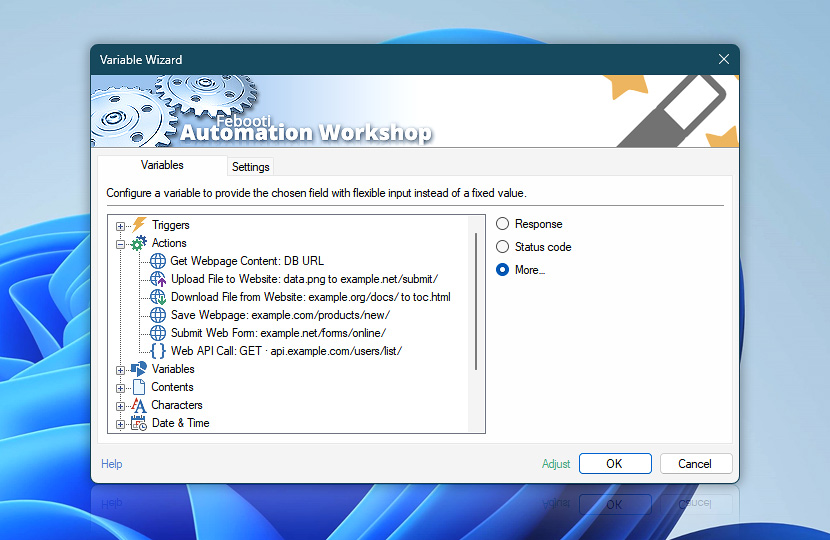
These variables make it possible to inspect server communication in greater detail, troubleshoot requests, validate authentication and session handling, analyze redirects or performance issues, and build advanced workflow logic using dynamically returned web communication data.
Response headers
Response headers can be used to inspect content types, authentication responses, redirects, caching behavior, rate limits, server technologies, security policies, cookies, API metadata, and many other communication details.
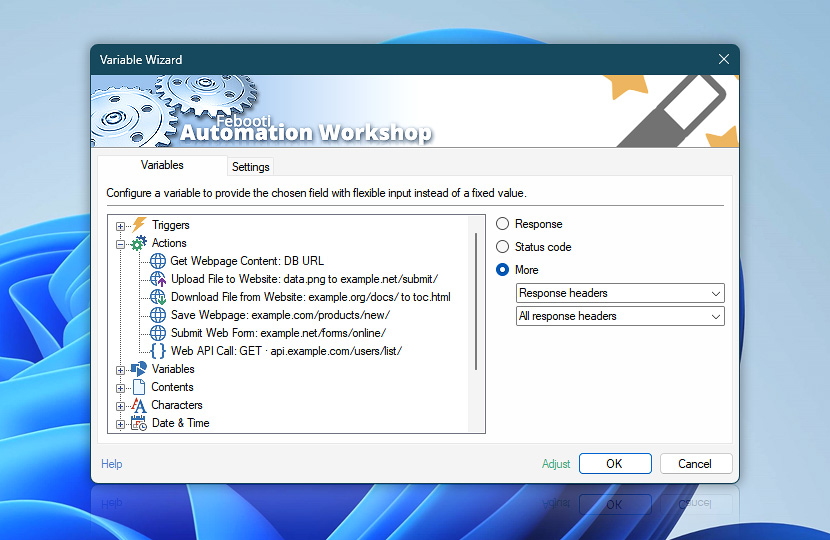
Workflows can retrieve either complete header collections or individual header values for logging, validation, troubleshooting, conditional logic, or advanced integration scenarios.
| Variable | Details |
|---|---|
| All response headers | Returns the complete collection of response headers received from the server, including each header name and its corresponding value.
Example:
|
| Preset header | Returns only the value of a selected predefined response header. Use the available header presets to quickly access commonly used response values.
Examples:
|
| Custom header | Returns only the value of a response header specified by name. Use this for application-specific or other custom headers that are not available as predefined presets—for instance, X-Invoice-Filename, X-Processing-Node, or X-Document-Revision.
Examples:
|
The Response headers variables provide direct access to HTTP headers returned by the server after request processing is completed. Variable Wizard allows selecting predefined header presets for commonly used values or specifying custom header names when exact response details are required.
Header names in this documentation are shown using conventional title-style capitalization for readability. HTTP/2 requires header field names to be sent in lowercase, so Content-Type is transmitted as content-type.
| Response header | Description |
|---|---|
| Accept-CH | Specifies which Client Hints the server wants to receive from the client. |
| Accept-CH-Lifetime | Legacy header specifying the lifetime for requested Client Hints. |
| Accept-Patch | Specifies the patch document formats accepted by the server. |
| Accept-Post | Specifies the media types accepted for POST requests. |
| Accept-Ranges | Indicates if the server supports range requests. |
| Accept-Signature | Indicates which signature algorithms the server supports. |
| Access-Control-Allow-Credentials | Indicates whether the response can be exposed when credentials flag is true. |
| Access-Control-Allow-Headers | Indicates which headers can be used during the actual CORS request. |
| Access-Control-Allow-Methods | Specifies the methods allowed when accessing the resource via CORS. |
| Access-Control-Allow-Origin | Indicates whether the response can be shared with requesting code from the given origin. |
| Access-Control-Allow-Private-Network | Indicates that a resource can be securely shared with a private network. |
| Access-Control-Expose-Headers | Allows servers to whitelist headers that browsers are allowed to access. |
| Access-Control-Max-Age | Indicates how long the results of a preflight CORS request can be cached. |
| Age | The time in seconds the object has been in a proxy cache. |
| Akamai-Cache-Status | Indicates the cache status (HIT, MISS, etc.) on the Akamai edge server. |
| Akamai-GRN | Global Request Number used for tracing requests in the Akamai network. |
| Akamai-Request-BC | Provides Akamai Breadcrumbs data for edge routing and network diagnostics. |
| Akamai-Request-ID | Unique identifier for the request handled by Akamai. |
| Allow | Lists the set of HTTP methods supported by the target resource. |
| Alternates | Legacy header indicating alternate representations of a resource. |
| Alt-Svc | Indicates alternative network services, such as HTTP/3. |
| anthropic-ratelimit-input-tokens-limit | Anthropic API limit for input tokens. |
| anthropic-ratelimit-input-tokens-remaining | Anthropic API remaining input tokens. |
| anthropic-ratelimit-input-tokens-reset | Anthropic API reset time for input token limit. |
| anthropic-ratelimit-output-tokens-limit | Anthropic API limit for output tokens. |
| anthropic-ratelimit-output-tokens-remaining | Anthropic API remaining output tokens. |
| anthropic-ratelimit-output-tokens-reset | Anthropic API reset time for output token limit. |
| anthropic-ratelimit-requests-limit | Anthropic API maximum request limit. |
| anthropic-ratelimit-requests-remaining | Anthropic API remaining allowed requests. |
| anthropic-ratelimit-requests-reset | Anthropic API reset time for request limit. |
| anthropic-ratelimit-tokens-limit | Anthropic API limit for total tokens. |
| anthropic-ratelimit-tokens-remaining | Anthropic API remaining total tokens. |
| anthropic-ratelimit-tokens-reset | Anthropic API reset time for total token limit. |
| Authentication-Info | Provides authentication details after successful HTTP authentication. |
| Cache-Control | Controls how the response is cached by browsers and intermediary caches. |
| Cache-Status | Standardized representation of proxy cache states (e.g., HIT, MISS). |
| Capsule-Protocol | Indicates support for the HTTP Capsule Protocol. |
| CDN-Cache-Control | Controls caching behavior specifically for CDNs. |
| CF-Apo-Via | Cloudflare Automatic Platform Optimization tracking header. |
| CF-BGJ | Cloudflare Background JavaScript indicator related to Rocket Loader optimization. |
| CF-Cache-Status | Indicates whether the response was a cache hit or miss in Cloudflare. |
| CF-Edge-Cache | Indicates Cloudflare Edge caching rules applied. |
| CF-Mitigated | Indicates whether Cloudflare mitigated the request due to security rules. |
| CF-Ray | Unique Cloudflare request tracking identifier. |
| Clear-Site-Data | Instructs the browser to clear browsing data (cookies, storage, cache). |
| Cloudflare-CDN-Cache-Control | Controls caching specifically for Cloudflare's CDN infrastructure. |
| Connection | Controls whether the network connection stays open after the transaction. |
| Content-Digest | Provides a cryptographic digest of the response representation. |
| Content-Disposition | Indicates if the content should be displayed inline or as an attachment. |
| Content-Encoding | Indicates the compression algorithm applied to the response body. |
| Content-Language | Describes the natural language(s) of the intended audience. |
| Content-Length | The size of the response body in bytes. |
| Content-Location | Indicates an alternate location for the returned data. |
| Content-MD5 | Legacy MD5 hash for response body integrity. |
| Content-Range | Indicates where in a full body message a partial message belongs. |
| Content-Security-Policy | Controls resources the user agent is allowed to load for a given page. |
| Content-Security-Policy-Report-Only | Allows monitoring of CSP effects without enforcing them. |
| Content-Type | Indicates the media type of the response body. |
| Critical-CH | Tells the client which Client Hints are critical for rendering the page. |
| Cross-Origin-Embedder-Policy | Prevents a document from loading cross-origin resources lacking explicit permission. |
| Cross-Origin-Embedder-Policy-Report-Only | Monitoring mode for Cross-Origin Embedder Policy. |
| Cross-Origin-Opener-Policy | Ensures a top-level document does not share a browsing context with cross-origin documents. |
| Cross-Origin-Opener-Policy-Report-Only | Monitoring mode for Cross-Origin Opener Policy. |
| Cross-Origin-Resource-Policy | Protects resources against cross-origin read requests. |
| DASL | Specifies supported WebDAV search grammars. |
| Date | The date and time at which the response message was originated. |
| DAV | Indicates that the resource supports the WebDAV protocol and version. |
| Delta-Base | Used in instance manipulation to indicate the base representation for a delta response. |
| Deprecation | Signals that the endpoint or feature is deprecated and provides details. |
| Dictionary-ID | Identifies the dictionary used for compression. |
| Digest | Legacy header providing a cryptographic digest of the response. |
| Document-Policy | Restricts the APIs and features that the document can use. |
| ETag | An identifier for a specific version of a resource. |
| Expect-CT | Legacy header to enforce Certificate Transparency. |
| Expires | The date and time after which the response is considered stale. |
| Fastly-Debug-Digest | Fastly debugging header showing the cache object digest. |
| Fastly-Debug-Path | Fastly debugging header showing the internal request routing path. |
| Fastly-Debug-TTL | Fastly debugging header showing the cache time-to-live. |
| Feature-Policy | Legacy header controlling browser features (replaced by Permissions-Policy). |
| Fly-Region | Indicates the Fly.io region that served the response. |
| Fly-Request-Id | Unique request identifier generated by Fly.io. |
| grpc-accept-encoding | Indicates the compression encodings supported by the gRPC server. |
| grpc-encoding | Indicates the compression encoding used for the gRPC response. |
| grpc-message | Contains the error message for a gRPC response. |
| grpc-status | Contains the status code for a gRPC response. |
| grpc-status-details-bin | Contains additional binary details for a gRPC error status. |
| IM | Indicates the instance manipulation applied to the response. |
| Keep-Alive | Specifies parameters for a persistent connection, like timeout. |
| Last-Modified | The date and time the origin server believes the resource was last modified. |
| Link | Provides a means for serializing one or more links in HTTP headers. |
| Location | Indicates the URL to redirect a page to or the location of a newly created resource. |
| Lock-Token | Returns the lock token for a newly created WebDAV lock. |
| MIME-Version | Specifies the MIME version of the response. |
| MS-Author-Via | Microsoft WebDAV header indicating supported authoring protocols. |
| NEL | Configures the Network Error Logging mechanism. |
| No-Vary-Search | Instructs the browser to ignore certain URL query parameters for caching. |
| Observe-Browsing-Topics | Privacy Sandbox header for observing browsing topics. |
| OData-EntityId | Identifies the URI of a newly created OData entity. |
| OData-Version | Specifies the OData protocol version of the response. |
| OpenAI-Organization | Indicates the OpenAI organization associated with the request. |
| OpenAI-Processing-Ms | The time in milliseconds OpenAI took to process the request. |
| OpenAI-Version | Indicates the OpenAI API version used. |
| Origin-Agent-Cluster | Requests origin-keyed agent clustering in the browser. |
| Origin-Trial | Enables an experimental web platform feature for the current origin. |
| P3P | Legacy Platform for Privacy Preferences header. |
| Paypal-Debug-Id | Unique identifier for debugging requests with PayPal support. |
| Permissions-Policy | Controls which browser features and APIs may be used. |
| Pragma | Legacy HTTP/1.0 cache control header. |
| Preference-Applied | Indicates which of the client's preferences were applied by the server. |
| Priority | Indicates the priority of the response in HTTP/2 and HTTP/3 streams. |
| Proxy-Authenticate | Defines the authentication method that should be used to access a proxy. |
| Proxy-Authentication-Info | Provides authentication details for proxy authentication. |
| Proxy-Status | Provides status information from proxies along the request path. |
| Public-Key-Pins | Legacy HTTP Public Key Pinning (HPKP) header. |
| Public-Key-Pins-Report-Only | Legacy HPKP reporting header. |
| Push-Policy | Experimental HTTP/2 server push policy header, now largely deprecated. |
| RateLimit | Communicates the client's rate limit quotas and remaining limits. |
| RateLimit-Limit | The maximum number of requests that the client is permitted to make. |
| RateLimit-Policy | Describes the rules of the rate limiting policy. |
| RateLimit-Remaining | The number of requests remaining in the current rate limit window. |
| RateLimit-Reset | The time at which the current rate limit window resets. |
| Referrer-Policy | Governs which referrer information should be included with requests. |
| Refresh | Instructs the browser to refresh the page or redirect after a specified duration. |
| Replay-Nonce | Server-issued nonce for ACME (e.g., Let's Encrypt) replay protection. |
| Reporting-Endpoints | Defines endpoints to which the browser should send security or crash reports. |
| Report-To | Configures a reporting group for browser-generated reports. |
| Repr-Digest | Digest of the selected representation for integrity validation. |
| Request-Id | Unique identifier for the request, commonly used for tracing. |
| Retry-After | Indicates how long the user agent should wait before making a follow-up request. |
| Schedule-Tag | Provides a synchronization token for CalDAV scheduling. |
| Sec-WebSocket-Accept | Confirms that the server is willing to initiate a WebSocket connection. |
| Sec-WebSocket-Extensions | Indicates the WebSocket extensions agreed upon by the server. |
| Sec-WebSocket-Protocol | Indicates the WebSocket subprotocol selected by the server. |
| Sec-WebSocket-Version | On 426 responses, lists WebSocket protocol versions supported by the server. |
| Server | Contains information about the software used by the origin server. |
| Server-Timing | Exposes server-side timing metrics for performance analysis. |
| Service-Worker-Allowed | Overrides the default scope of a Service Worker. |
| Set-Cookie | Sends cookies from the server to the user agent. |
| Set-Cookie2 | Legacy versioned cookie header. |
| Signature | Contains a digital signature of the HTTP message. |
| Signature-Input | Describes how the message signature was generated. |
| SourceMap | Links the generated code to a source map for debugging. |
| Speculation-Rules | Provides rules to the browser for prefetching and prerendering. |
| Status | Non-standard CGI/HTTP-1.0-era header conveying the response status. |
| Status-URI | URI to monitor the status of an asynchronous operation. |
| Strict-Transport-Security | Forces the browser to use HTTPS for future requests, improving security (HSTS). |
| Stripe-Should-Retry | Indicates if a failed Stripe API request should be retried. |
| Stripe-Version | The Stripe API version used to process the request. |
| Sunset | Indicates that a URI is likely to become unresponsive at a specified point in the future. |
| Supports-Loading-Mode | Declares support for specific loading modes, like credentialed prerendering. |
| Surrogate-Control | Provides caching directives tailored specifically for reverse proxies and CDNs. |
| Surrogate-Key | Tags cacheable responses with keys for targeted CDN cache invalidation. |
| TCN | Indicates that the resource is subject to transparent content negotiation. |
| Timing-Allow-Origin | Specifies origins allowed to see values retrieved via Resource Timing API. |
| Tk | Legacy Tracking Status header (paired with deprecated DNT request header). |
| Trailer | Allows the sender to include additional fields at the end of chunked messages. |
| Transfer-Encoding | Specifies how the response payload is transferred to the client. |
| Upgrade | Requests the client to switch to a different protocol (e.g., WebSocket). |
| Use-As-Dictionary | Instructs the client to use the response as a dictionary for future compression. |
| Variant-Key | Identifies the specific variant served for content negotiation cache keying. |
| Variants | Lists the available representations of a resource for content negotiation. |
| Vary | Determines how to match future request headers for caching validation. |
| Via | Added by proxies to track message forwards and avoid request loops. |
| Want-Content-Digest | Server signals it would like the client to include Content-Digest in subsequent requests. |
| Want-Digest | Legacy header signaling preference for content digests in subsequent requests. |
| Want-Repr-Digest | Server signals it would like the client to include Repr-Digest in subsequent requests. |
| Warning | Legacy header carrying warning information about the response. |
| WWW-Authenticate | Defines the authentication method that should be used to access a resource. |
| X-Accel-Buffering | Controls Nginx response buffering. |
| X-Accel-Charset | Sets the charset for an Nginx internal redirect. |
| X-Accel-Expires | Sets the caching time for an Nginx internal redirect. |
| X-Accel-Limit-Rate | Sets the transfer rate limit for an Nginx response. |
| X-Accel-Redirect | Triggers an internal redirect in Nginx. |
| X-Accepted-OAuth-Scopes | Indicates the OAuth scopes required to access a GitHub API resource. |
| X-Akamai-Edge-IP | Returns the IP address of the Akamai edge server. |
| X-Akamai-Session-Info | Contains Akamai session-specific debugging information. |
| X-Akamai-Transformed | Indicates Akamai image transformation (Image Manager) applied dimensions and quality changes. |
| X-Amz-Bucket-Region | Indicates the AWS region where the S3 bucket is located. |
| X-Amz-Cf-Id | Amazon CloudFront request identifier. |
| X-Amz-Cf-Pop | Amazon CloudFront edge location (Point of Presence) that served the request. |
| X-Amz-Delete-Marker | Indicates whether the deleted S3 object was a delete marker. |
| X-Amz-Expiration | Provides the expiration rules for the S3 object. |
| X-Amz-Id-2 | Secondary AWS S3 request identifier for debugging. |
| X-Amzn-ErrorMessage | Contains a descriptive error message from AWS API Gateway. |
| X-Amzn-ErrorType | Specifies the error type returned by AWS API Gateway. |
| X-Amzn-Remapped-Content-Length | Indicates the original content length before AWS modification. |
| X-Amzn-RequestId | Unique AWS API Gateway or Lambda request identifier. |
| X-Amz-Replication-Status | Indicates the replication status of the S3 object. |
| X-Amz-Request-Id | Primary AWS S3 request identifier for debugging. |
| X-Amz-Restore | Provides restoration details for an archived S3 object. |
| X-Amz-Server-Side-Encryption | Indicates the server-side encryption algorithm used by S3. |
| X-Amz-Server-Side-Encryption-Aws-Kms-Key-Id | Indicates the AWS KMS key ID used for S3 encryption. |
| X-Amz-Storage-Class | Indicates the storage class of the S3 object. |
| X-Amz-Version-Id | Indicates the specific version ID of the S3 object. |
| X-AspNetMvc-Version | Specifies the version of ASP.NET MVC used to generate the response. |
| X-AspNet-Version | Specifies the version of ASP.NET used by the server. |
| X-Azure-Ref | Azure Front Door request tracking reference. |
| X-Backend-Server | Indicates the specific backend server that handled the request. |
| X-Cache | Indicates whether the response was served from cache (HIT, MISS, etc.). |
| X-Cache-Hits | Cumulative cache hit count for this object since it was cached. |
| X-Cache-Lookup | Indicates if a cache lookup was performed. |
| X-Content-Digest | Legacy header indicating the digest of the content. |
| X-Content-Duration | Specifies the duration of audio/video content in seconds. |
| X-Content-Type-Options | Prevents the browser from MIME-sniffing the response. |
| X-Correlation-ID | Correlates related requests across distributed systems. |
| X-Dc | Indicates the specific datacenter that served the request. |
| X-Debug-Token | Symfony Profiler debugging token. |
| X-Debug-Token-Link | URL to the Symfony Profiler for the request. |
| X-DNS-Prefetch-Control | Controls DNS prefetching behavior in the browser. |
| X-Download-Options | Prevents the browser from opening a downloaded file directly (IE specific). |
| X-Drupal-Cache | Indicates the cache status for a Drupal CMS response. |
| X-Drupal-Dynamic-Cache | Indicates the dynamic cache status for a Drupal CMS response. |
| X-Edge-Location | Indicates the CDN edge location that served the request. |
| X-Envoy-Upstream-Service-Time | The time in milliseconds the Envoy proxy spent waiting for the upstream service. |
| X-Frame-Options | Controls whether the browser should be allowed to render a page in a frame or iframe. |
| X-Generator | Indicates the software or CMS used to generate the response. |
| X-GitHub-Api-Version-Selected | Indicates the specific GitHub API version selected for the response. |
| X-GitHub-Media-Type | Indicates the media type used for the GitHub API response. |
| X-GitHub-Request-Id | Unique request identifier for GitHub API troubleshooting. |
| X-Goog-Generation | Google Cloud Storage object generation number. |
| X-Goog-Hash | Google Cloud Storage object hash (e.g., CRC32C, MD5). |
| X-Goog-Metageneration | Google Cloud Storage object metadata generation number. |
| X-Goog-Stored-Content-Encoding | Original content encoding of the Google Cloud Storage object. |
| X-Goog-Stored-Content-Length | Original content length of the Google Cloud Storage object. |
| X-GUploader-UploadID | Google Cloud upload identifier for resumable uploads. |
| X-Kong-Proxy-Latency | Time in milliseconds taken by the Kong gateway to process the request. |
| X-Kong-Upstream-Latency | Time in milliseconds taken by the upstream service behind Kong. |
| X-LiteSpeed-Cache | Indicates the cache status for the LiteSpeed web server. |
| x-ms-activity-id | Microsoft Azure activity identifier for request tracing. |
| x-ms-blob-type | Indicates the blob type for Azure Blob Storage. |
| x-ms-client-request-id | Echoes the client-provided request ID in Azure APIs. |
| x-ms-continuation | Continuation token for paginated Azure API responses. |
| x-ms-correlation-request-id | Correlation ID for tracking Azure requests. |
| x-ms-lease-status | Lease status for Azure Storage blobs. |
| x-ms-ratelimit-remaining-subscription-reads | Remaining read operations for an Azure subscription. |
| x-ms-ratelimit-remaining-subscription-writes | Remaining write operations for an Azure subscription. |
| x-ms-request-charge | Request Units (RUs) consumed by an Azure Cosmos DB operation. |
| x-ms-request-id | Unique request identifier generated by Microsoft Azure. |
| x-ms-session-token | Session token for Azure Cosmos DB consistency. |
| x-ms-version | Specifies the API version used for the Microsoft Azure service. |
| X-NewRelic-App-Data | New Relic application tracking data. |
| X-Next-Page | URL or identifier for the next page in paginated results. |
| X-NF-Request-ID | Unique Netlify request identifier. |
| X-OAuth-Scopes | Lists the OAuth scopes associated with the access token. |
| X-Page | Indicates the current page number in paginated results. |
| X-Permitted-Cross-Domain-Policies | Restricts Adobe Flash Player or PDF access across domains. |
| X-Per-Page | Indicates the number of items per page in paginated results. |
| X-Pingback | Provides the URL of a Pingback server. |
| X-Poll-Interval | Suggests the interval in seconds the client should wait before polling again. |
| X-Powered-By | Indicates the technology supporting the web application. |
| X-Proxy-Cache | Indicates the cache status of an intermediate proxy. |
| X-RateLimit-Bucket | Identifies the specific rate limit bucket applied to the request. |
| X-RateLimit-Global | Indicates if the client is being globally rate-limited. |
| X-RateLimit-Limit | The maximum number of allowed requests in the current window. |
| X-RateLimit-Limit-Requests | The maximum number of requests allowed in the rate limit window. |
| X-RateLimit-Limit-Tokens | The maximum number of tokens allowed in the rate limit window. |
| X-RateLimit-Remaining | The number of remaining requests in the current window. |
| X-RateLimit-Remaining-Requests | The number of remaining requests allowed in the window. |
| X-RateLimit-Remaining-Tokens | The number of remaining tokens allowed in the window. |
| X-RateLimit-Reset | The timestamp or seconds remaining until the rate limit window resets. |
| X-RateLimit-Reset-Requests | The time when the request rate limit resets. |
| X-RateLimit-Reset-Tokens | The time when the token rate limit resets. |
| X-RateLimit-Resource | Specifies the resource constraint that triggered the rate limit. |
| X-RateLimit-Scope | Indicates the scope of the rate limit (e.g., user, IP, global). |
| X-RateLimit-Used | The number of requests already consumed in the current window. |
| X-Request-Cost | Indicates the processing cost or units consumed by the request. |
| X-Request-ID | Unique identifier for the request, commonly used for tracing. |
| X-Response-Time | The time in milliseconds taken by the server to process the request. |
| X-Robots-Tag | Provides crawling directives for search engine bots. |
| X-Runtime | The time in seconds taken to execute the application code. |
| X-Sentry-Rate-Limits | Sentry API rate limits indicating quotas and backoff times. |
| X-Served-By | Identifies the specific server or cache node that served the response. |
| X-Shopify-API-Version | Indicates the Shopify API version used for the response. |
| X-Shopify-Request-Id | Unique request identifier for Shopify API troubleshooting. |
| X-Shopify-Shop-Api-Call-Limit | Indicates the current usage and limit of Shopify API calls. |
| X-Shopify-Stage | Indicates the Shopify environment stage (e.g., production, development). |
| X-Shopify-Trace-Id | Shopify internal trace identifier for the request. |
| X-Sorting-Hat-PodId | Shopify infrastructure routing identifier. |
| X-Sorting-Hat-ShopId | Shopify infrastructure shop routing identifier. |
| X-Total-Count | Indicates the total number of items available across all pages. |
| X-Total-Pages | Indicates the total number of pages available. |
| X-Trace-ID | Custom trace identifier for request tracking. |
| X-Transaction-ID | Business transaction identifier across distributed services. |
| X-UA-Compatible | Forces Internet Explorer to render in a specific document mode. |
| X-Varnish | Varnish Cache identifier for the current request. |
| X-Vercel-Cache | Indicates the Vercel edge cache status (HIT, MISS, PRERENDER). |
| X-Vercel-Execution-Region | Indicates the region where the Vercel serverless function executed. |
| X-Vercel-Id | Unique identifier for the Vercel request, including datacenter info. |
| X-WebKit-CSP | Legacy WebKit header for Content Security Policy. |
| X-WebKit-CSP-Report-Only | Legacy WebKit reporting header for CSP. |
| X-XSS-Protection | Configures the legacy Cross-Site Scripting (XSS) filter built into older browsers. |
Request headers
The Request headers variables provide access to HTTP headers sent together with the request.
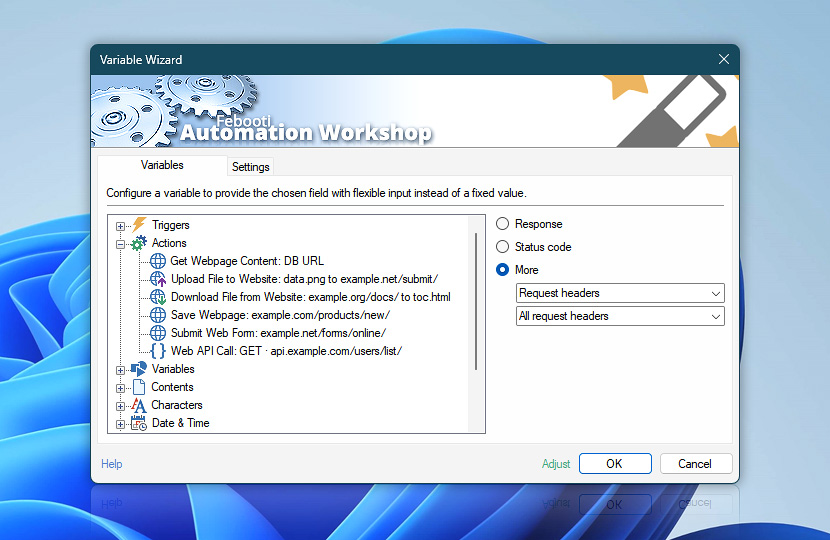
Variable Wizard allows workflows to retrieve complete header collections, inspect individual header values, or quickly access commonly used fields using predefined request header presets.
| Variable | Details |
|---|---|
| All request headers | Returns the complete collection of request headers sent to the server, including each header name and its corresponding value.
Example:
|
| Preset header | Returns only the value of a selected predefined request header. Use the available header presets to quickly access commonly used request values.
Examples:
|
| Custom header | Returns only the value of a request header specified by name. Use this for non-standard or application-specific headers sent with the request—for instance, X-Customer-ID, X-Client-Version, or X-Export-Format.
Examples:
|
Request headers are useful for validating authentication settings, troubleshooting API communication, confirming transmitted content types, inspecting custom integration parameters, or logging request details used during workflow execution.
Received cookies
The Received cookies variables provide access to cookies returned by the server during request processing.
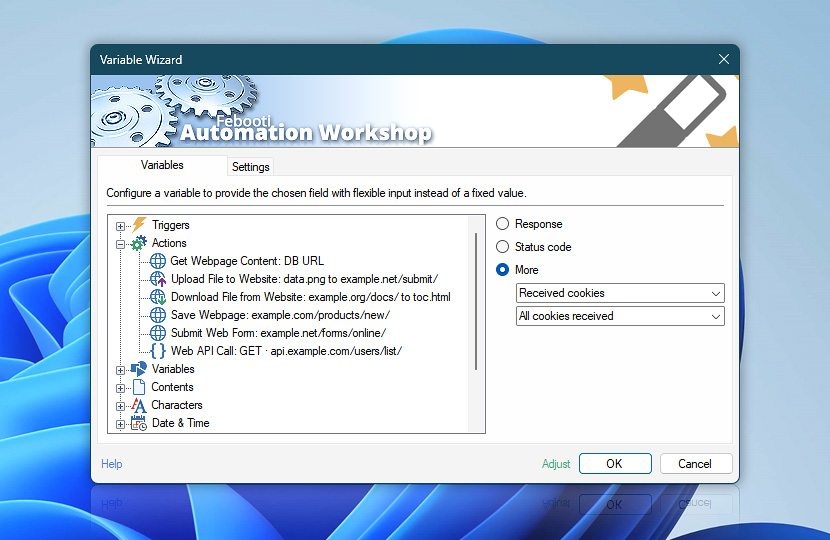
Workflows can retrieve complete cookie collections or inspect individual cookie values using predefined presets or custom cookie names.
| Variable | Details |
|---|---|
| All cookies received | Returns the complete collection of cookies received from the server, including each cookie name and its corresponding value.
Example:
|
| Preset cookie | Returns only the value of a selected predefined cookie. Use the available cookie presets to quickly access commonly used cookie values.
Examples:
|
| Custom cookie | Returns only the value of a cookie specified by name. Use this for application-specific or other cookies that are not available as predefined presets—for instance, preferred_store, last_viewed_product, or checkout_step_details.
Examples:
|
Received cookies are commonly used for authentication sessions, login validation, tracking identifiers, security tokens, personalization settings, and API communication state management. These variables help validate server responses, troubleshoot session handling, and build workflows that react dynamically to returned web session data.
Sent cookies
The Sent cookies variables provide access to cookies included with the outgoing request before communication with the server begins.
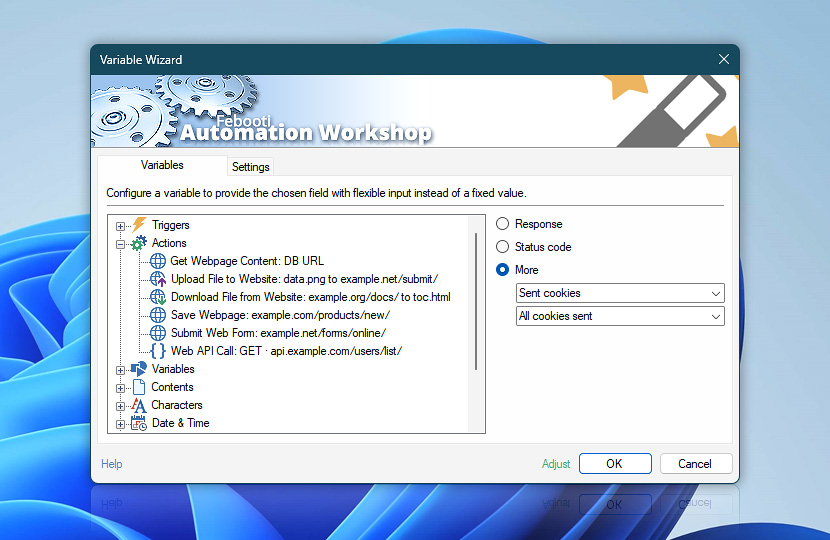
Workflows can retrieve complete cookie collections or inspect individual cookie values using predefined presets or custom cookie names.
| Variable | Details |
|---|---|
| All cookies sent | Returns the complete collection of cookies included with the outgoing request, including each cookie name and its corresponding value.
Example:
|
| Preset cookie | Returns only the value of a selected predefined cookie. Use the available cookie presets to quickly access commonly used outgoing cookie values.
Examples:
|
| Custom cookie | Returns only the value of a cookie specified by name. Use this for application-specific or other custom cookies included with the request—for instance, favorite_section, sidebar_state, or x_promo_seen.
Examples:
|
Sent cookies are commonly used for authentication sessions, persistent logins, API access validation, personalization settings, tracking identifiers, and maintaining communication state between requests. These variables help validate request configuration, troubleshoot authentication issues, inspect session handling behavior, and build workflows that interact reliably with websites, APIs, and cloud services.
Remote endpoint
The Remote endpoint category variables provide access to the resolved server address used during Internet and Web Action request processing. These values can be used to inspect the actual remote IP address and port selected for the connection.
Remote endpoint variables are useful for troubleshooting connection targets, validating which server was reached, logging communication details, or diagnosing network, DNS, proxy, and routing behavior.
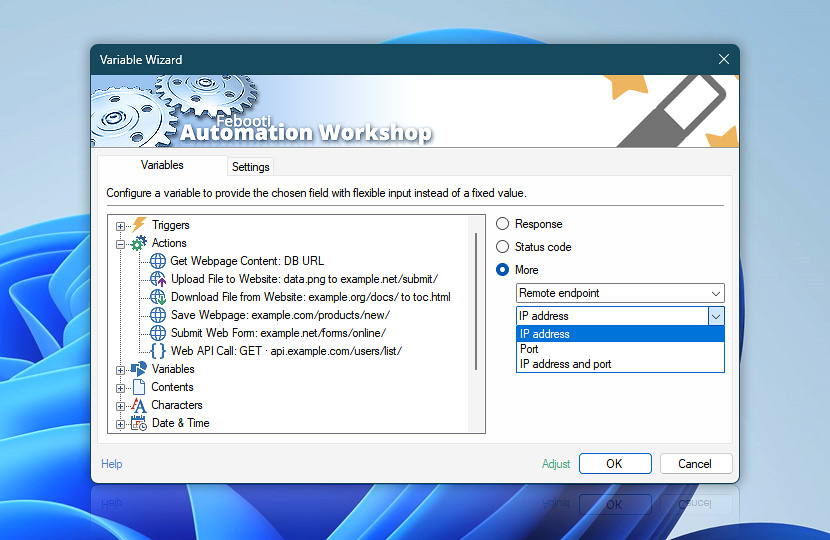
Remote endpoint values show the actual server address used for the connection. These values are useful when verifying where the request was sent, especially when DNS resolution, redirects, proxies, or load-balanced services are involved.
| Variable | Details |
|---|---|
| IP address | Returns the resolved remote server IP address used for the connection. This value represents the actual destination address reached after DNS resolution and routing have completed. Useful for validating DNS resolution, troubleshooting routing problems, monitoring CDN or load balancer behavior, or recording the exact server endpoint used during communication. Typical values depend on the remote service and network configuration. Public Internet services usually return public IPv4 or IPv6 addresses, while internal services or proxies may return private or local network addresses. Examples:
|
| Port | Returns the remote communication port used for the request connection. This value identifies the service port reached on the remote endpoint. Useful for validating secure or custom service configurations, troubleshooting firewall or proxy issues, and confirming whether communication occurred over the expected service port. Typical values depend on the request URL, protocol, proxy configuration, and service settings. Standard web requests usually use port 80 for HTTP or port 443 for HTTPS, while APIs and internal services may use custom ports. Examples:
|
| IP address and port | Returns the remote server IP address and communication port combined in a single value. Useful for compact logging, diagnostics, monitoring, or validating the complete remote endpoint used during workflow execution. Examples:
|
URL
The URL category variables provide access to the request address used by an Internet Action and the final address reached after processing redirects. These values can be used to log request targets, verify redirect behavior, troubleshoot unexpected destinations, or reuse URLs later in the workflow.
URL variables are useful when a web service redirects requests, normalizes addresses, changes paths, or sends the Action to a different final location than the original request URL.
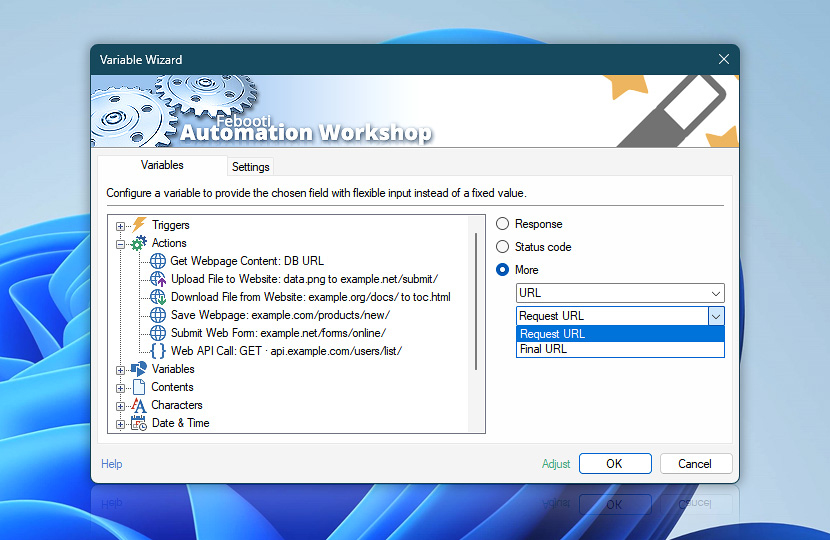
Request URL shows the original address configured for the request, including any query parameters entered directly in the URL field. Final URL shows the effective address after query parameters from the Action and Web profile have been applied and after any redirects or other URL changes have been processed. URL fragments (#...) are not included in either value.
| Variable | Details |
|---|---|
| Request URL | Returns the originally requested URL before any redirects or URL changes are processed. Useful for validating request configuration, troubleshooting redirect behavior, comparing original and final destinations, or logging the initial communication target specified by the workflow. Typical values are the URLs configured in the Internet Action. They may include paths, query parameters (only when specified in the URL field), API endpoints, file locations, or addresses (when entered without an http:// or https:// the prefix is added).
Examples:
|
| Final URL | Returns the final resolved URL after redirects or URL changes have been completed. Useful for tracking redirect chains, validating final destinations, detecting rewritten or redirected endpoints, and monitoring where requests are ultimately routed by websites, APIs, or cloud services. Typical values may match the Request URL when no redirect occurs, or differ when the server redirects the request to another page, endpoint, domain, or normalized address. Also, query parameters are added in the final URL. Examples:
|
Files
The Files category variables provide access to file path details used by file-based Internet and Web Actions. These values can be used to retrieve the complete file path, folder location, or filename from an Action that uploads, downloads, saves, or transfers files.
Files variables are useful for logging file operations, passing downloaded or saved files to later Actions, extracting file names for reports, or reusing folder paths in the workflow.
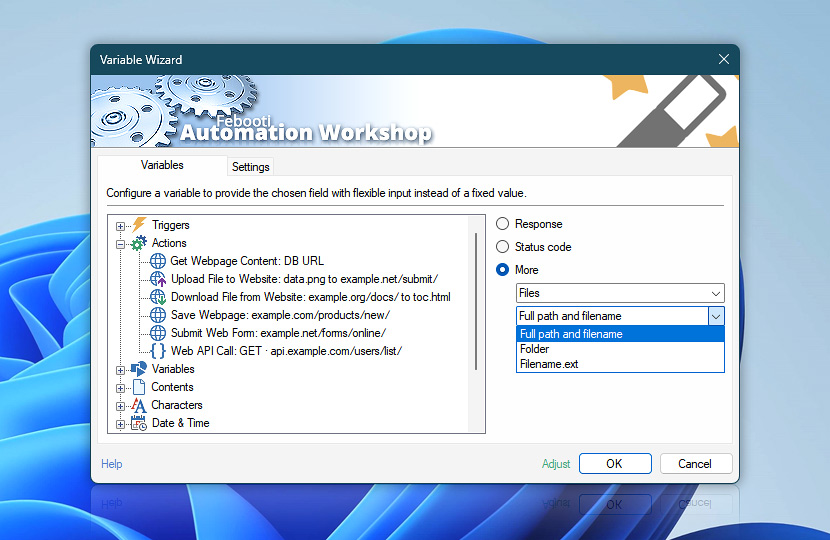
Files variables show the full path, folder, or filename used by the selected Action. These values are useful when the workflow needs to reuse, log, move, or process the resulting file.
| Variable | Details |
|---|---|
| Full path and filename | Returns the complete file path, including the folder location and filename. This value identifies the exact local or network file used or produced by the selected Action. Useful for passing the file to another Action, logging the exact file location, attaching or moving downloaded files, or verifying where a file was saved. Typical values may include local drive paths, network share paths, or generated filenames created during upload, download, or save operations. Examples:
|
| Folder | Returns the folder path without the filename. This value identifies the local or network folder used or produced by the selected Action. Useful for reusing the file location in later Actions, organizing downloaded or saved files, creating reports, or passing the folder path to file management Actions. Typical values may include local folders, network share folders, or output folders used during upload, download, or save operations. Examples:
|
| Filename.ext | Returns the filename with its extension, without the folder path. This value identifies the file name used or produced by the selected Action. Useful for logging file names, creating reports, building destination paths, checking file types, or passing the filename to later Actions. Typical values include the base filename and extension of downloaded, uploaded, saved, or transferred files. Examples:
|
Timing
The Timing variables provide detailed request timing information collected while an Internet Action communicates with a remote server. These values help measure connection setup, server responsiveness, transfer performance, and the total duration of the request.
Timing variables are useful for troubleshooting slow requests, comparing API performance, detecting network or server delays, and creating workflows that respond to communication timing conditions.
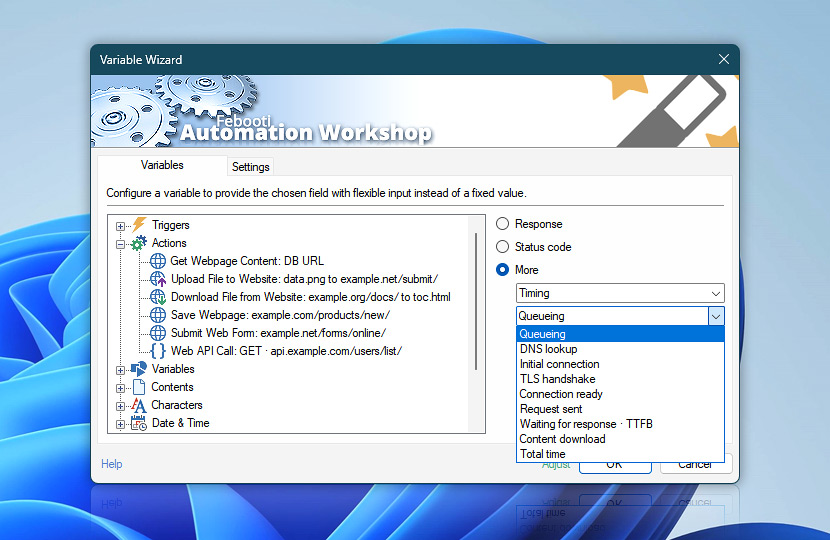
All timing values are returned in milliseconds. Except for Total time, each variable represents the time spent in a specific request phase. Total time is cumulative and represents the complete request duration from start to finish.
| Variable | Details |
|---|---|
| Queueing | Returns the time the request spent waiting before network processing started. This may include internal scheduling, connection preparation, or other waiting time before DNS lookup and connection setup begins. Useful for identifying delays before the actual network operation starts, especially when many requests are running, connection limits are reached, or an operation has to wait before it can proceed. Typical values range from 0 ms when processing starts immediately to higher values when the request waits for an available connection or processing slot. Examples:
|
| DNS lookup | Returns the time required to resolve the server name to an IP address. This includes the DNS name lookup phase before a connection to the remote server can be established. Useful for troubleshooting DNS delays, slow name resolution, misconfigured DNS servers, or network environments where resolving host names takes longer than expected. Typical values are often very low when the result is cached, but may increase when the resolver is slow, unavailable, or the network has DNS-related delays. Examples:
|
| Initial connection | Returns the time required to establish the initial network connection with the remote server. This includes the connection phase after DNS lookup has completed. Useful for identifying network latency, routing issues, firewall or proxy overhead, and other delays that occur while connecting to the remote endpoint. Typical values are often low on fast networks, but may be 0 ms when an existing connection is reused. Higher values can indicate network distance, connection delays, firewall or proxy overhead, or slow connection attempts. Examples:
|
| TLS handshake | Returns the time required to complete the secure TLS handshake with the remote server. This applies to HTTPS and other secure connections where encrypted communication is established. Useful for analyzing certificate validation delays, TLS negotiation performance, proxy inspection overhead, or secure connection issues. Typical values are usually low on established or optimized connections, but may be 0 ms when no TLS handshake is needed or an existing secure connection is reused. Examples:
|
| Connection ready | Returns the time required to prepare the connection for data transfer. At this point, DNS lookup, connection setup, and TLS negotiation, when applicable, have completed. Useful for separating connection preparation from request sending, server response time, and content transfer. Typical values reflect the time needed before the request can be sent. Higher values may indicate delays during connection setup, TLS negotiation, proxy handling, or other pre-transfer steps. Examples:
|
| Request sent | Returns the time required to send the request to the remote server. This includes sending request headers and, when applicable, request body, form data, or upload content. Useful for measuring request transmission delays, especially when submitting forms, uploading files, or sending larger request bodies. Typical values are often very low for requests without a body, but may increase when sending form data, uploading files, or transmitting larger payloads. Examples:
|
| Waiting for response · TTFB | Returns the time spent waiting until the first response byte is received from the server. This is commonly known as Time to First Byte, or TTFB. Useful for measuring server responsiveness after the request has been sent. High values may indicate server-side processing delays, overloaded services, slow APIs, or backend performance issues. Typical values depend on the remote service and request type. Fast APIs may respond quickly, while higher values can indicate that the server needs more time to process the request before sending a response. Examples:
|
| Content download | Returns the time required to receive the response body or downloaded content after the first response byte has been received. Useful for analyzing transfer speed, large downloads, bandwidth limitations, or slow response body delivery. This value does not represent the full request duration. Typical values are often very low for small responses, but may increase when downloading larger files, receiving large API responses, or transferring content over a slow connection. Examples:
|
| Total time | Returns the complete time required to process the request from start to finish. This includes queueing, DNS lookup, connection setup, TLS negotiation, request sending, waiting for the response, content download, and any redirects. Useful for overall performance monitoring, logging request duration, comparing endpoints, detecting slow operations, and validating service responsiveness. Typical values represent the full request duration. Higher values may indicate slow connection setup, server processing delays, redirects, large downloads, or network issues. Examples:
|
| Adjust | Streamline creation of Task workflows even further—instantly make quick variable adjustments such as in-place text replacement (all, first, or last), ensuring (starts, ends, or does not), trimming (whitespaces, quotes, etc.), or changing capitalization. Chain multiple adjustments. Optionally, set a different display name. |
Applies to…
- Get Webpage Content · Overview · Variables
- Upload File to Website · Overview · Variables
- Download File from Website · Overview · Variables
- Save Webpage · Overview · Variables
- Submit Web Form · Overview · Variables
- Universal Web API Call · Overview · Variables
We are here to help…
If you have any questions, please do not hesitate to contact our support team.