
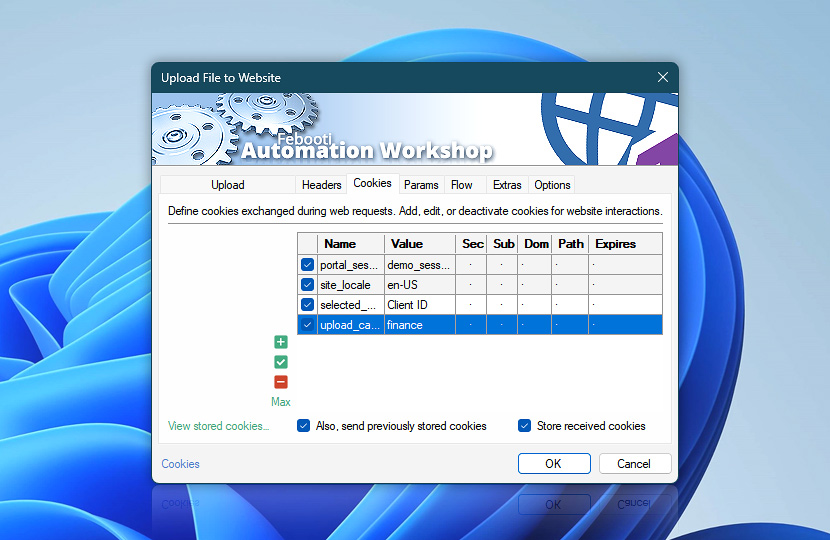
Configure HTTP cookies used during file uploads to manage session handling and authenticated interactions with websites. Cookies help maintain state between requests, ensuring uploads are processed within the correct session context.
| Cookies | Details |
|---|---|
| List of cookies | Define cookies included with the request. Entries can come from this Upload File to Website Action or linked Web Profiles. Cookies help maintain authenticated upload sessions and ensure consistent communication with the server. Inherited profile cookies are shown first and highlighted. Cookies configured directly in this Action follow as regular entries. |
| Add / Edit / Remove | Add new cookies, edit, or remove existing cookies. |
| Min / Max | Resize the cookies editing area. |
| View stored cookies… | View cookies currently stored by Automation Workshop. |
| Also, send previously stored cookies | Send stored or defined cookies with requests to preserve session state and ensure consistent communication with websites. |
| Store received cookies | Automatically store cookies received from server responses to maintain session continuity across requests. |
Note
- For centralized cookie management, use the Web Profile. Configure shared cookies in Profile cookies, or adjust the cookies caching policy to control caching scope and reuse.
We are here to help…
If you have any questions, please do not hesitate to contact our support team.