
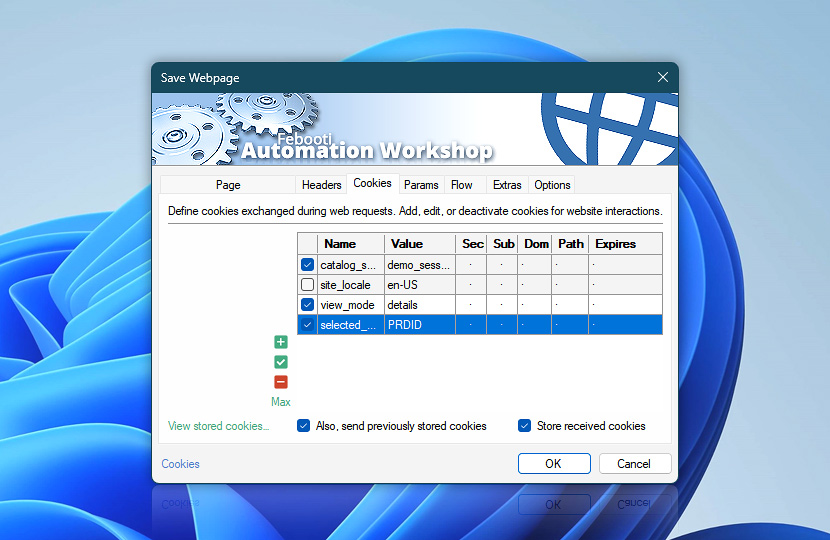
Configure HTTP cookies used when retrieving and saving webpage content to manage session handling and website interactions. Cookies help maintain state between requests, ensuring content is saved in the correct session context.
| Cookies | Details |
|---|---|
| List of cookies | Define cookies included with the request. Entries can come from this Save Webpage Action or linked Web Profiles. Cookies help maintain session state when retrieving content and ensure consistent page saving results. Inherited profile cookies are shown first and highlighted. Cookies configured directly in this Action follow as regular entries. |
| Add / Edit / Remove | Add new cookies, edit, or remove existing cookies. |
| Min / Max | Resize the cookies editing area. |
| View stored cookies… | View cookies currently stored by Automation Workshop. |
| Also, send previously stored cookies | Send stored or defined cookies with requests to preserve session state and ensure consistent communication with websites. |
| Store received cookies | Automatically store cookies received from server responses to maintain session continuity across requests. |
Note
- To manage shared cookies, open Profile cookies in the Web Profile. See the cookies caching policy to control how cookies are stored and reused during execution.
Ask for more…
If you have any questions, please do not hesitate to contact our support team.