
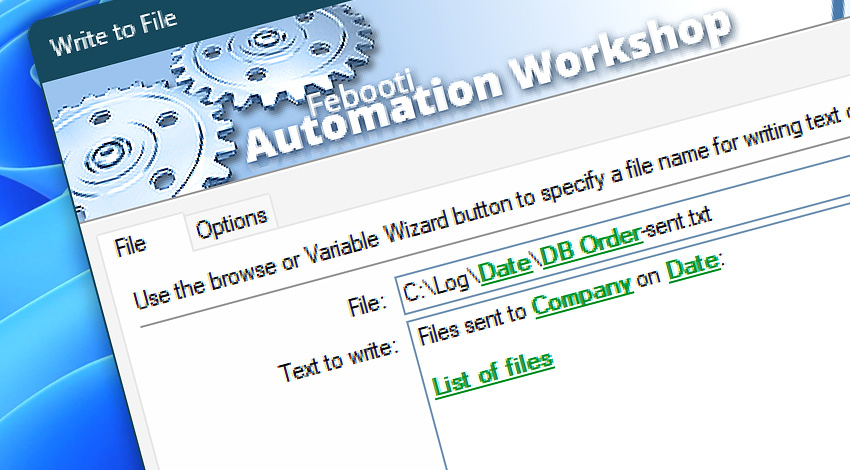
Automation Workshop includes the Write to File Action that writes provided Unicode text or binary data into a specified file. Options include encoding selection (ASCII or UTF), and whether new data should be appended to the file or if it should be overwritten.
Features & highlights
- Automatically writes text to a file (the text can contain both fixed and variable parts).
- Read multiple files and combine them by using the Variable Wizard.
- It can automatically write text to a file using ASCII or Unicode encoding, including UTF-8 and UTF-16. Add an optional Unicode header (BOM).
- Option to append new file content to the end of a file—allows for incremental data collection. Or, choose to overwrite the file every time.
- Write data that contains dynamic and context-sensitive Variable Wizard values that can be retrieved from other Actions or Triggers.
- Supports Unicode in file and folder names.
Documentation
- File · Enter the file name and text to write into it.
- Options · Select whether to append data to an existing file or overwrite it. Choose text encoding.
Interconnect
- Write to File integration—with Variables (manipulate data dynamically within a workflow) and Events (recorded entries that detail system activity).
- Streamline your automation processes by visually connecting your workflow using Variable Wizard—a powerful tool to access all 1,000+ variables—system, network, Triggers, Actions, globals, web, and much more…
- Moreover, not only utilize Write to File variables, but also seamlessly integrate them with a diverse array of other file and folder variables from local disks, mapped drives, network shares, and remote servers—FTP, SFTP, WebDAV, Amazon S3, and more…
Quick access
To streamline your workflow creation, you can locate the Write to File Action throughout Automation Workshop's search tools—including the knowledge base, menu, and Add Action feature—using the quick «WF» shortcut.
Contents & metadata…
Automation Workshop provides a wide range of Actions to access and modify file contents, properties, and metadata.
- Read from File · Overview · Variables
- Compute File Checksum · Overview · Variables
- Get File Date & Time · Overview · Variables
- Set File Date & Time · Overview · Variables
- Set File Attributes · Overview · Variables
- Get File Information · Overview · Variables
- Remote File Information · Overview · Variables
Discover
Automation Workshop includes many additional Triggers and numerous Actions to help automate repetitive computer or business tasks using state-of-the-art GUI tools.
Still have a question?
If you have any questions, please do not hesitate to contact our support team.