
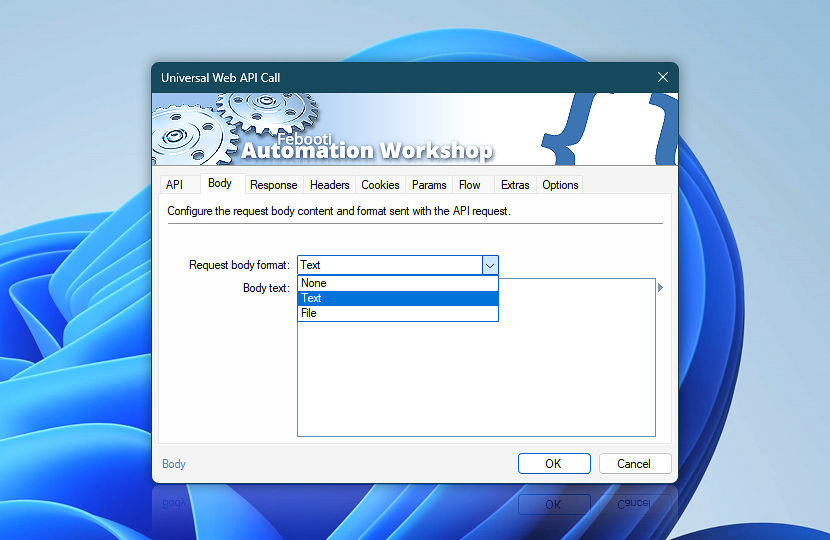
The Universal Web API Call can include a request body supplied as text, loaded from a local or network file, or omitted entirely.
Use a request body to send JSON, XML, plain text, structured data, documents, archives, or other content required by the target API. Text bodies and file paths can include variables from files, Triggers, previous Actions, dates, times, and other workflow data.
| Body | Details |
|---|---|
| Request body format | Choose how the request body is supplied · Details
|
| Body text | Enter the text content to send in the request body. This field is available when the request body format is set to Text. Use it for JSON, XML, plain text, scripts, commands, form-like payloads, or other text-based API content. Variables can be inserted to build the body dynamically at runtime. |
| Body file | Specify the local or network file whose contents will be sent as the request body. This field is available when the request body format is set to File. The file is transmitted as the complete request body, making this option suitable for documents, exports, archives, binary data, generated files, and large payloads. |
| Browse |  Use Browse to select a particular file or folder on a local disk, network share, or LAN location. Use Browse to select a particular file or folder on a local disk, network share, or LAN location. |
| Variable Wizard |  Use dynamic data input—substitute a parameter from a file, web, connected Trigger, other Actions, date and time presets, etc. Use dynamic data input—substitute a parameter from a file, web, connected Trigger, other Actions, date and time presets, etc. |
Format
The selected request body format determines whether content is included in the API request and how Automation Workshop obtains that content.
None
No request body is sent. Use this format when the API method or endpoint does not require content in the request body, such as many GET, HEAD, DELETE, and status-check requests.
Headers, cookies, query parameters, authentication, and other request settings can still be configured and sent as usual.
Text
Provide the complete request body directly in the Action. Use this format for JSON, XML, plain text, commands, scripts, or other text-based payloads.
The text can be static or dynamically assembled with variables. This makes it possible to insert record identifiers, dates, file names, user input, Trigger data, previous Action results, and other workflow values into the body before the request is sent.
File
Send the contents of a local or network file as the complete request body. Use this format when the payload already exists as a file or is created by an earlier workflow step.
This option is suitable for documents, reports, exports, archives, binary data, generated JSON or XML files, and other payloads that are easier to manage outside the Action itself.
Notes
Like response content, request bodies may also use compression formats such as Brotli, Gzip, or Zstandard when supported by the receiving API. Compressing larger payloads can reduce upload time and bandwidth usage.
Automation Workshop does not compress request bodies automatically. Prepare the payload as a compressed file with an external utility, send it using the File request body format, add the appropriate Content-Encoding header, and confirm that the receiving API supports the selected compression format.
Assistance is here…
If you have any questions, please do not hesitate to contact our support team.