
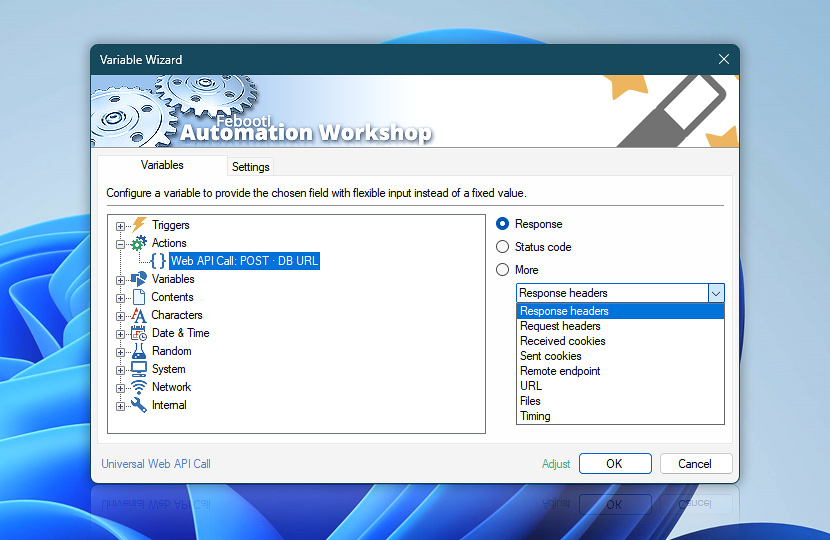
The Universal Web API Call Action performs flexible HTTP and API requests to websites, REST services, cloud platforms, AI services, internal systems, and custom web applications. The returned server response is made available for later workflow processing, allowing Tasks to validate requests, process structured data, integrate external services, or dynamically control subsequent Actions.
Variable Wizard provides quick access to response bodies, HTTP status codes, headers, cookies, remote address information, redirects, and detailed request timing data. Request and response headers can use predefined presets or fully customized header names, enabling advanced communication with modern APIs, authentication systems, and enterprise web services.
| Variable | Details |
|---|---|
| Response | Returns the response value produced by the Universal Web API Call Action. When the response is kept in memory and processed as a variable, this variable contains the response body returned by the server. Depending on the target API or web service, the value may include JSON, XML, HTML, plain text, authentication tokens, generated identifiers, status messages, URLs, or structured API output. When the response is saved to a file, this variable returns the full path and filename of the saved response file instead of the response body. Use the file path to pass the saved response to later Actions, attach it to email, move it, archive it, or process it with file-based operations. Typical values depend on the API response and the selected response handling settings. Examples:
|
| Status code | Returns the status code received after the Universal Web API Call Action request is processed. Use this value for simple comparisons in Compare Action. Quickly detect successful API requests, redirects, authentication failures, rate limits, validation errors, unavailable services, or server-side processing issues. Examples:
|
| More… | Additional variables provide extended request and response details for the Universal Web API Call Action. Use them to validate API communication, analyze metadata, monitor redirects, troubleshoot authentication issues, inspect server responses, and build advanced integrations with external services and cloud platforms.
Use these values to troubleshoot API requests, validate integrations, analyze response metadata, monitor service availability, log communication details, and build advanced automated workflows that interact with websites, APIs, and cloud systems. |
| Adjust() | Streamline creation of Task workflows even further—instantly make quick variable adjustments such as in-place text replacement (all, first, or last), ensuring (starts, ends, or does not), trimming (whitespaces, quotes, etc.), or changing capitalization. Chain multiple adjustments. Optionally, set a different display name. |
Automatic list processing…
The Universal Web API Call variables returned as lists (even multi-level) can be automatically processed in further Actions. Use the For Each Action to parse a given text string (any list variable) and sequentially retrieve its elements one by one · see list processing examples. Or, use the Split Text and Lookup Text Actions to access list elements by their indices.
Just ask…
If you have any questions, please do not hesitate to contact our support team.