
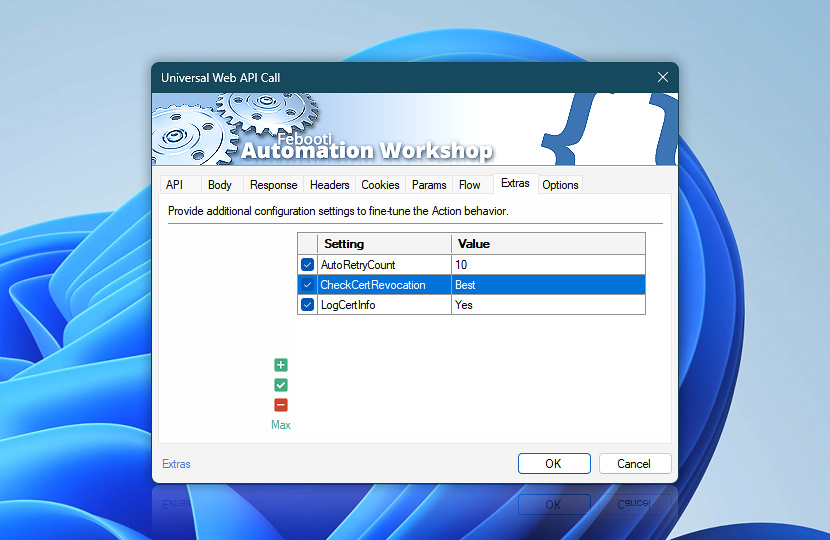
Configure extra settings for the Universal Web API Call Action. Use these options to fine-tune API request behavior, payload handling, response processing, file output, and compatibility with specific endpoints, services, or web servers.
Extra settings are optional and are typically used only when an API endpoint, server, proxy, response output, or automation workflow requires special handling beyond the standard Action configuration.
Use extra settings to adjust advanced request and response behavior without changing the main API endpoint, method, headers, parameters, or body configuration.
| Extras | Details |
|---|---|
| List of settings | Define extra settings applied when executing web API calls, including request behavior, payload handling, response processing, file output, filename handling, endpoint compatibility, and other optional web communication details. For instance:
|
| Add / Edit / Remove | Add new settings, edit values, or remove unused settings. |
| Min / Max | Resize the settings editing area. |
Notes
- Extra settings are configured separately for each Action. They affect only the selected API call operation and do not change global Internet & Web settings or Web Profile configuration.
- Extra settings can complement the main API configuration when an endpoint requires special handling for request delivery, response processing, saved output, or advanced compatibility scenarios.
Need assistance?
If you have any questions, please do not hesitate to contact our support team.