
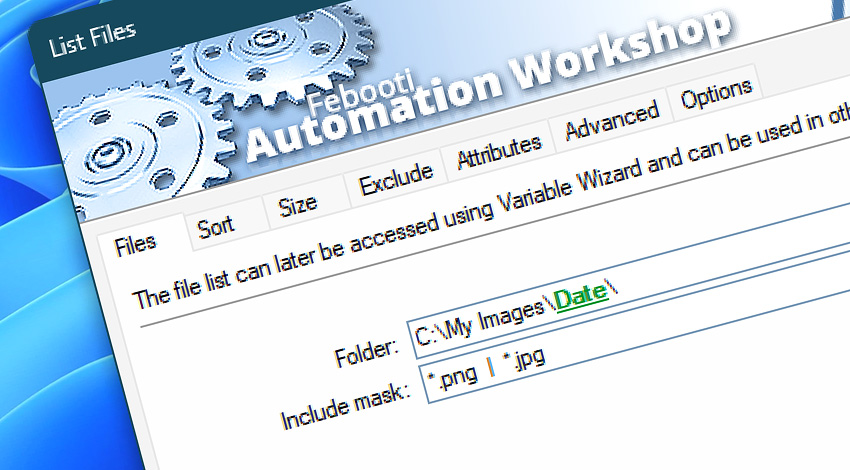
Automation Workshop includes the List Files Action that retrieves the contents of the specified folder. Build your file list using wildcards (including multiple file masks), apply multi-level sorting, exclude small or large files, filter out old or new files, etc.
Use the automatically created file list in the subsequent Actions to email, to delete, to sync, to upload the list of files. Automation Workshop supports more than a hundred Actions that support dynamic lists.
The list can contain files, folders, or both. Note that some Actions accept only files or folders as their input. Configure the List Files Action appropriately to seamlessly couple it with other Actions.
Features & highlights
- Automatically create a list of files and directories from a local or network folder.
- Use easy to adjust include/exclude filters and custom multi-sorting to shape the list for your business process needs.
- It supports any file system, network shares, UNC paths, and even FTP & Cloud file listing.
- Customize the list with a custom format and separator.
- Full Unicode support in file and folder names.
Usage examples
- Automatically list 25 oldest files in a folder. Or any number of newest, biggest, smallest files.
- Create a list of directory contents to send it over email.
- Perform batch operations with a particular type of files.
- Automatically generate a file list, then sequentially perform operations only with these files. No programming or coding skills required.
Documentation
- Files · Select a folder to get its contents as a list. Choose file masks/wildcards.
- Sort · Choose the multi-level sorting options and limit the list size.
- Size · Specify the minimum and maximum size of files to be included in the list.
- Exclude · Ignore files and folders based on their name or date range.
- Attributes · Include and exclude files and folders based on their attribute pattern.
- Advanced · Set the list separator and choose the custom list padding.
- Options · Choose whether to list files, folders, or both. Select list entry format (full path, relative path, filenames only). Optionally, choose to process subfolders.
Interconnect
- Dynamic variables & Events of the List Files.
- Variable Wizard and dynamic values of all the File & Folder Actions for local and network drives, and remote FTP, SFTP, WebDAV, Amazon S3, Google Cloud Storage, and DigitalOcean Spaces servers.
- To create a list of files of the remote servers check the List Remote Files Action.
- Streamline automation processes by connecting Triggers and Actions using Variable Wizard.
Discover
Automation Workshop includes many more awesome Triggers and numerous Actions to aid you to automate any repetitive computer or business task by providing state-of-the-art GUI tools.
Help at your fingertips…
If you have any questions, please do not hesitate to contact our support team.