
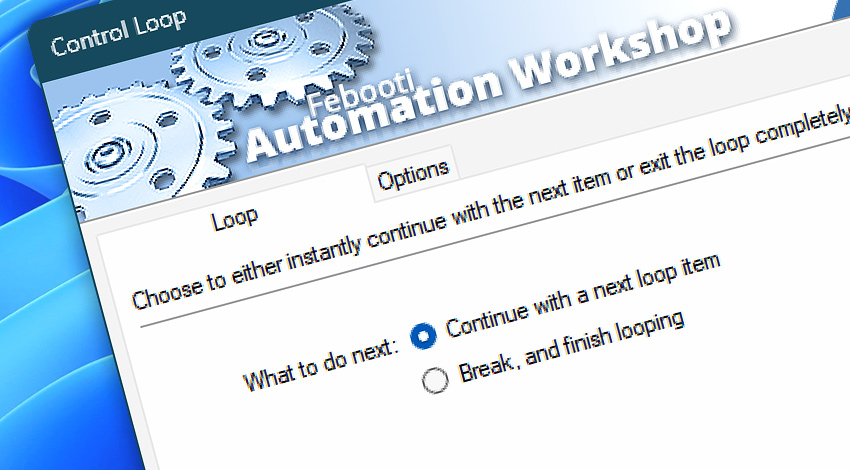
Automation Workshop includes the Control Loop Action which provides precise control over automated workflows that use loops. It enables Tasks to dynamically decide whether to skip to the next cycle or exit the loop entirely, based on conditions encountered during execution.
This Action is especially useful in scenarios involving complex data processing, conditional file operations, or decision-based workflows. It supports both Loop and For Each Actions, and even allows targeting specific nested loops—empowering users to build more intelligent and adaptable automation logic without writing code.
Features & highlights
- Provides conditional control over loop execution in automated workflows.
- Supports both Loop and For Each Actions.
- Allows breaking out of or continuing the loop based on real-time conditions.
- Offers selection of which loop to control—ideal for nested loops or multi-level automation logic.
- Helps prevent unnecessary/complex processing, saving time and system resources.
- Enables building smarter, decision-based workflows—without writing a single line of code.
Documentation
- Loop · Choose to "break" or "continue" a loop.
- Options · Choose an advanced mode to act on nested loops easily.
Interconnect
- Control Loop integration—with Variables (manipulate data dynamically within a workflow) and Events (recorded entries that detail system activity).
- Streamline your automation processes by visually connecting your workflow using Variable Wizard—a powerful tool to access all 1,000+ variables—system, network, Triggers, Actions, globals, web, and much more…
Quick access
To streamline your workflow creation, you can locate the Control Loop Action throughout Automation Workshop's search tools—including the knowledge base, menu, and Add Action feature—using the quick «CL» shortcut.
Discover
Automation Workshop includes many additional Triggers and numerous Actions to help automate repetitive computer or business tasks using state-of-the-art GUI tools.
Need help?
If you have any questions, please do not hesitate to contact our support team.