Febooti fileTweak modules - extend possibilities

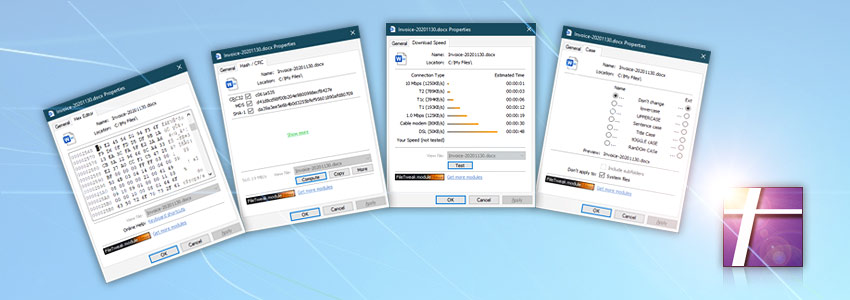
Febooti fileTweak property pages are called modules (formerly Members) where each of those modules represents separate program like change file / photo date, change attributes, calculate file hash, edit files in hexadecimal mode, etc.

With Febooti fileTweak you can expand Windows property pages on any version of Microsoft Windows (2000 / XP / Vista / Windows 7 / 2003 & 2008 Server).

  • Febooti fileTweak Hex Editor icon Hex editor module (freeware).
    Hex editor allows to view and edit files, search for particular content or address in the file, to replace any data, copying of variety of data formats and more. Module can be installed as stand alone product or as module of Febooti fileTweak.
    Freeware Hex editor | edit file with Hex editor
  • Febooti fileTweak Hash & CRC icon Hash & CRC module (freeware).
    Febooti fileTweak Hash & CRC is a freeware hash / CRC calculator to compute hash fingerprint from file. Supported hash / CRC formats: CRC32, MD2, MD4, MD5, SHA-1, SHA-224, SHA-256, SHA-384, SHA-512, RIPEMD-128, RIPEMD-160, RIPEMD-256, RIPEMD-320, WHIRLPOOL and Tiger-192.
    Freeware Hash & CRC | calculate hash / crc checksum
  • Febooti fileTweak Download Speed icon Download speed module (freeware).
    Febooti Download Speed is a freeware utility that allows to test your Internet connection speed and estimate download times of selected files (be it web pages, images and other media) on various types of connections.
    Freeware Download speed | Internet download speed test
  • Febooti fileTweak Case icon Case module (freeware).
    Change file / folder case. You can modify file case by changing to UPPERCASE, lowercase, Title Case, Sentence case, tOGGLE cASE and RAnDom CAsE. Process single file / folder as well as tree of subfolders. Provides great means to standardize a case of a lot of file and folder names.
    Freeware Case | change file case
Expand Windows property pages with freeware modules…
  • Date module.
    Allows to change date and time attributes for multiple files and folders. With date module you can change file's and folder's creation, modification and last accessed date and time. Modified parameters may be year, month, date, hour, minutes and seconds. Also you can process tree of subfolders.
    Screenshots: change file date, change folder date, change date for multiple files and folders.
    Online tutorial: how to change file date?
  • JPG Date module.
    Allows to change JPG photo date and time. JPG Date module contains a simple Exif editor that gives access to edit Exif information metadata tags, such as Image taken date, Image modified date and Image digitized date (when present in Exif jpeg format metadata). Provides information on digital camera model and manufacturer specified in Exif information of JPG image.
    Screenshot: change JPG photo date.
  • Attributes module.
    Allows to change attributes for multiple files and folders. With attributes module you can change and count all file's and folder's attributes such as Read-only, Archive, Hidden, System, Temporary, Offline, Not indexed, Encrypted, Compressed, Reparse point and finally Sparse. Also you can process tree of subfolders.
    Screenshots: change file attributes, change folder attributes, change attributes for multiple files and folders.
    Online tutorial: how to change file attributes?
  • View module.
    Allows to view multiple or single file and folder contents. Switching from file to file can be done with one touch. Folder contents (file and folder list) can be easily printed / copied into clipboard for later use in any other program which accepts paste command.
    Screenshots: view file content, view / print folder content.
    Online tutorial: how to view file / folder content?
  • Description module.
    Allows to view file or folder description. Supported most common description files: descript.ion; file_id.diz; read.me and more. Order in which description files are prioritized is following - descript.ion, file_id.diz, readme.txt, etc. If there is more than one description file available for selected file or files or folders, switching to another description file can be done with one touch.
    Screenshot: view file description.
  • fileTweak module.
    Manages all the module (Date, JPG date, Attributes, View, Description, About and Hex Editor, Hash & CRC, Download Speed, Case as well) available in Windows file property pages which belongs to Febooti fileTweak. Choose the modules of your choice to customize the way you look at your properties pages. For instance, there can be only Windows default general page and Date module, if other modules are disabled.
    Screenshots: customize Febooti fileTweak, customize freeware modules.
  • About module.
    Shows user registration information and Febooti fileTweak product version.
    Screenshot: view user information.
Copyright © 2001-2013 Febooti Software. All rights reserved. Last updated: January 24, 2011