
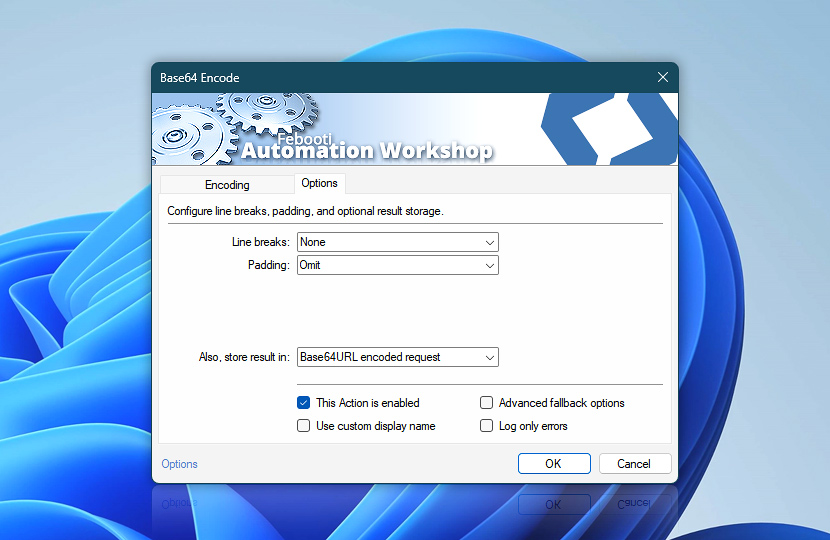
 This is an upcoming feature. Base64 Encode is planned for general availability in version 10.1.
The Options tab of the Base64 Encode Action allows you to configure line breaks, padding, and optional result storage. These settings determine how the encoded output is formatted and where it can be saved for later use.
Choose whether to produce a continuous Base64 string or split it into fixed-length lines for MIME or PEM compatibility. You can also include or omit padding characters according to the requirements of the destination system.
| Options | Details |
|---|---|
| Line breaks | Controls how the Base64-encoded output is divided into lines:
|
| Padding | Controls whether standard Base64 padding characters are appended when required:
|
| Also, store result in | The result of the encoding operation is already accessible via the Variable Wizard. Optionally, choose an existing variable to store the result. To create an empty variable, use the Set Variable Action. |
| This Action is enabled | An Action is executed only if it is enabled. Otherwise, it will be automatically skipped (completely ignored) from the Task flow. |
| Use custom display name | Rename this Action, to make a human-readable workflow that will help you to find, read, and make sense of the Task structure later. |
| Advanced fallback options | Manage the advanced fallback options—select which error types will lead to automatic execution of predefined workaround operations. |
| Log only errors | Do not log information and warning messages for this Action. It may be useful to keep the log file small and tidy on production systems. |
We are here to help…
If you have any questions, please do not hesitate to contact our support team.