
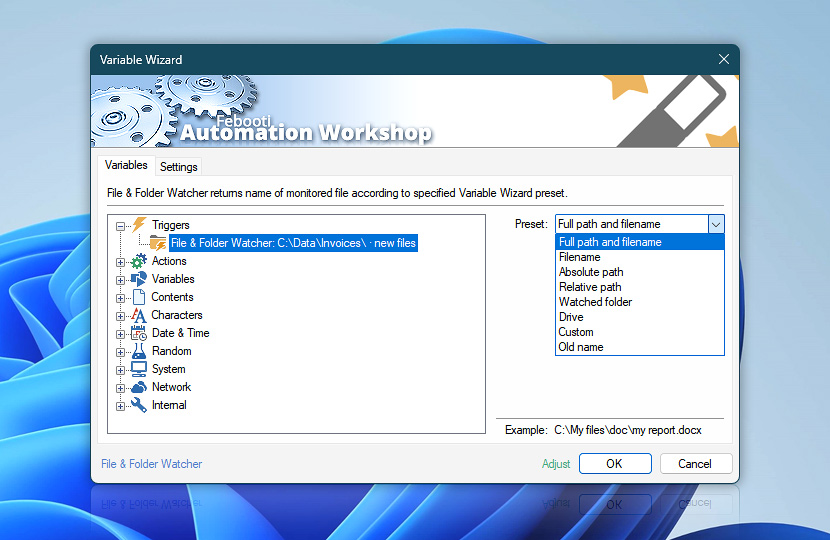
When using File & Folder Watcher, sometimes it is very important to provide subsequent Actions with information what files and folders have been watched and in what location on disk (path).
Instead of providing fixed values when configuring File Actions, a user can specify that these values are to be taken from File & Folder Watcher by using Variable Wizard when applicable.
| Variable | Details |
|---|---|
| Preset | Choose one of the available presets that determines which parts of monitored file name will be returned:
|
| Example | Shows a typical example of file and folder name, formatted according to the selected preset. |
| Adjust() | Streamline creation of Task workflows even further—instantly make quick variable adjustments such as in-place replacement (all, first, or last occurrence), trimming (whitespaces, quotes, etc.), or changing capitalization. Optionally, set a different display name. |
Example…
Assuming that File & Folder Watcher is set to monitor C:\My Documents\ folder, including its subfolders and then activated by C:\My Documents\Images\My Picture.jpg file, the returned variable values of each preset are listed below…
Full path and filename
| Preset | Details |
|---|---|
| Full path and filename | C:\My Documents\Images\My Picture.jpg |
Filename
Filename preset returns filename without its location on disk. A user can specify whether a filename, extension, or both are returned.
| Option | Details |
|---|---|
| Filename | My Picture.jpg |
| File | My Picture |
| Extension | .jpg |
Absolute path
Regardless of the monitored folder and its subfolders, the absolute path preset returns the full path of the folder containing the monitored file. Drive letter and backslash are optional.
| Option | Details |
|---|---|
| Absolute path | \My Documents\Images |
| Drive | C:\My Documents\Images |
| Trailing backslash | \My Documents\Images\ |
Relative path
Relative path contains the subfolders and filename without the watched folder (or absolute path). Optionally, only the subfolder path without the filename can be obtained.
| Option | Details |
|---|---|
| Relative path | Images |
| Trailing backslash | Images\ |
| File | Images\My Picture.jpg |
Watched folder
Watched folder preset returns the full path of the folder monitored by File & Folder Watcher.
| Option | Details |
|---|---|
| Watched folder | C:\My Documents |
| Trailing backslash | C:\My Documents\ |
Drive
Drive preset allows retrieving different variations of the drive letter. If the file is located in an UNC network path, an empty driver variable value is returned.
| Option | Details |
|---|---|
| Drive | C |
| Colon | C: |
| Trailing backslash | C:\ |
Custom
The custom preset allows combining necessary components (and skipping the ones not needed) into a custom variable value. Supplemented with 8.3 file name format, the custom preset provides good means for variable integration into subsequent Actions and external applications.
On file systems that do not support the 8.3 file names (e.g., exFAT) the long file name will be returned by the Variable Wizard even if an 8.3 file name value is requested.
8.3 filenames are provided for backward compatibility on legacy systems and are not necessary on modern Windows systems.
| Option | Details |
|---|---|
| Drive | C: |
| Path | \My Documents\Images\ |
| File | My Picture |
| Extension | .jpg |
| 8.3 filename | C:\MYDOCU~1\IMAGES\MYPICT~1.JPG |
Old name
The Old name preset contains the original filename of a file before it was renamed. It contains a value only when the option to Watch for renamed files is selected.
| Option | Details |
|---|---|
| Drive | C: |
| Path | \My Documents\Images\ |
| File | img7202404 |
| Extension | .jpg |
Multi-triggers?
Complex workflows often incorporate multiple File & Folder Watcher Triggers. Are you wondering how to pull dynamic variables from the Trigger which set your workflow in motion? Or perhaps you need to pull data from any given Trigger, regardless of the activation criteria?
With the multi-triggering feature, accessing filenames of monitored files and folders becomes a breeze—simply fetch the values from Any File & Folder Watcher category—and Automation Workshop will seamlessly connect your Actions with the right triggering data, ensuring a smooth operation without any extra effort. Experience immediate automation advantages across both local servers and distant machines!
Need assistance?
If you have any questions, please do not hesitate to contact our support team.