
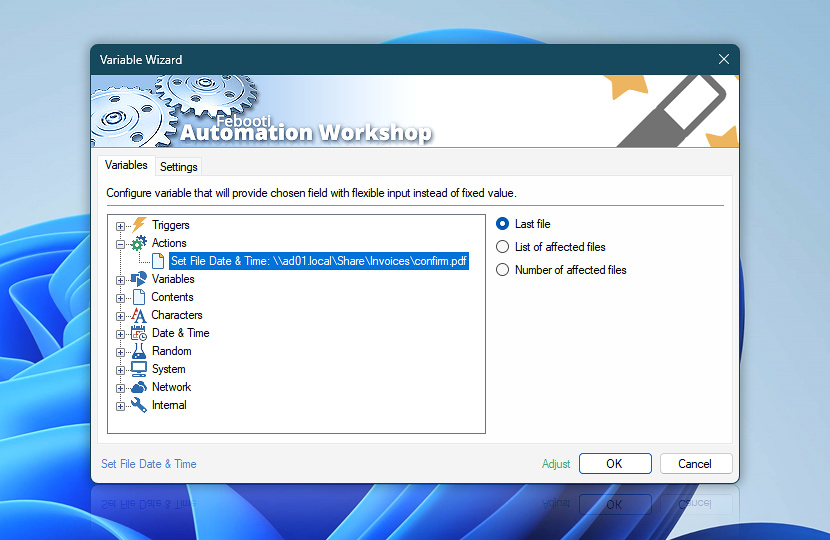
After its completion the Set File Date & Time Action retains some of its operational data such as the full path and names of files or folders, whose date and time have been set as well as the total number of affected files and completion status of the file date and time setting procedure.
These dynamic data on setting file and folder date and time can be retrieved by the means of Variable Wizard and used for automatic ad-hoc configuration of the next Actions, thus streamlining automatic file and folder date and time change into the wider context of the Task.
| Variable | Details |
|---|---|
| Last file | The full path and name of the last file or folder whose date and time has been set.
Examples:
|
| List of affected files | The list of files and folders that were subject to date and time change.
Examples:
|
| Number of affected files | The total number of files and folders whose date and time were set.
Examples:
|
| Completion status | Retrieve Action execution status with a possible value—Successful or Failed. Or Empty, if Action has not been executed yet. |
| Adjust* | Streamline creation of Task workflows even further—instantly make quick variable adjustments such as in-place text replacement (all, first, or last), ensuring (starts, ends, or does not), trimming (whitespaces, quotes, etc.), or changing capitalization. Chain multiple adjustments. Optionally, set a different display name. |
Automatic list processing…
The Set File Date & Time variables returned as lists (even multi-level) can be automatically processed in further Actions. Use the For Each Action to parse a given text string (any list variable) and sequentially retrieve its elements one by one · see list processing examples. Or, use the Split Text and Lookup Text Actions to access list elements by their indices.
Need help?
If you have any questions, please do not hesitate to contact our support team.