
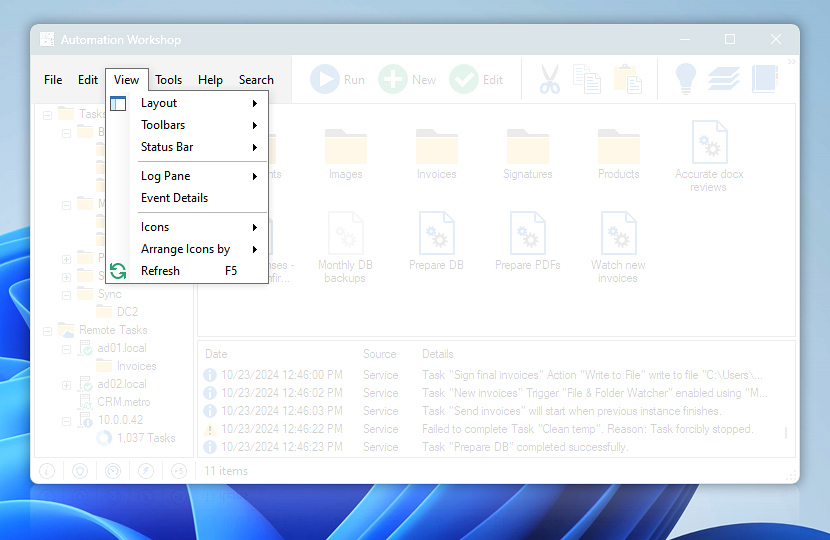
View menu features commands for configuring the toolbars and Task file icon appearance in Automation Workshop Manager interface.
| View menu | Details |
|---|---|
| Layout | Choose between Full Height Folders and Full Width Log Pane modes. While Full Height Folder mode allows seeing more folders in Task folder tree, Full Width Log Pane provides more space for Task execution details. Lock the Layout option prevents panes from being accidentally resized. |
| Toolbars | Provides options for enabling or disabling toolbars, locking or unlocking toolbar position and toolbar appearance customization. |
| Status Bar | Show Triggering Status option allows to choose whether Task triggering status will be shown in status bar or not, while Show Item Count shows the number of Task files or folders in current folder. |
| Log Pane | Auto Resize Columns option automatically sets the optimum column width for better display of current operations. Clear Log Pane resets the Log Pane contents and the Task operation data are collected from that moment. |
| Event Details | Shows Event Details for item selected in Log Pane. |
| Icons | Choose from Large Icons, Icons, List and Details to determine how the Task files are displayed. |
| Arrange Icons by | Specify the order how Task files are displayed. Task files can be sorted by their name, last execution time, number of successful or failed executions both in ascending and descending order. |
| Refresh | Refresh Automation Workshop window. |
We are here to help…
If you have any questions, please do not hesitate to contact our support team.