
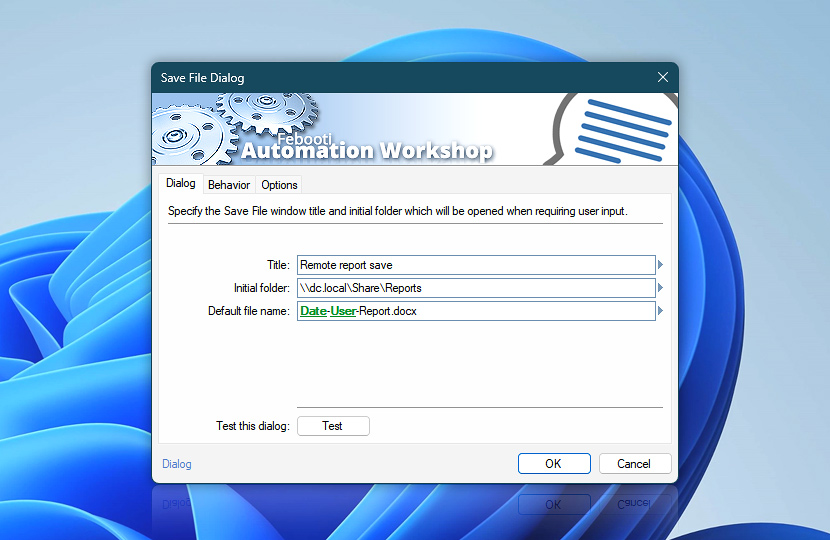
Specify the title of the File Dialog window and the initial folder for the file path. The Save File Dialog Action shows a standard File Dialog window with a custom title and requires the user to enter a filename. The file itself can be either existing or non-existing.
After entering the filename, the path and filename are stored as a variable that can be retrieved by any subsequent Action by using the Variable Wizard. The Save File Dialog Action does not itself save any files, however, it is a useful tool for proper filename input in the middle of automated processes.
| Dialog | Details |
|---|---|
| Title | Set a custom title for the File Dialog window. |
| Initial folder | Choose the folder in which to create a reference to the necessary file. The initially opened folder can be changed in the File Dialog window by easily browsing to any other available folder or even creating a new one. |
| Default file name | The filename which will be offered as a default choice when showing the Save File Dialog window to the user. |
| Test this dialog | Press the Test button to display the Save File Dialog in its current configuration. Note that only retrievable Variable Wizard values will be filled in when testing the Save File Dialog window (variables that depend on the execution of preceding Triggers or Actions will return empty variable content). |
| Browse |  Use Browse to select a particular file or folder on local disk, network share on LAN (local area network), etc. Use Browse to select a particular file or folder on local disk, network share on LAN (local area network), etc. |
| Variable Wizard |  Use dynamic data input—substitute a parameter from a file, web, connected Trigger, other Actions, date and time presets, etc. Use dynamic data input—substitute a parameter from a file, web, connected Trigger, other Actions, date and time presets, etc. |
Interconnect
- Save File Dialog integration and auditing—Variables (dynamic data) and Events (recorded activity). Access the full path and filename selected by the user, including separate variables for the folder, filename, button selected, and dialog title. Events signifying the success or failure of the filename selection process are automatically logged.
Note
- Always force placing new windows in the foreground (above all other windows). See simple instructions for a fix—New program window appears behind all other open windows.
Questions?
If you have any questions, please do not hesitate to contact our support team.