
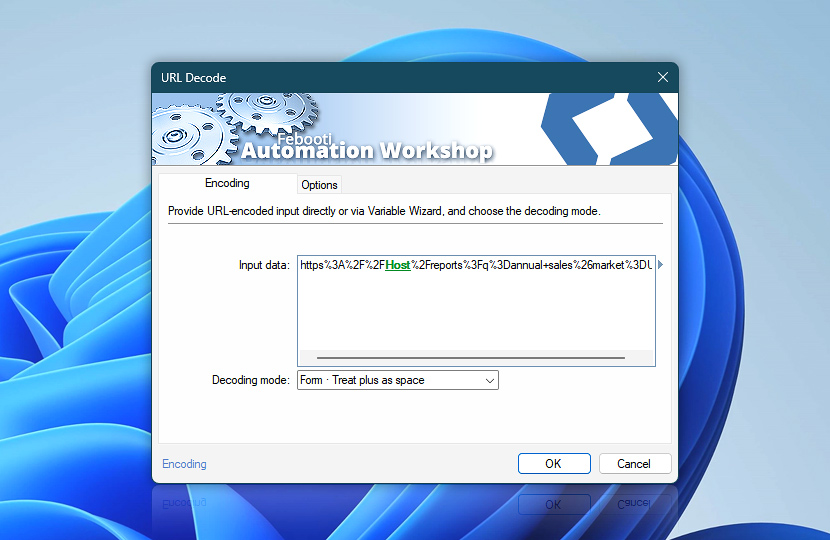
 This is an upcoming feature. URL Decode is planned for general availability in version 10.1.
The Encoding tab of the URL Decode Action specifies the URL-encoded source data and determines how plus signs are interpreted during decoding. Percent-encoded byte sequences are converted back into their original characters for further processing.
Provide the encoded input directly or dynamically through the Variable Wizard, and then choose the decoding mode that matches the source format. The output character set and optional result storage are configured separately on the Options tab.
| Encoding | Details |
|---|---|
| Input data | Specifies the URL-encoded data to decode. Enter the value directly or use the Variable Wizard to provide dynamic content from files, Triggers, previous Actions, variables, web responses, and other sources. |
| Decoding mode | Specifies how plus signs in the encoded input are handled:
|
| Variable Wizard |  Use dynamic data input—substitute a parameter from a file, web, connected Trigger, other Actions, date and time presets, etc. Use dynamic data input—substitute a parameter from a file, web, connected Trigger, other Actions, date and time presets, etc. |
Interconnect
- URL Decode integration and auditing—Variables (dynamic data) and Events (recorded activity). Use Variables to decode URLs and components received from connected Triggers or previous Actions, and use Events to track successful or unsuccessful decoding for auditing and workflow control.
More encoding…
Along with the URL Decode Action, Automation Workshop includes a set of related tools within the Encoding family designed to help process and transform data across different workflows.
- URL Encode · Overview · Variables
- Base64 Decode · Overview · Variables
- HTML Decode · Overview · Variables
Notes
- Select Treat plus as space option only when the source uses form-style encoding. Otherwise, literal plus signs may be converted incorrectly.
- The character set selected on the Options tab must match the encoding originally used to produce the percent-encoded byte sequences.
Questions?
If you have any questions, please do not hesitate to contact our support team.