
 This is an upcoming feature. URL Encode is planned for general availability in version 10.1.
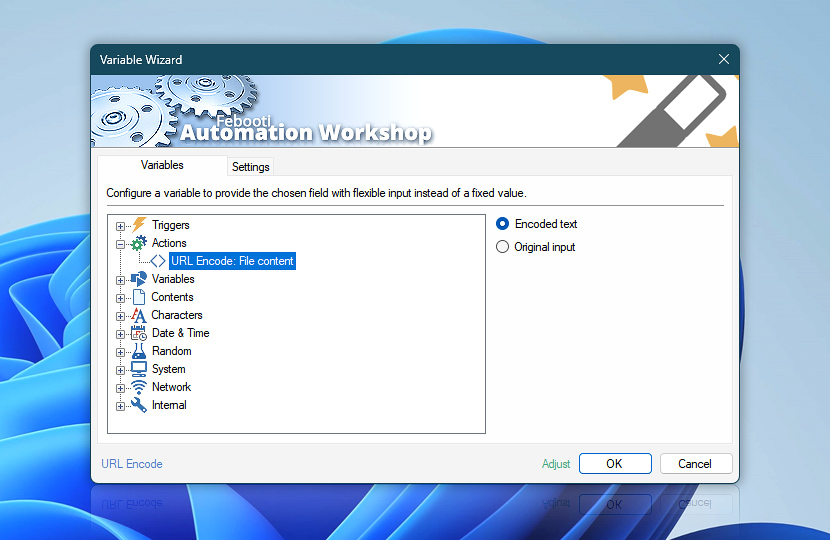
After encoding the supplied data, the URL Encode Action provides both the encoded result and the original input as dynamic Variable Wizard values. These values can be reused by subsequent Actions without creating additional variables.
Use the encoded value when building URLs, query parameters, paths, or web requests, while the original input remains available when later workflow steps need the complete unmodified source value.
| Variable | Details |
|---|---|
| Encoded text | Returns the URL-encoded string produced by the Action. The exact output depends on the selected encoding mode and options—space representation, hexadecimal letter case, and character set.
Examples:
|
| Original input | Returns the source data exactly as supplied to the URL Encode Action before encoding. Especially useful when the original input was assembled from multiple Variable Wizard values and needs to be reused as a single value later in the workflow.
Examples:
|
| Completion status | Retrieve Action execution status with a possible value—Successful or Failed. Or Empty, if Action has not been executed yet. |
| Adjust | Streamline creation of Task workflows even further—instantly make quick variable adjustments such as in-place text replacement (all, first, or last), ensuring (starts, ends, or does not), trimming (whitespaces, quotes, etc.), or changing capitalization. Chain multiple adjustments. Optionally, set a different display name. |
Just ask…
If you have any questions, please do not hesitate to contact our support team.