
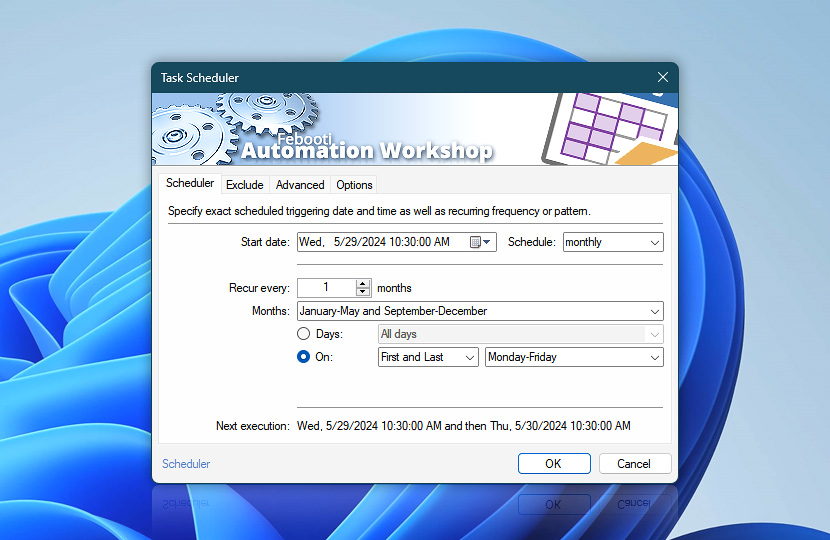
Overview of Task Scheduler Trigger. Specify schedule start date and time and recurrence pattern. Recurrence options allows Task execution based both on fixed intervals (such as once a day or every third hour) and various advanced time patterns (such as on every third week on Mondays and Thursdays or last Friday of every second month).
| Scheduler | Details |
|---|---|
| Start date | Specifies the beginning date and time of the schedule. |
| Schedule | Specifies whether the Task will be executed once, once in a fixed period of time (every second, minute, hour) or on advanced schedule (particular weekday of the week, date of the month, etc.). |
| Recur every | Specifies recurrence frequency. If the basis for scheduling is set to weekly or monthly, Task will execute on all selected weekdays or dates. |
| Weekdays & Months | Depending on schedule type (i.e., weekly or monthly) user can specify either particular weekdays or particular months on which to schedule Task. If months are specified, additional selection of dates of the month or weekdays of particular weeks is provided. |
| Days | When using monthly schedule, specifies on which dates of the month Task will be scheduled. |
| Weeks | Specifies the weeks of a month and particular weekdays for scheduling Task. |
| Next execution | Shows the date and time of the next schedule. The Trigger Manager provides an overview of all upcoming Task execution schedules within the next day, week, or month. |
Interconnect
- Dynamic variables & Events of the Task Scheduler. Obtain the planned, actual, and next execution dates/times of the Trigger for use in your workflow, for example, for reporting purposes. View relevant events, such as a warning when the system clock is set to a past date or time.
Notes
- It is possible to create more advanced schedule (e.g., for executing Task on multiple particular dates) by using multiple Task Scheduler Triggers for a single Task.
- If schedule start date is set to more than 10 years ago and during that time the Task has never been active, scheduled Tasks may not be considered as missed and, hence, rescheduled.
- Use the Execution policy to allow (or prevent) the Task to run only on the selected date and time range. The Execution policy can be used independently from the Task Scheduler. The Trigger starts the Task on a predefined schedule, while the Execution policy allows or prevents the Task from running on specified days or at certain times.
Just ask…
If you have any questions, please do not hesitate to contact our support team.