
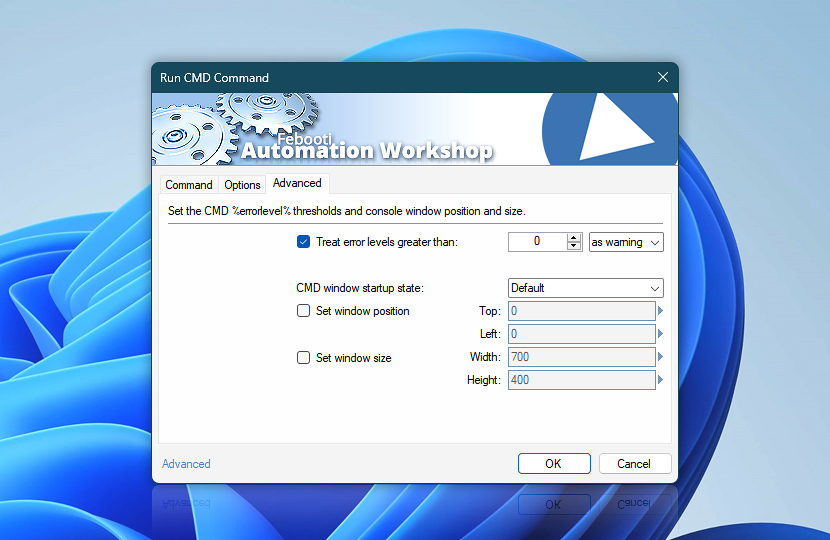
The Advanced tab of the Run CMD Command Action allows you to set %errorlevel% thresholds, and define the command prompt window size and position on the screen relative to the top-left corner. Unless explicitly specified otherwise, the default window size and position will be applied when opening the Windows Command Prompt.
It is also possible to choose the command prompt window startup state, namely, whether it will be maximized, minimized, full-screen, or hidden.
| Advanced | Details |
|---|---|
| Treat exit codes greater than | By default, the errorlevel value of successful CMD command execution is 0. When using Run CMD Command Action it may prove useful to treat errorlevel values greater than 0 (or any other specified value) as a possible or actual error by logging a warning or an error, respectively. |
| CMD window startup state | Choose command prompt window startup state. Available options are:
|
| Set window position | Specify how far (in pixels) the CMD command prompt window will be placed from the top and left sides of the screen. Variable Wizard can be used instead of fixed values to set a context-specific cmd.exe window position. |
| Set window size | Specify the dimensions (in pixels) of the CMD command prompt window by providing either fixed values for cmd.exe window height and width or using Variable Wizard to set context-specific dynamic size. |
| Variable Wizard |  Use dynamic data input—substitute a parameter from a file, web, connected Trigger, other Actions, date and time presets, etc. Use dynamic data input—substitute a parameter from a file, web, connected Trigger, other Actions, date and time presets, etc. |
Notes
- Since Windows 11, the console window may ignore application-defined size and position settings. As a workaround, you can set a permanent, preferred window size for the console through its own Properties dialog.
- On 64-bit Windows machines, the CMD window is not shown in full-screen mode even if the CMD window startup state option is set to Full screen. Instead, the CMD window will most likely be hidden. On 32-bit machines, since Windows 7, the Full screen option only works with non-WDDM graphics card drivers.
Assistance is here…
If you have any questions, please do not hesitate to contact our support team.