
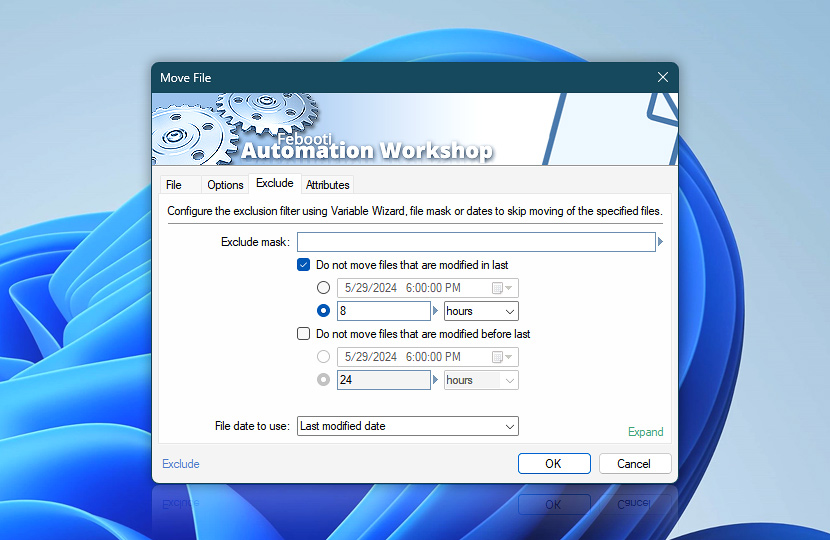
Forbid Move File Action to process files that match initial moving pattern by configuring file exclusion filter. Exclusion filter works in the same way as file moving, but with opposite effect—it excludes the files that would be moving otherwise by narrowing the initial deletion range.
| Exclude | Details |
|---|---|
| Exclude mask | Specify either file name & mask or provide data from Variable Wizard to exclude matching files from moving. Multiple inputs must be separated by | vertical bar character · Learn file masks and wildcards |
| Do not move files that are modified after | Files will be excluded on basis of their age (when it is more recent than specified). Both date & time of file and its age in seconds, minutes, hours or days can be specified. |
| Do not move files that are modified before | Files will be excluded on basis of their age (when it is older than specified). Both date & time of file and its age in seconds, minutes, hours or days can be specified. |
| File date to use | Choose which file date will be matched when applying exclusion filter. Creation date specifies when file was first created, Last modified date—last time file was changed, Last accessed date—last time file was read. |
| Interactive preview | Shows interactive preview of the advanced date filter. It automatically excludes files of different types—new or old, recently modified, lately used, etc. |
| Time units |  Define and set a time frame in any given preferred format—be it milliseconds, seconds, minutes, hours, or days. Define and set a time frame in any given preferred format—be it milliseconds, seconds, minutes, hours, or days. |
| Variable Wizard |  Use dynamic data input—substitute a parameter from a file, web, connected Trigger, other Actions, date and time presets, etc. Use dynamic data input—substitute a parameter from a file, web, connected Trigger, other Actions, date and time presets, etc. |
Note
- Exclude mask filter is applied to long file name, while both long and short file (8.3) names are present in file system.
Questions?
If you have any questions, please do not hesitate to contact our support team.