freeware Case - change file / folder case

change file case
change file case

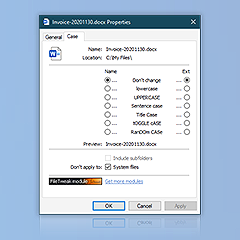
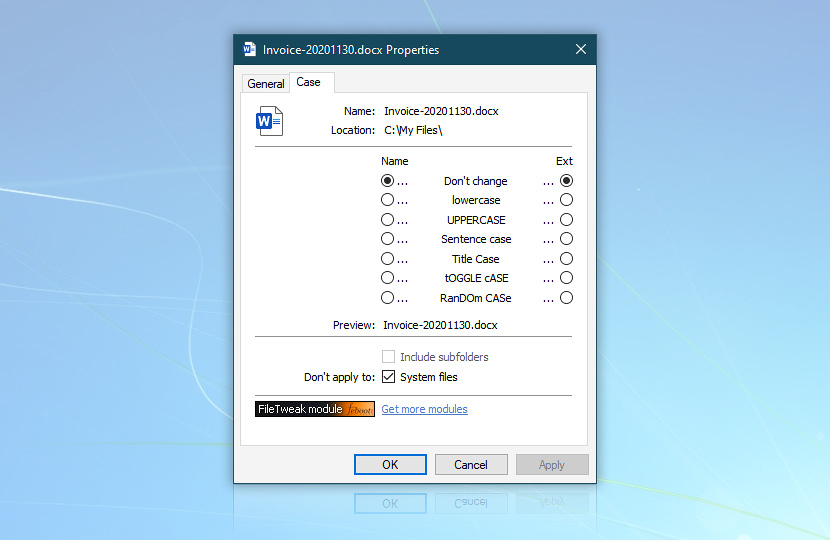
Febooti fileTweak Case module is a freeware utility that can be used either as stand alone utility or as a module of fileTweak. Case module expands Windows properties pages by adding a batch file case renaming possibility that allows to change filename and directory letters (characters) case automatically.

Freeware Case - change file / folder case.

This utility might prove useful to beautify and standardize appearance of files and folders in directory listing when browsing your hard drives and other media storages.

Case module works both with single and multiple files and folders providing great means to standardize a case of a lot of file and folder names with a single click.
Febooti fileTweak Case supports the following naming schemes:
Naming schemeDescription
Don't change caseAll filename and folder letters keep their original case.
lowercaseAll filename and folder letters are changed to lowercase.
UPPERCASEChanges all letters in file and folder names to uppercase.
Sentence caseChanges the first letter of each sentence (group of words separated by delimiters such as dots, exclamations) to uppercase and all the following letters to lowercase.
Title CaseChanges the first letter of every word contained in filename to uppercase and the rest to lowercase. Use Smart Titles option to exclude most prepositions and conjunctions.
tOGGLE cASEAll letters of file and folder names are changed to opposite, namely lowercase letters are made uppercase and vice versa.
rAnDom CAsEAll letters of selected files and folders are changed randomly without any criteria.

Optimized for easiness of use and functionality, Febooti Case can be used both as stand alone utility and as module of Febooti fileTweak - award-winning set of utilities that provides useful possibilities in managing your files (e.g. change file date in batch mode, change file and folders attribute and many more). When used as a module of fileTweak, Case module becomes fully integrated in it and can be enabled or disabled from fileTweak control center.

* Note that Febooti fileTweak Case works both on 32-bit and 64-bit Windows editions.

What do you think about Febooti fileTweak Case? Good? Bad? Give us feedback or request feature!

Copyright © 2001-2013 Febooti Software. All rights reserved. Last updated: July 18, 2011