
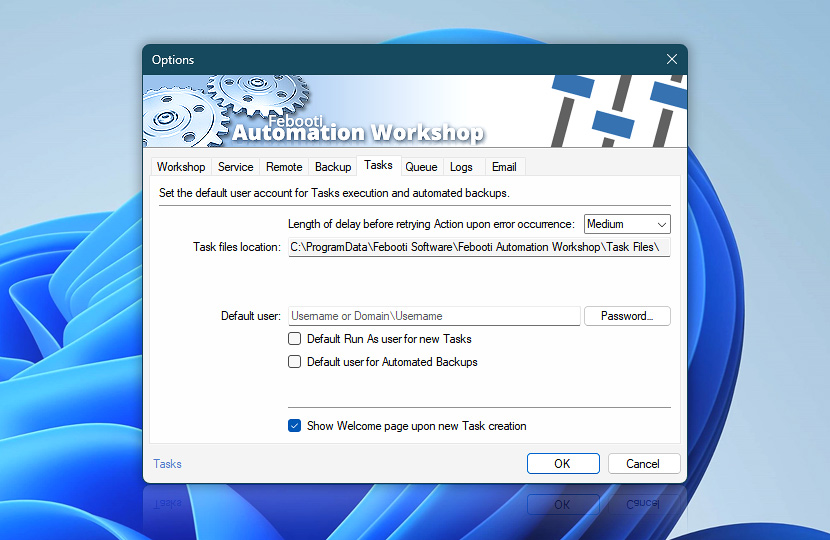
Tasks tab allows configuring basic task related settings. Specify default user account whose credentials will be used to execute appropriately configured Tasks. Disable Task Wizard welcome screen (if already acquainted with design of Task structure), configure delays for error caused Action retries.
| Tasks | Details |
|---|---|
| Length of delay before retrying Action upon error occurrence | If an Action is configured to be retried upon encountering an error and the error occurs, the Action is retried for a specified number of times. This option allows specifying the length of delay which will be applied before attempting another try to execute the Action.
|
| Task files location | Displays the path to the folder that contains Task files. |
| Default user | Default user parameter (specified here) is applied to all Tasks that are configured to Run Tasks as default user in Run As tab. When executed, these Tasks inherit network and desktop access rights of this default user. Syntax:
|
| Password | Enter password for default user account. |
| Default Run As user for new Tasks | All subsequently created Tasks will be executed from this Default user account with according Desktop and Network access rights. The setting can be changed in Run As tab of Task Properties. |
| Default user for Automated Backups | When enabled, automatic backup operations will be performed with this Default user account, instead of the SYSTEM account. The SYSTEM account only has access to local machine resources and can not store backups directly on network drives. |
| Show Welcome page upon new Task creation | An introductory Welcome page is shown each time Task Wizard is opened. |
Help at your fingertips…
If you have any questions, please do not hesitate to contact our support team.