
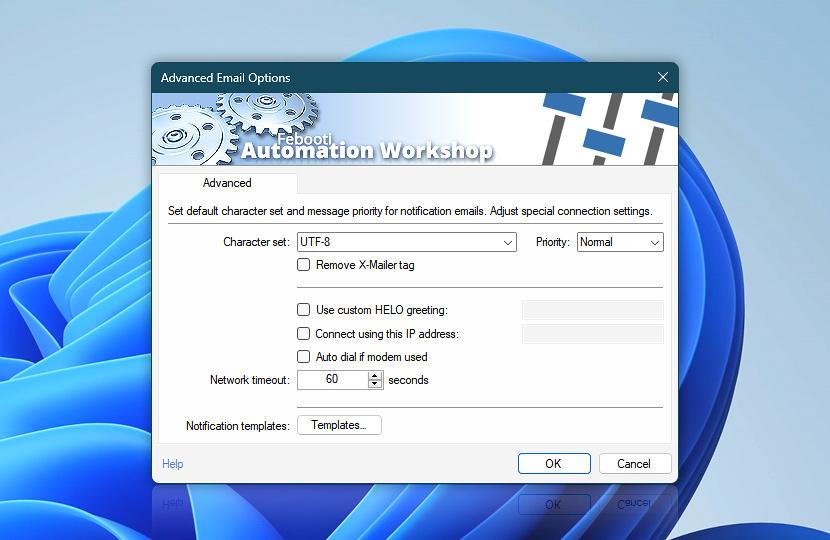
Advanced Email Options allow the user to configure and fine tune Automation Workshop email delivery by setting character set, choosing email priority flag as well as choosing network connection, using custom headers and greeting strings, or modifying standard information message, warning and error email message template · See all email options
| Advanced | Details |
|---|---|
| Character set | Select among most popular message encoding character sets or enter necessary one, if not available on the list. |
| Priority | Set email priority flag (Not set, Low, Normal or High). |
| Remove X-Mailer tag | If enabled, X-Mailer tag Febooti Automation Workshop will not be added to email header. |
| Use custom HELO greeting | Provide text that will be used for HELO / EHLO greeting when initiating client and SMTP connection. If not provided, computer name is used for initiation of SMTP connection. |
| Connect using this IP address | In case your machine features multiple connections to network, it is possible to choose which one will be used by providing Domain name or IP address of necessary interface. |
| Auto dial if modem used | If modem is used, Automation Workshop will automatically connect Internet when necessary. |
| Network timeout | Indicates the maximum length of time email sending is attempted before detecting network timeout. |
| Notification templates | See or edit the email notification templates used when Automation Workshop reports a successful or failed Task execution or Action failure. |
Assistance is here…
If you have any questions, please do not hesitate to contact our support team.