
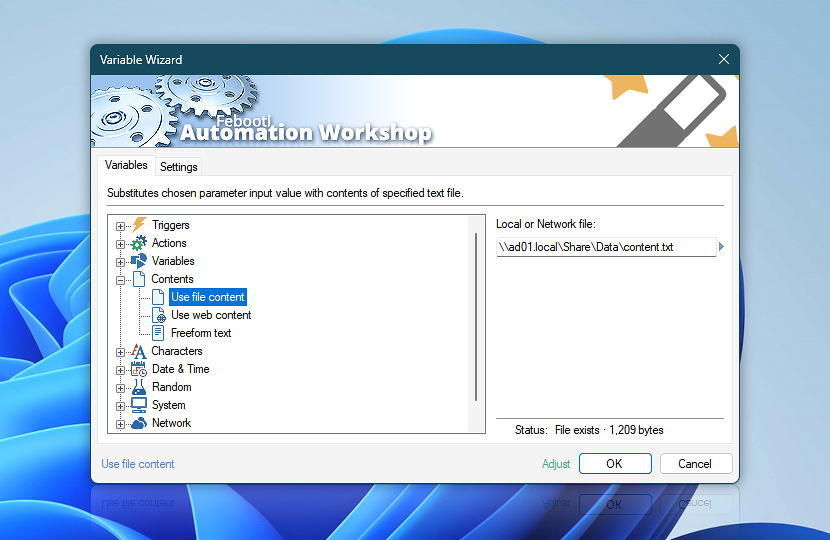
The Use file content feature allows an Action to use a file content in a no-code fashion. It works by replacing an input value with the specified file content, thus effectively expanding and facilitating Action configuring capabilities. The Use file content option can use both files on a local media and those located on network drives.
Expand substitution capabilities even further with the Read from File Action which expands this feature. It allows very flexible options for specifying the input filename and other options. Your workflow can select an input file based on previous Trigger or Action output—it enables you to create very flexible and robust no-code workflows.
| Variable | Details |
|---|---|
| Local or Network file | Provide a file to be used as a substitute for input settings. Any local, network, or mapped file can be selected. Read about differences on UNC paths and mapped drives under User Account Control. |
| Browse |  Use Browse to select a particular file or folder on local disk, network share on LAN (local area network), etc. Use Browse to select a particular file or folder on local disk, network share on LAN (local area network), etc. |
| Status | Displays whether the specified file exists at specified location. If a network path is specified, Access denied status may be displayed (due to default SYSTEM user); however file is retrieved upon execution, if valid credentials are specified in the Task Run As settings. |
| Adjust() | Streamline creation of Task workflows even further—instantly make quick variable adjustments such as in-place text replacement (all, first, or last), ensuring (starts, ends, or does not), trimming (whitespaces, quotes, etc.), or changing capitalization. Chain multiple adjustments. Optionally, set a different display name. |
Questions?
If you have any questions, please do not hesitate to contact our support team.