
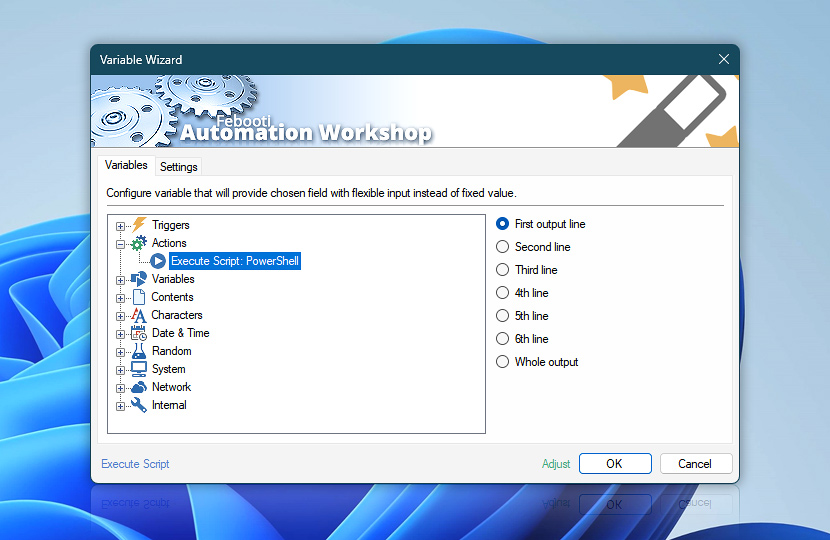
Some JScript, VBScript, PowerShell and batch file scripts are not merely running commands, but also provide some screen output. After Execute Script Action completes, the screen output of executed scripts are retrievable as dynamic values via Variable Wizard. These dynamic values can then be used in any subsequent Action as a parameter specifying its operations.
| Variable | Details |
|---|---|
| First output line | Returns the first line of screen output generated by the script. |
| Second line | Returns the second line of script's screen output. |
| Third line | Returns the third line of script's output. |
| 4th line | Returns the fourth line of script's screen output. |
| 5th line | Returns the fifth line of script's output. |
| 6th line | Returns the sixth line of script's output. |
| Whole output | Returns the entire screen output generated by the executed script. |
| Completion status | Retrieve Action execution status with a possible value—Successful or Failed. Or Empty, if Action has not been executed yet. |
| Adjust() | Streamline creation of Task workflows even further—instantly make quick variable adjustments such as in-place replacement (all, first, or last occurrence), trimming (whitespaces, quotes, etc.), or changing capitalization. Optionally, set a different display name. |

Need assistance?
If you have any questions, please do not hesitate to contact our support team.