
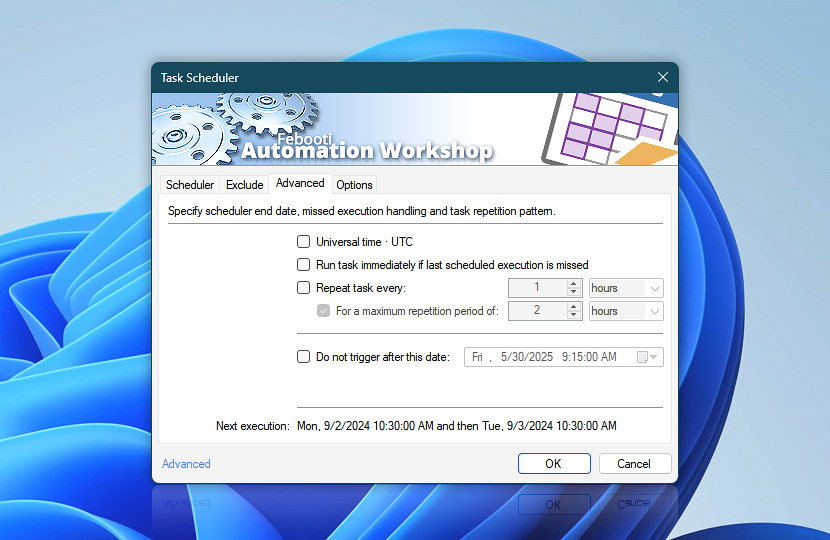
Specify schedule end date and time after which Task will not be scheduled, choose whether Task should be executed as soon as possible after missing schedule as well as set Task repetition interval.
| Advanced | Details |
|---|---|
| Universal time · UTC | Specifies that Universal time (UTC) will be used when scheduling a Task. See Daylight Saving Time notes. |
| Run task immediately if last scheduled execution is missed | Specifies that Task is executed as soon as possible after missing the scheduled execution (e.g., due to computer being switched off). |
| Repeat task every | Indicates that Task, once scheduled, will be repeated once in a specified amount of time. Repetitions are part of recurrences so that every scheduled Task recurrence will execute the specified number of repetitions. |
| For a maximum repetition period of | Indicates the amount of time during which Task will be repeated. |
| Do not trigger after this date | Specifies schedule end date and time. After this date and time Task will not be scheduled. |
| Next execution | Shows the date and time of the next schedule. The Trigger Manager provides an overview of all upcoming Task execution schedules within the next day, week, or month. |
| Time units |  Define and set a time frame in any given preferred format—be it milliseconds, seconds, minutes, hours, or days. Define and set a time frame in any given preferred format—be it milliseconds, seconds, minutes, hours, or days. |
Notes
- When Task Scheduler is configured to repeat the Task, repetitions are executed without taking into account exclusion filter settings.
- Repetitions of scheduled Task are not run after the next recurrence. A new cycle of repetitions begins, instead.
- If Task is scheduled to run once, repetitions are carried out infinitely or until the specified end date of the schedule.
- Even if Run task immediately if last scheduled execution is missed option is enabled, its effects are not displayed in next execution hint.
- Exclusion filter settings are ignored when performing the missed execution.
- Too small repeat time (normally, below a second) can cause missed scheduled execution depending on computer speed.
Ask for more…
If you have any questions, please do not hesitate to contact our support team.