
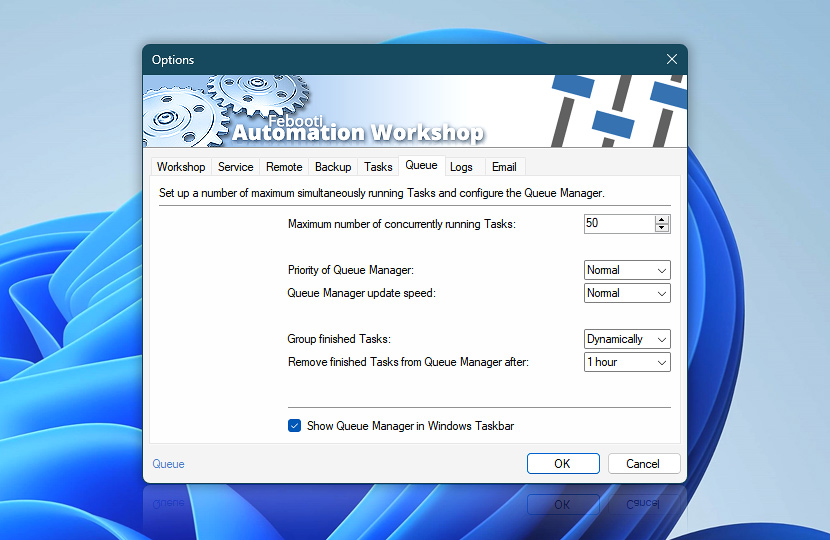
Queue tab provides options for setting maximum number of Tasks that can be executed simultaneously in parallel manner. Set up the way Queue Manager displays and manages active Tasks.
| Queue | Details |
|---|---|
| Maximum number of concurrently running Tasks | Set the maximum number of Tasks that can run simultaneously. When limit is reached, other Tasks are put into queue for execution upon availability of free queue slot. Automation Workshop supports an unlimited number of Tasks, Actions, and Triggers. Queue Manager limits only the simultaneously active/running Tasks. Also note the per-Task setting Limit concurrently running instances available in the Task properties, which provides more granular control over parallel execution for individual Tasks. |
| Priority of Queue Manager | Indicate how often Automation Workshop will check whether queued Tasks have to be executed. Higher priority leads to more frequent checks, but also higher CPU resource use. The default priority is Normal which grants real-time queue execution. |
| Queue Manager update speed | Indicate the rate of Queue Manager window update. The default Queue Manager update speed is Normal which provides reasonable near real-time queued Task updates. Low and High update speeds allow to allocate a bit less or more resources for Queue Manager user interface refresh. |
| Group finished Tasks | Enable automatic finished Task grouping to improve currently running Task visibility in the rapid Task execution scenarios:
|
| Remove finished Tasks from Queue Manager after | Choose for how long already finished Tasks will be displayed in Queue Manager. Also affects dynamic Task activity values that Queue Manager returns via Variable Wizard. |
| Show Queue Manager in Windows Taskbar | If enabled, Queue Manager will be shown in Windows Taskbar. |
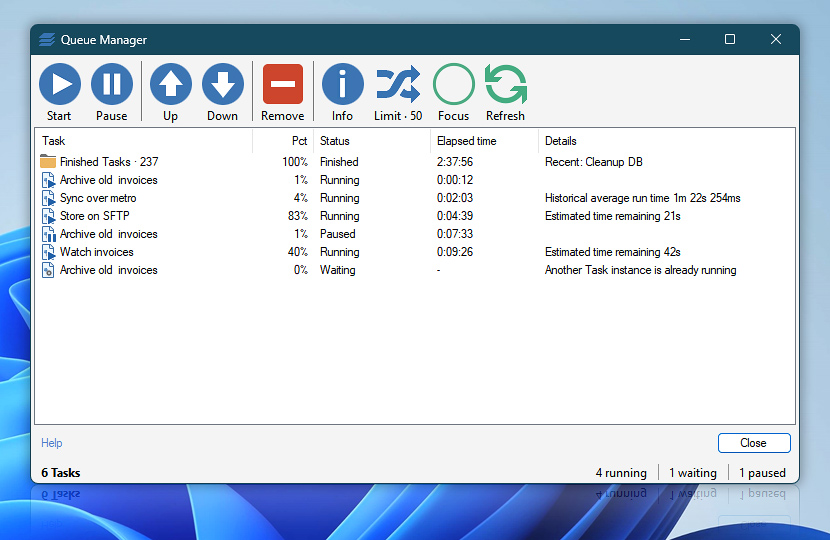
Queue Manager
We are here to help…
If you have any questions, please do not hesitate to contact our support team.