
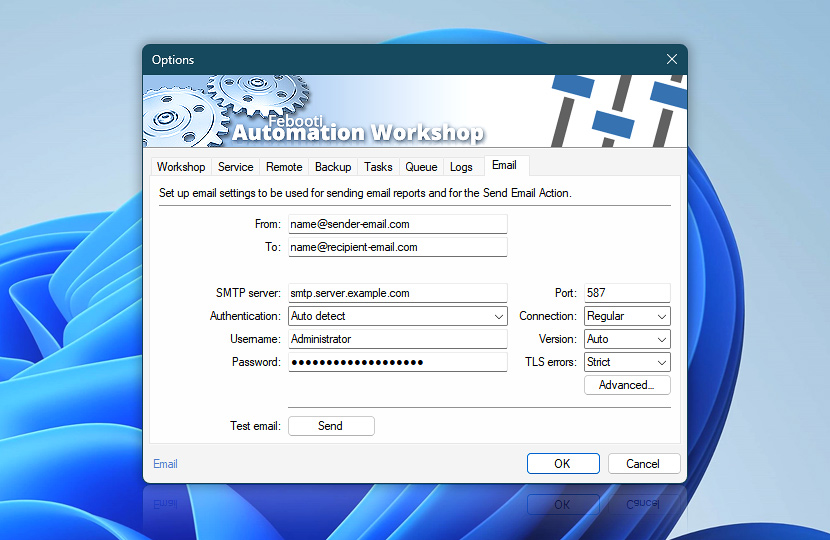
Email tab allows specifying the default SMTP server both for sending Task success and failure reports and emails using Send Email Action. Provide connection parameters, such as authentication, username, password, port settings and other details.
| Details | |
|---|---|
| From | Provide sender's email address with or without name:
|
| To | Provide single or multiple email recipients:
|
| SMTP server | Enter address of SMTP server that will be used as default for all email and notification sending processes. See: |
| Port | Set SMTP server port. |
| Authentication | Select SMTP authentication method (None, OAuth2, Auto detect, PLAIN, LOGIN, NTLM or CRAM-MD5) · Detailed explanation |
| Username | Provide SMTP authentication username. |
| Password | Provide SMTP authentication password. |
| Use credentials | Choose an existing OAuth 2.0 credential or create a new one via API Keys & Credentials. |
| Connection | Choose between Regular, and secure client and SMTP connection (SSL or STARTTLS). |
| Version | Choose TLS versions (Auto detect, SSLv3, TLS 1.0, TLS 1.1, TLS 1.2, or TLS 1.3). |
| TLS errors | Option allows ignoring any certificate errors caused when connecting to secure SMTP server. |
| Advanced | Configure advanced email settings such as character encoding, email priority, network timeout, and adjust email notification templates to format automatic emails with information messages, warnings and errors. |
| Test email | Click Send button to send test email. Automation Workshop will log an information Event ID 2190, which indicates that the user has tested email settings by sending a notification email. |
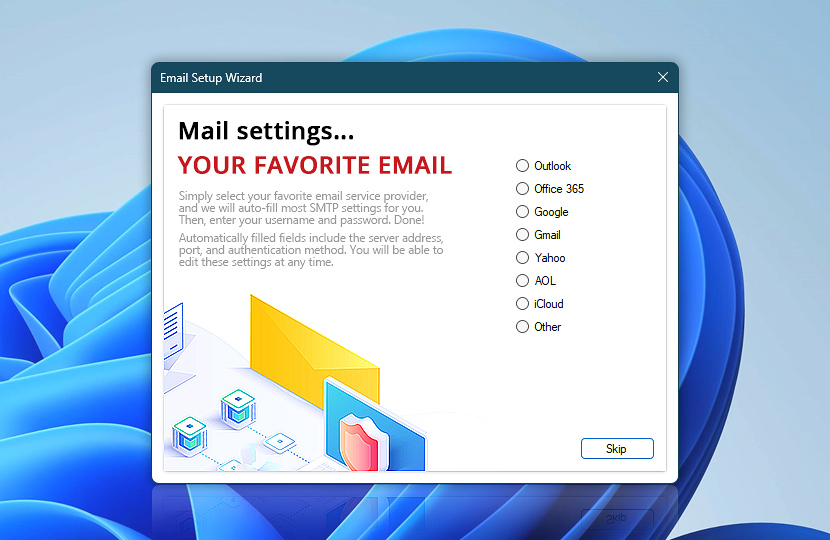
Email Setup Wizard
Simply select your favorite email service provider, and we will auto-fill most SMTP settings for you. Then, enter the username and password. Automatically filled fields include a server address, port, and authentication method. You will be able to edit these settings at any time. Some email service providers require an additional SMTP password configuration.
Popular SMTP settings
Need a helping hand?
If you have any questions, please do not hesitate to contact our support team.