
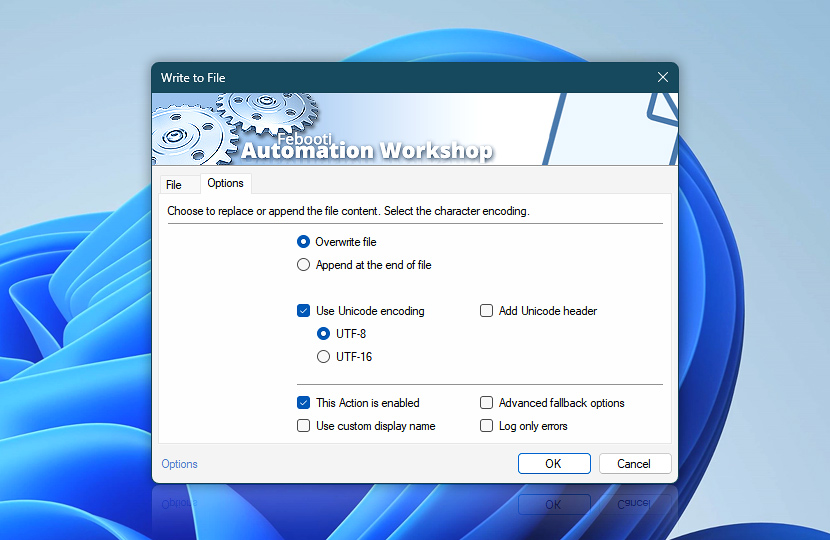
Options tab of the Write to File Action allows specifying output file encoding and overwriting settings.
| Options | Details |
|---|---|
| Overwrite file | If selected, an existing file with the same name as an output file will be overwritten with a new one. |
| Append at the end of file | If selected, an existing file with the same name as an output file will be appended with contents of a provided text. |
| Use Unicode encoding | Specifies that the output file will be saved using Unicode encoding. If the option is disabled, the Write to File Action saves files using language for non-Unicode programs / system locale specified in Regional Settings (also known as ASCII, ANSI, or OEM code page).
|
| Add Unicode header | Add a BOM or Byte Order Mark header to the beginning of a file. UTF-16 files usually have the BOM. It signals endianness of an UTF-16 file. On the other side UTF-8 files can skip this mark. BOM use is optional. |
| This Action is enabled | An Action is executed only if it is enabled. Otherwise, it will be automatically skipped (completely ignored) from the Task flow. |
| Use custom display name | Rename this Action, to make a human-readable workflow that will help you to find, read, and make sense of the Task structure later. |
| Advanced fallback options | Manage the advanced fallback options—select which error types will lead to automatic execution of predefined workaround operations. |
| Log only errors | Do not log information and warning messages for this Action. It may be useful to keep the log file small and tidy on production systems. |
Need assistance?
If you have any questions, please do not hesitate to contact our support team.