
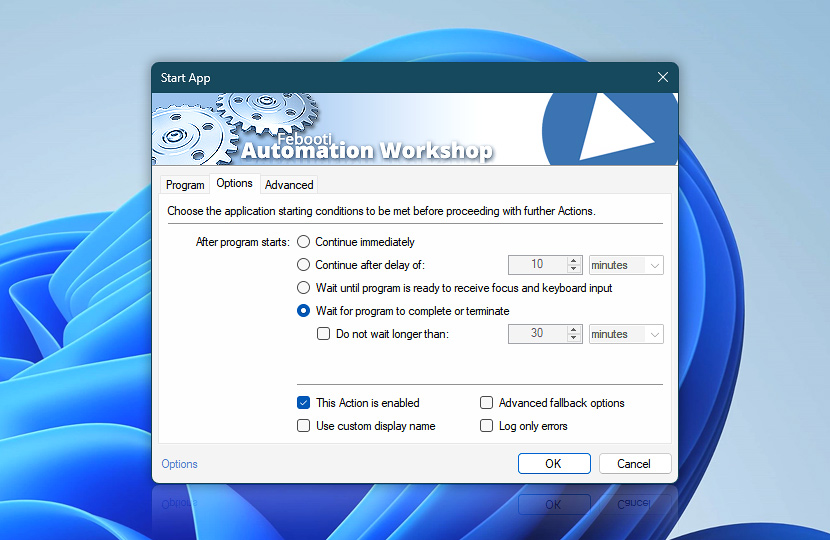
The Options tab allows you to control how a Task proceeds after executing a program. You can launch the next Action immediately, after a fixed delay, when the program is ready to receive focus and keyboard input, or only after the application has terminated.
| Options | Details |
|---|---|
| Continue immediately | Task's next Action will be executed immediately after starting the application. |
| Continue after delay of | The next Action will be executed after a specified delay. |
| Wait until program is ready to receive focus and keyboard input | The Task will wait until the program is fully initialized and ready to receive focus or keyboard input before proceeding with the next Action. |
| Wait for program to complete | The next Action will start immediately after the application finishes. |
| Do not wait longer than | If enabled, Automation Workshop will not wait longer than the specified amount of time for the program to finish before proceeding with the next Action. |
| Time units |  Define and set a time frame in any given preferred format—be it milliseconds, seconds, minutes, hours, or days. Define and set a time frame in any given preferred format—be it milliseconds, seconds, minutes, hours, or days. |
| This Action is enabled | An Action is executed only if it is enabled. Otherwise, it will be automatically skipped (completely ignored) from the Task flow. |
| Use custom display name | Rename this Action, to make a human-readable workflow that will help you to find, read, and make sense of the Task structure later. |
| Advanced fallback options | Manage the advanced fallback options—select which error types will lead to automatic execution of predefined workaround operations. |
| Log only errors | Do not log information and warning messages for this Action. It may be useful to keep the log file small and tidy on production systems. |
Need assistance?
If you have any questions, please do not hesitate to contact our support team.