
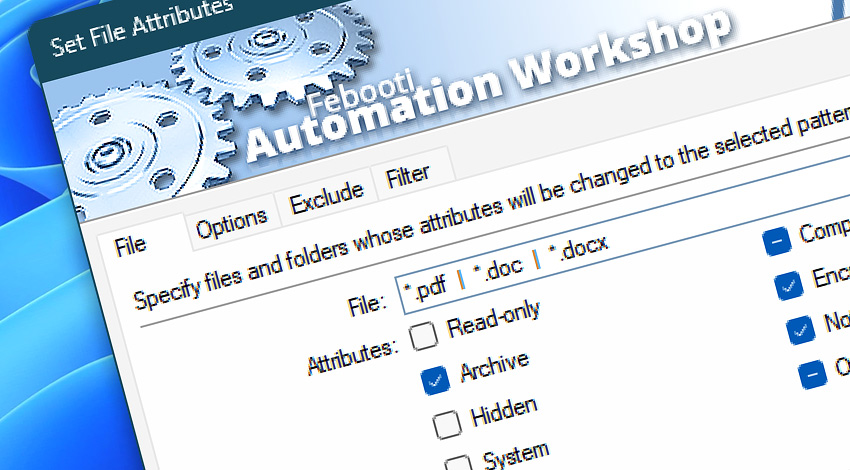
Automation Workshop includes the Set File Attributes Action that performs automatic batch attribute changing for multiple files and folders (directories).
Apply settings such as file masks, exclude timestamps, as well as variables provided by a Trigger or another Action. Supports the changing of the read-only, archive, hidden, system, compressed, encrypted, not indexed, and offline attributes.
Documentation
- File · Set a filename or mask to apply the attributes pattern.
- Options · Choose whether to apply attribute changes to files, folders, or both. Specify if files and folders located in subfolders should be included.
- Exclude · Filter out files using wildcards for both files and folders, as well as by timestamps.
- Filter · Define an attribute pattern to include or exclude files with matching attributes.
Interconnect
- Set File Attributes integration—Variables (manipulate data dynamically within a workflow) and Events (recorded entries that detail the activity within the system).
- Effortlessly streamline your automation processes by visually connecting your workflow using Variable Wizard—a powerful tool to access all 1,000+ variables—system, network, Triggers, Actions, globals, web, and much more…
- Moreover, not only utilize Set File Attributes variables, but also seamlessly integrate them with a diverse array of other file and folder variables from local disks, mapped drives, network shares, and remote servers—FTP, SFTP, WebDAV, Amazon S3, and more…
Quick access
To streamline your workflow creation, you can locate the Set File Attributes Action throughout the entire Automation suite's search tools—including the knowledge base, menu, and Add Action feature—using the quick «SFA» shortcut.
Contents & metadata…
Automation Workshop provides a wide range of Actions to access and modify file contents, properties, and metadata.
- Read from File · Overview · Variables
- Write to File · Overview · Variables
- Compute File Checksum · Overview · Variables
- Get File Date & Time · Overview · Variables
- Set File Date & Time · Overview · Variables
- Get File Information · Overview · Variables
- Remote File Information · Overview · Variables
Discover
Automation Workshop includes many more awesome Triggers and numerous Actions to aid you to automate any repetitive computer or business task by providing state-of-the-art GUI tools.
Need assistance?
If you have any questions, please do not hesitate to contact our support team.