
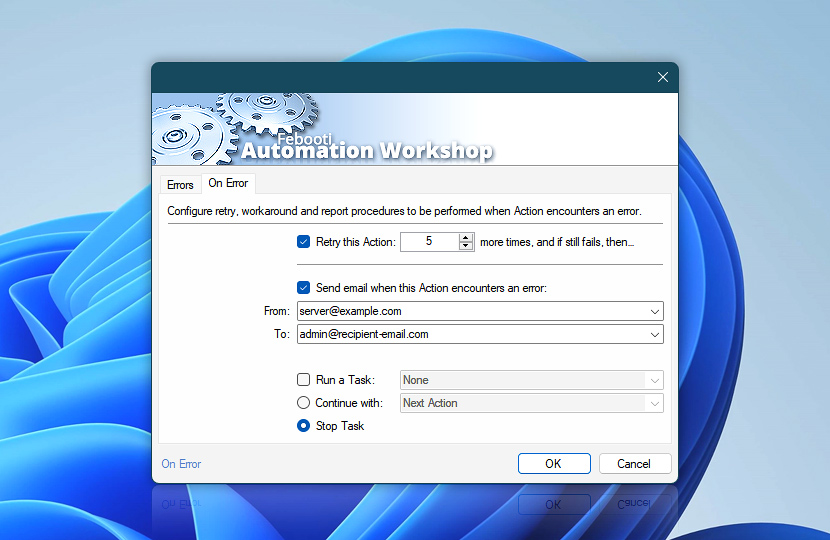
When an Action experiences an error, it can either stop the Task or continue with selected workaround procedures. The Task can retry or skip the Action, run another Task, or report the issue to the user or system administrator.
| On error | Details |
|---|---|
| Retry this Action n more time(s), and if still fails, then… | Choose the number of times the Task will retry the Action before concluding that the process has failed. |
| Send email when this Action encounters an error | Send an email notification when the Action has failed. |
| From | Choose the email address of the sender that will send the error notification. |
| To | Choose the email address of recipient that will receive the error notification. To set multiple recipients, use semicolon or a comma-separated list:
See a complete list of supported email syntax. |
| Run a Task | Choose to run another automated Task when the Action fails. Action name and error status can be accessed using the Variable Wizard Task parameters variables. This Task waits until the fallback Task finishes before proceeding with the Continue with option. |
| Continue with | Choose an Action within the same Task with which to continue when the current Action has failed. |
| Stop Task | Stops the Task with an error. |

Note
Some Automation Workshop Actions are created in such a way that by their very design they cannot experience an error, or advanced fallback is not possible.
Need assistance?
If you have any questions, please do not hesitate to contact our support team.