
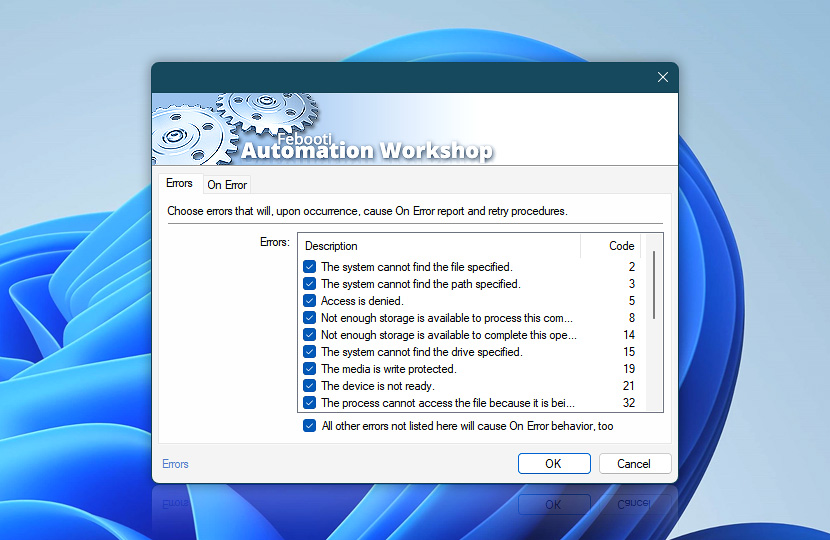
Different Actions can experience different errors from minor issues to critical showstoppers. Automation Workshop supports advanced error processing and lets users choose which errors to ignore and which ones to process.
While in theory it is best to design Tasks in a way that their Actions do not cause errors, on specific occasions it can be more practical to design workarounds instead. If it is paramount that no errors occur, the user can set desktop and email alerts that call for immediate attention.
| Errors | Details |
|---|---|
| Errors | A list of most common errors that the Action can experience. Disable errors to ignore them when they occur. Disabled errors do not cause On Error behavior and are considered a successful completion. |
| All other errors not listed here will cause On Error behavior, too | Choose whether less common unlisted errors are ignored or processed by the On Error workaround procedure. |
Storage & memory errors
Normally file system and memory errors should not be ignored, because they have a direct impact on automation processes and can disrupt them entirely.
- The system cannot find the file specified · Code: 2
- The system cannot find the path specified · Code: 3
- The system cannot open the file · Code: 4
- Access is denied · Code: 5
- Not enough storage is available to process this command · Code: 8
- Not enough storage is available to complete this operation · Code: 14
- The system cannot find the drive specified · Code: 15
- The directory cannot be removed · Code: 16
- The media is write protected · Code: 19
- The device is not ready · Code: 21
- The process cannot access the file because it is being used by another process · Code: 32
- The disk is full · Code: 39
- The network path was not found · Code: 53
- The file exists · Code: 80
- The parameter is incorrect · Code: 87
- There is not enough space on the disk · Code: 112
- The filename, directory name, or volume label syntax is incorrect · Code: 123
- The directory is not empty · Code: 145
- Cannot create a file when that file already exists · Code: 183
- Not a valid Win32 application · Code: 193
- The directory name is invalid · Code: 267
- The file cannot be accessed by the system · Code: 1920
Other errors
- The file mask is invalid · Code: E101
- No path or startup folder specified · Code: E102
- Failed to assign variable · Code: E103
- 0 files affected · Code: E104
Logic errors
Logic errors usually stem from faulty Task structures introduced by the user when designing the Task workflow. To solve these issues, the user can verify that the Task's workflow is properly configured.
- ELSE without an IF action · Code: E190
- Label is not found · Code: E191
- Multiple labels with the same name · Code: E192
Email errors
Typically, Send Email Action errors happen due to issues with local files or with the email server.
- Cannot send email · Code: E201
- Cannot connect to email server · Code: E202
- Cannot find attachments · Code: E203
- Cannot send a separate email · Code: E204
More?
Besides errors experienced by Actions themselves, sometimes errors are caused by external scripts and applications executed by Run group Actions. These errors are returned as exit codes or errorlevels.
- See exit codes for Run CMD Command and Start App Actions.
- See return codes for Remote FTP Command and Remote SSH Command Actions.
Note
- Some remote file Actions may return slightly different (or not at all) error codes depending on the connection protocol used.
Help at your fingertips…
If you have any questions, please do not hesitate to contact our support team.