
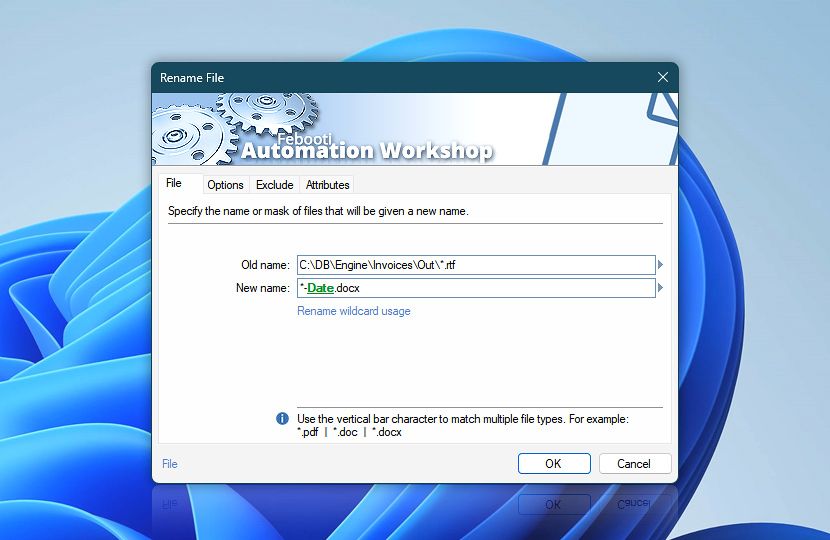
Specify files to be renamed. File input line supports path, filename and file mask as well as variables that can be used either separately or in various combinations. Multiple inputs must be separated by | vertical bar character.
| File | Details |
|---|---|
| Old name | Specify files to rename. Available options include providing full path and filename or file mask. If path is not specified, Action is performed in current folder · Learn file masks and wildcards |
| New name | Specify new name or naming scheme (file mask) for files being renamed. New name parameter does not support multiple inputs. File rename Action does not move or copy files to another location; if full path is specified in New name input, only a part related to file name will be used · Learn rename wildcards |
| Browse |  Use Browse to select a particular file or folder on local disk, network share on LAN (local area network), etc. Use Browse to select a particular file or folder on local disk, network share on LAN (local area network), etc. |
| Variable Wizard |  Use dynamic data input—substitute a parameter from a file, web, connected Trigger, other Actions, date and time presets, etc. Use dynamic data input—substitute a parameter from a file, web, connected Trigger, other Actions, date and time presets, etc. |
Interconnect
- Dynamic variables & Events of the Rename File. Access variables storing the latest source and destination filenames or, for multiple file renames, access lists containing source, destination, or both. Also, includes a count variable. Detailed logs of renaming progress and any errors are also maintained.
Notes
- Automation Workshop supports Unicode file names, and path up to 32,000 characters, providing a necessary capacity when performing automated file renaming.
- Rename File Action always sets archive attribute to files when rename operation is performed.
- It renames also read-only files.
Ask for more…
If you have any questions, please do not hesitate to contact our support team.